一旦您的 WhatsApp Cloud API 连接到 PushEngage,您就可以向您的 Shopify 客户发送自动化的 WhatsApp 消息 — 包括购物车恢复提醒、订单状态通知和促销活动。本指南涵盖自动化消息方面:您可以运行哪些广告系列、如何设置以及如何使用消息模板。
开始之前
- 您的 WhatsApp Cloud API 已连接到 PushEngage。如果尚未连接,请先完成设置 WhatsApp Cloud API 以在 Shopify 上启用消息。
- WhatsApp 自动化消息使用 Meta 批准的消息模板。Meta 的模板审批可能需要几小时到几天。
- PushEngage 中的 WhatsApp 消息功能适用于所有付费 Shopify 套餐。
WhatsApp 自动化消息的工作原理
WhatsApp 自动化消息的工作方式与推送通知不同。有两种对话类型:
| 类型 | 描述 | 成本 |
|---|---|---|
| 实用/交易性 | 订单确认、发货更新、退款通知 — 客户期望收到的消息 | Meta 按对话收费 |
| 营销 | 购物车恢复、促销、重新互动 — 您发起的对话 | Meta 按对话收费 |
PushEngage 负责交付和广告系列设置。Meta 负责对话计费和模板审批。所有消息都必须使用预先批准的模板。
步骤 1:在 Shopify 中访问 WhatsApp 广告系列
- 登录您的 Shopify 管理后台。
- 转到应用并打开PushEngage。
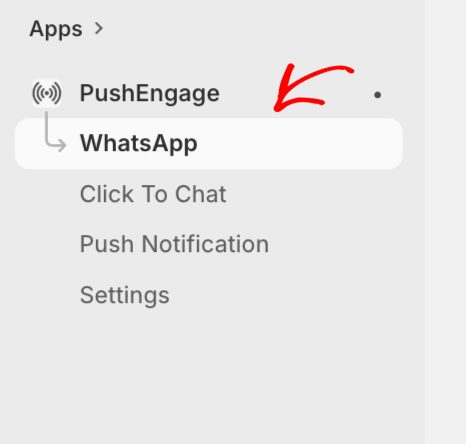
- 在 PushEngage Shopify 应用侧边栏中导航到WhatsApp。
步骤 2:创建或使用消息模板
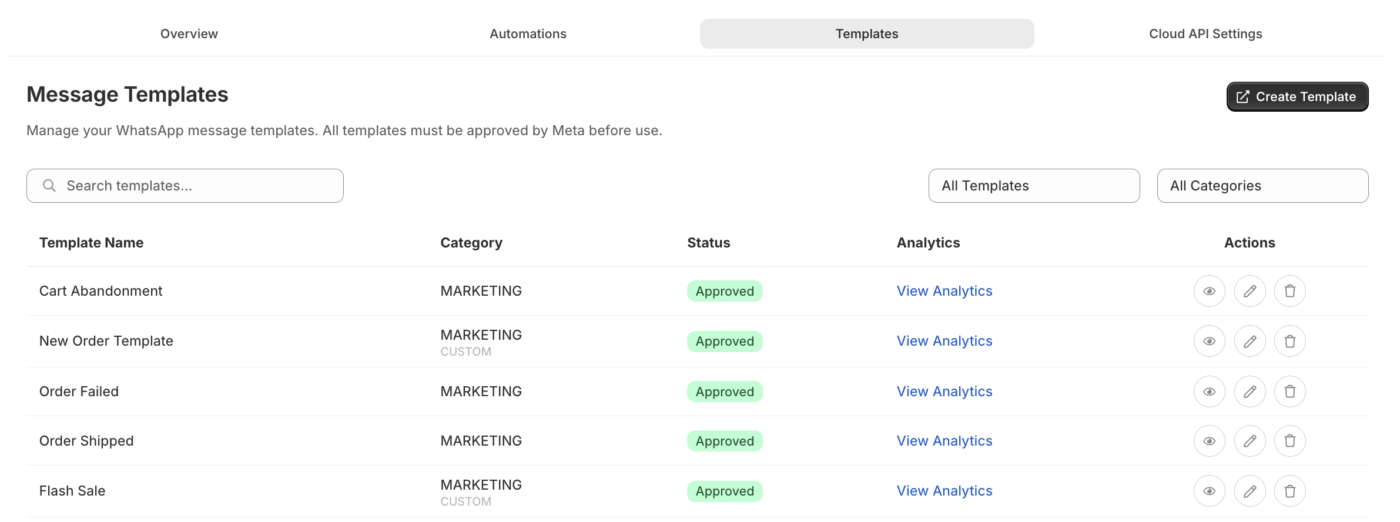
WhatsApp 要求所有发出的自动化消息都使用预先批准的消息模板。PushEngage 提供适用于常见 Shopify 用例的现成模板,您可以提交给 Meta 审批。
- 在 WhatsApp 部分,转到消息模板。
- 浏览可用模板或点击创建模板。
- 选择模板类别:营销或实用。
- 填写模板名称、语言、正文文本和任何变量占位符。
- 提交以供 Meta 审批。
Shopify 的常用模板变量
| 变量 | 它插入的内容 |
|---|---|
{{1}} | 客户名字 |
{{2}} | 产品名称或订单 ID |
{{3}} | 订单总额 |
{{4}} | 跟踪链接或商店网址 |
购物车恢复模板示例:
您好 {{1}},您的购物车里有 {{2}}。请在此处完成购买:{{4}}
订单确认模板示例:
您好 {{1}},您的订单 #{{2}} 已确认。总计:{{3}}。感谢您的惠顾!
第 3 步:设置自动 WhatsApp 购物车恢复
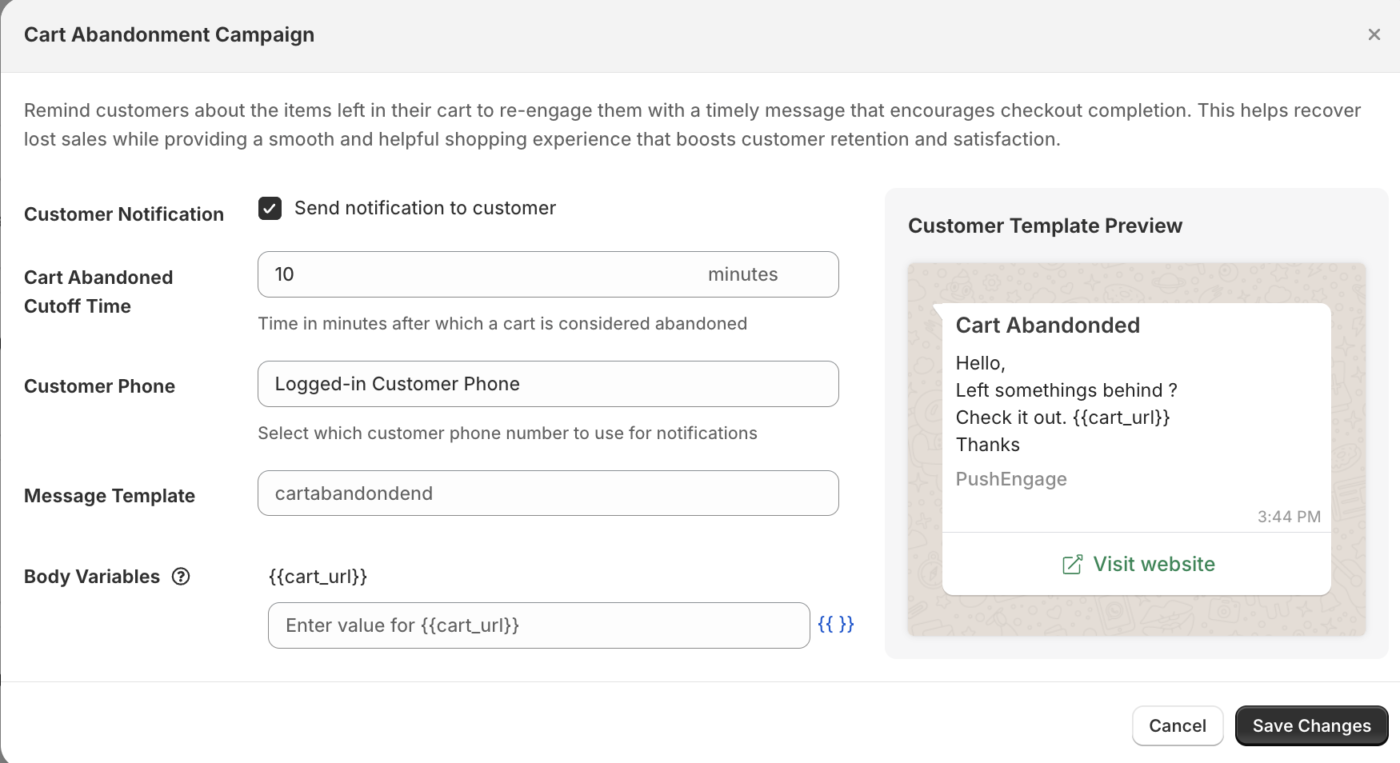
通过 WhatsApp 进行购物车恢复会向放弃购物车的客户发送消息,前提是他们已选择接收 WhatsApp 消息。
- 在 WhatsApp 部分,转到 自动化。
- 选择您要使用的购物车恢复模板。
- 设置延迟:消息在客户放弃购物车后多久发送(例如:1 小时)。
- 启用营销活动。
注意: WhatsApp 消息只能发送给已提供 WhatsApp 号码并同意接收消息的客户。PushEngage 在可用时使用 Shopify 订单记录中的电话号码。
第 4 步:设置订单更新通知
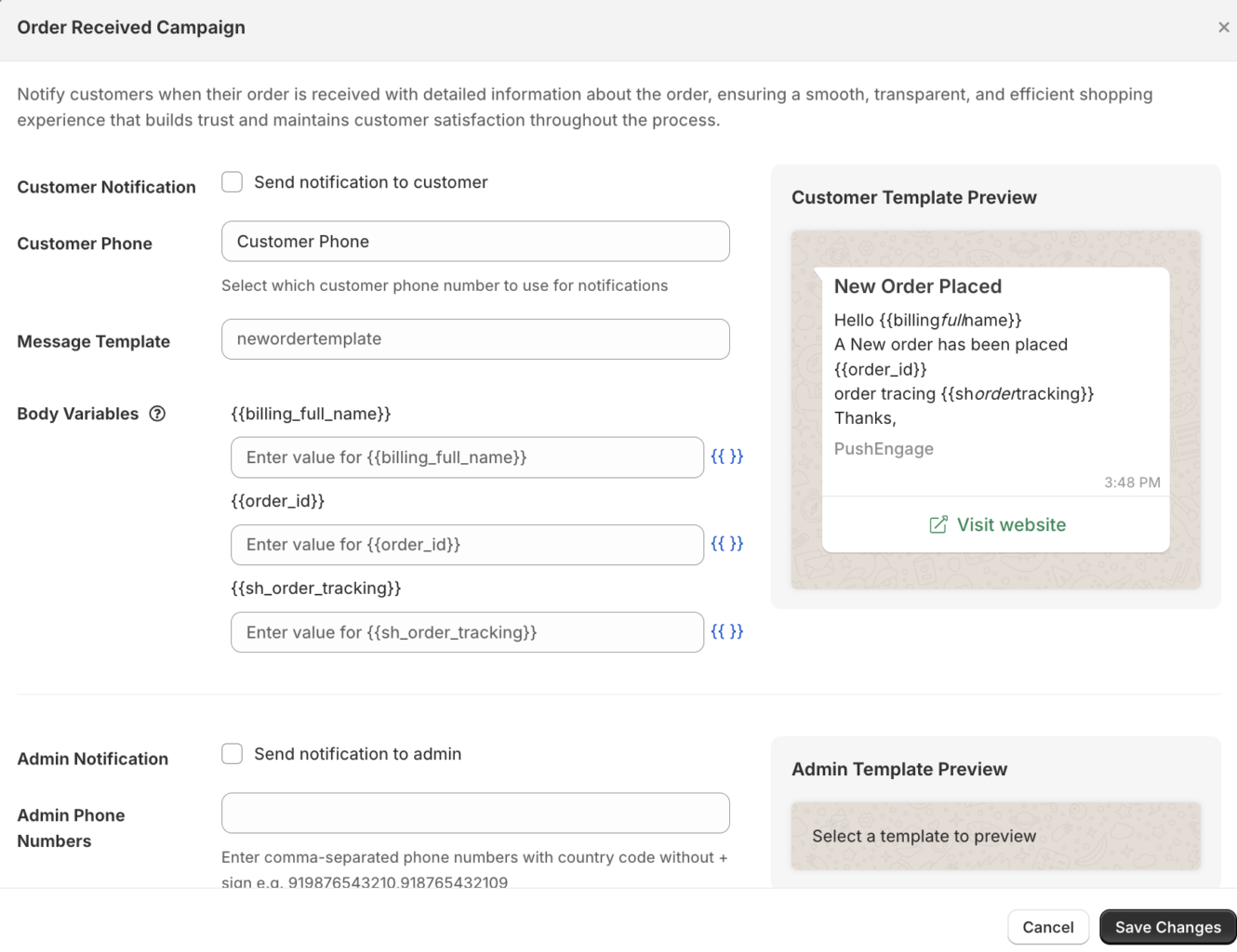
订单通知让客户在整个订单生命周期中随时了解情况,而无需依赖电子邮件。
- 在 WhatsApp 部分,转到订单通知。
- 启用您要发送的通知类型:
| 通知 | 触发器 |
|---|---|
| 订单已确认 | 下新订单时 |
| 订单已发货 | 订单标记为已发货时 |
| 订单已送达 | 发货状态更新为已送达时 |
| 已退款 | 处理退款时 |
- 对于每条通知,选择要使用的预批准模板。
- 点击保存。
查看 WhatsApp 分析
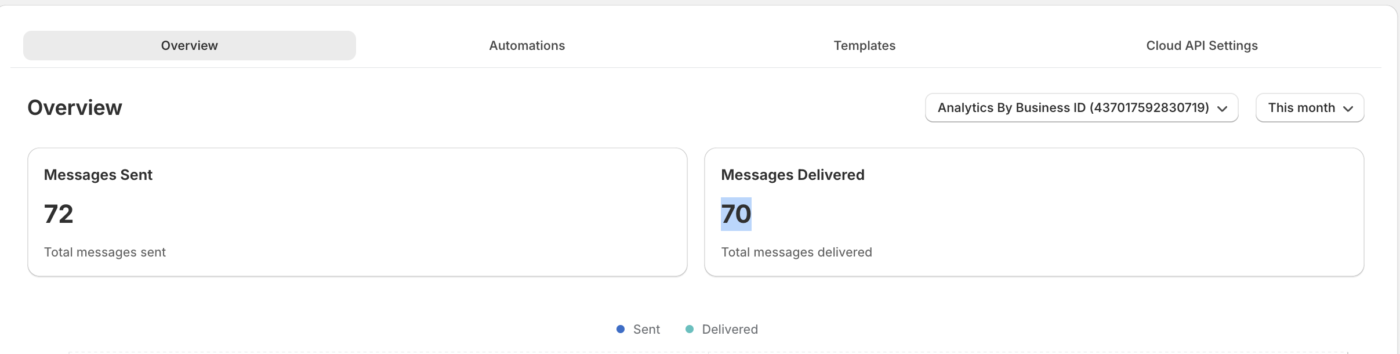
- 在 PushEngage Shopify 应用中转到WhatsApp » 分析。
- 查看包括已发送、已送达、已读和已回复的消息在内的指标。
| 指标 | 它的含义 |
|---|---|
| 已发送 | 待发送的消息 |
| 已送达 | 消息已成功送达客户的 WhatsApp |
| 已读 | 客户打开了消息(必须启用 WhatsApp 已读回执) |
| 已回复 | 客户发送了回复 |
常见问题解答
客户是否需要选择加入才能接收 WhatsApp 消息? 是的。WhatsApp 要求客户明确同意才能接收营销消息。交易性消息(订单更新)可以发送给在结账过程中提供号码的客户,这符合 Meta 的实用对话规则 — 但您应根据 Meta 的 WhatsApp Business Policy 确认您的具体用例。
Meta 模板审批需要多长时间? 通常需要几个小时到 2 个工作日。某些模板可能需要修改,如果它们不符合 Meta 的内容指南。
WhatsApp 消息是免费的吗? WhatsApp 对话按对话收费,而不是按消息收费,由 Meta 收费。每月前 1,000 次服务对话是免费的。营销和实用对话的收费标准因国家/地区而异。请查看 Meta 的定价页面了解当前费率。
我可以为同一事件发送 WhatsApp 和推送通知吗? 是的。PushEngage 支持多渠道营销活动。您可以运行一个购物车放弃推送通知序列,同时为同一客户发送 WhatsApp 购物车恢复消息。
如果您遇到任何问题,请随时通过单击此处联系我们。我们的支持团队将能够帮助您。