Powerful Push Notification Segmentation
PushEngage gives you complete control over segmenting your subscribers based on any attribute or action.
Increase Click Rates by 200% or More
Your visitors aren’t all the same, so they shouldn’t get the same notifications, either.
Segmentation of push notifications can increase your CTR by 2x or more. In the ecommerce industry, segmentation boosts clicks by 218%!

Automatic Segmentation
Automatically segment users based on the page they subscribed from, the pages they’ve viewed on your website, their device type, location, and more.
For example, you can automatically create a sales segment to target people who have viewed your product pages, and a separate lead nurturing segment for visitors who have just viewed your blog.
Self-Segmentation
By giving your subscribers options, you can easily provide relevant and personalized experiences.
PushEngage makes it easy to create push notification opt-ins that let your visitors self-segment by interest.


Advanced Custom Segmentation
Want more options for segmenting your subscribers?
The PushEngage API unlocks unlimited options for segmentation. You can segment subscribers based on literally any action they take on your website, including submitting a form, making a purchase, clicking a button, and more.
Geo-Targeted Push Notifications
PushEngage automatically segments all your new subscribers by location, including City, State, and Country.
- 通过推广本地优惠来促进销售
- Send time-sensitive offers based on time zone
- 通过及时通知推广本地活动
- 以及更多…

探索更多强大的推送通知功能
PushEngage 拥有您创建强大的推送通知以发展您的业务所需的所有功能。
常见问题解答和资源
您对 PushEngage 有疑问吗?请参阅下面的常见问题列表。如果此处未列出您的问题,请联系我们。
PushEngage 非常适合企业主、博主、电子商务网站所有者以及基本上任何经营网站的人。如果您想获得更多回头客、增加销售额、提高转化率并减少购物车放弃,那么您就需要 PushEngage。
PushEngage 可以安装在网络上几乎所有的网站平台上。唯一的要求是您必须有一个网站,您可以在其中将自定义 JavaScript 添加到网站页面正文中。
PushEngage 还提供市场上最好的 WordPress 推送通知插件,可将 PushEngage 的强大功能与您的自托管 WordPress 网站无缝集成。
完全不需要。您可以轻松地在您的网站上设置 PushEngage,而无需了解任何代码。借助 PushEngage,只需点击几下即可轻松设计和发送高转化率的推送通知 – 无需了解任何代码。我们使其极其用户友好,因此任何人都可以创建推送通知,而无需开发人员。
我们知道网站速度和性能比以往任何时候都更重要,因此我们构建 PushEngage 时尽可能轻量级和快速。它绝不会减慢您的网站速度。
是的,您绝对可以在您的客户网站上使用 PushEngage。您可以注册我们的企业套餐,在无限的网站上使用 PushEngage 并获得无限的子账户。您还将获得其他功能,例如智能购物车放弃营销活动、自动库存警报、降价警报、自定义触发营销活动、个性化智能标签以及为您的客户提供一流体验所需的一切。
是的,我们提供全包式企业套餐,附带 VIP 支持和入门指导。您可以请求演示了解更多信息。
是的!我们提供免费的WordPress插件,让您在发布新帖子时自动发送推送通知。
当然可以。PushEngage适用于任何网站平台。您只需要将一段代码添加到您的网站即可。
我们还有一个PushEngage Shopify应用,您可以轻松地在您的Shopify商店中设置推送通知。
请通过联系页面向我们发送您的问题,或发送电子邮件至[email protected]。
Dynamically Segment Push Notifications
Subscriber segmentation is the first step to personalization. Dynamic segmentation is a step towards true personalization. Make each customer feel like they’re the center of your universe.
With dynamic segmentation, you’ll never send a message out of place ever again!
If you can segment push notifications the right way, you don’t have to worry about accidentally sending the wrong message to the wrong subscriber.
Normally, you’d need an expensive CRM that can dynamically update customer segments based on their actions and browsing behavior. But with PushEngage, it’s super-easy to dynamically segment push notifications.
最棒的部分?
You don’t need any extra software or coding skills to send targeted push notifications.
What Is Dynamic Segmentation for Push Notifications?
Dynamic segmentation is the process of shifting a subscriber from one segment to another without any manual action. It’s a very neat way of keeping your subscribers segmented according to their preferences and habits without having to manually add them to different lists and delete them from the old ones.
If you’re fairly new to marketing, then the fairest question right now is…
What’s a segment?
A customer segment is a group of customers who have certain things in common. The common factor could be their love for specific products or their tendency to browse similar content. It could even be their location or the language that they speak.
那么,为什么要细分推送通知?
很简单——每个人都喜欢个性化的关注。
你对在线受众了解得越多,与他们沟通的效果就越好。通过设备类型、位置、语言、浏览习惯等细分你的订阅者,是一种在不骚扰的情况下发送批量消息的简单方法。
换句话说,细分你的订阅者列表是实现个性化推送通知的好方法。
现在,你可能想知道,“这很好。但动态细分是什么意思?”
很简单——订阅者根据他们的行为、习惯、位置和其他数据点动态地细分到不同的列表中。
理论上,这是一个非常简单的想法。但由于大多数应用程序和网站管理和传输数据的方式,创建一个自动化的方法来解决这个问题是极其困难的。
值得庆幸的是,有了 PushEngage,动态细分变得轻而易举,而且它被设计成一个自动化过程。我们还将向你展示如何设置它(稍后会详细介绍)。
发送 有针对性的推送通知,让你的客户不会像 Spotify 意外让 Sarah 感觉那样。
何时应该细分推送通知?
简短的回答是:一直!没有“至尊魔戒”。没有营销信息能让所有人都同样喜欢。
有针对性的推送通知效果更好,因为它们更具吸引力。每个人都想感觉特别。如果你以正确的方式细分你的推送通知,你就能以竞争对手无法想象的方式服务你的受众。
使用 PushEngage,你可以根据行为和兴趣细分推送通知。你可以……
- 从仪表板创建地理定位推送通知。
- 定位订阅者使用的设备类型
- 根据订阅者访问的 URL 创建细分
但乐趣不止于此。
你可以使用 PushEngage Javascript API 创建完全自定义的细分,基于网站访问者采取的任何操作。
推送通知细分示例
理论上,有针对性的推送通知听起来很有趣。但现实世界呢?它们真的那么有效吗?
事实是……
它的效果比营销人员预期的要好得多。
为什么?因为个性化让每个人都感觉特别。
一个有趣的个性化例子是 Phooto 根据地理定位细分发送本地语言的推送通知。这带来了 20.66% 的订阅率和 8.32% 的废弃购物车恢复率!
ShoutMeLoud 也开始为他们的博客细分推送通知。这个信息图将告诉你关于结果的所有信息:
如何细分推送通知
既然你已经了解了什么是目标推送通知以及它们为何如此有效,那么下面是如何在 PushEngage 中不到 10 分钟内设置好它:
第 1 步:在仪表板中转到细分

第 2 步:点击标有创建新细分的 + 按钮:

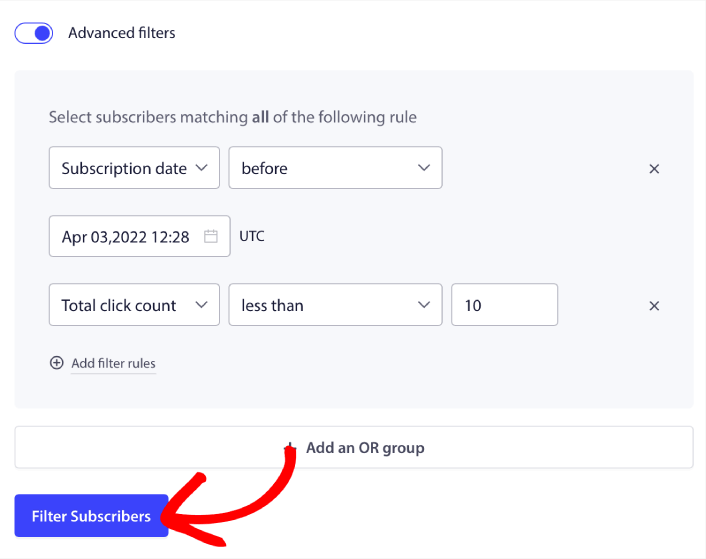
第 3 步:为您的推送通知设置一个细分
本文将向您展示如何根据您的需求配置细分。
PushEngage 默认收集设备和地理位置数据,并自动创建这些细分。之后,您可以使用 PushEngage API创建自定义细分。
就这样!
那么,您还在等什么?
通过动态细分发展您的业务
PushEngage 可以轻松地将正确的消息发送给正确的受众,从而最大限度地提高您的收益。
- 永久免费套餐
- 轻松设置
- 五星支持