在您的 PushEngage 账户中,您可以随时更新网站名称、网址和网站徽标等网站详情。
本指南将引导您完成直接从仪表板更新/更改网站详情的过程。
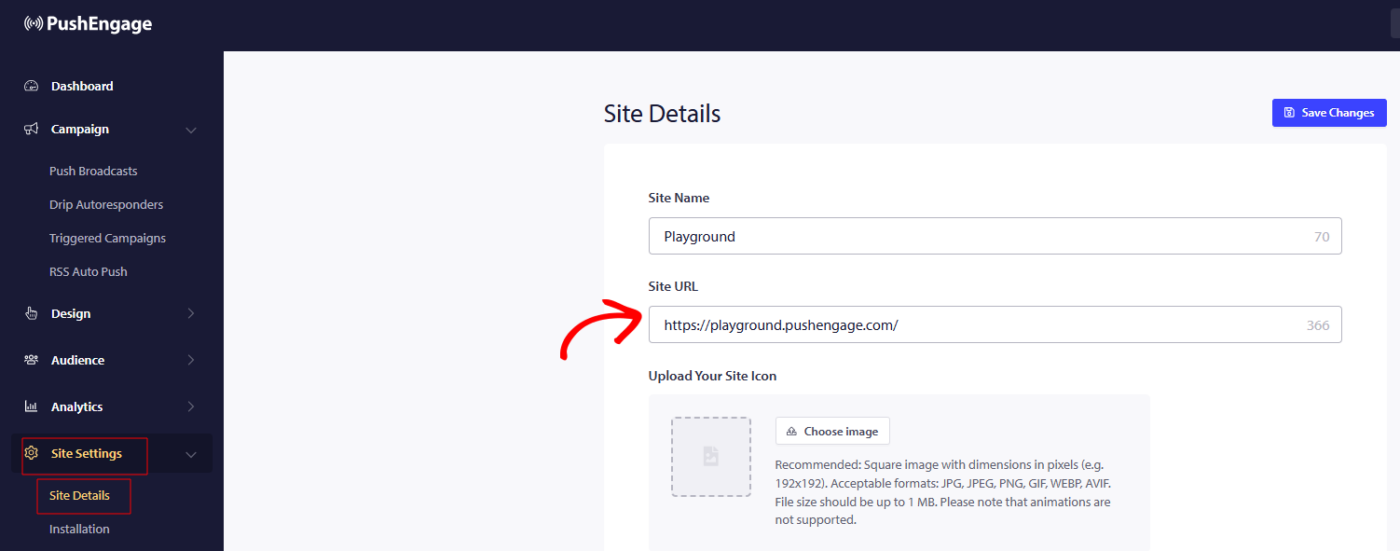
您可以导航到 网站设置 » 网站详情 并更新您想要更新的任何详情。
还提到了网站徽标的尺寸,因此请使用相同的比例和尺寸,以免徽标在订阅选择加入或通知图片中被裁剪。
T
G
做出更改后,请记住点击 保存更改 以应用更新。
如果您遇到任何问题,请 联系我们 。我们的支持团队将能够帮助您。
加入75,000+企业主,通过推送通知更快地发展您的业务
在您的 PushEngage 账户中,您可以随时更新网站名称、网址和网站徽标等网站详情。
本指南将引导您完成直接从仪表板更新/更改网站详情的过程。
您可以导航到 网站设置 » 网站详情 并更新您想要更新的任何详情。
还提到了网站徽标的尺寸,因此请使用相同的比例和尺寸,以免徽标在订阅选择加入或通知图片中被裁剪。
T
G
做出更改后,请记住点击 保存更改 以应用更新。
如果您遇到任何问题,请 联系我们 。我们的支持团队将能够帮助您。