如何联系点击了“阻止”的人?

This article will help you know how you can recover your website visitors who want to subscribe to your notifications after denying them initially. By enabling the recovery widget, you can give second chance to visitors to become a subscriber again who clicked on the block when they first visited the website.

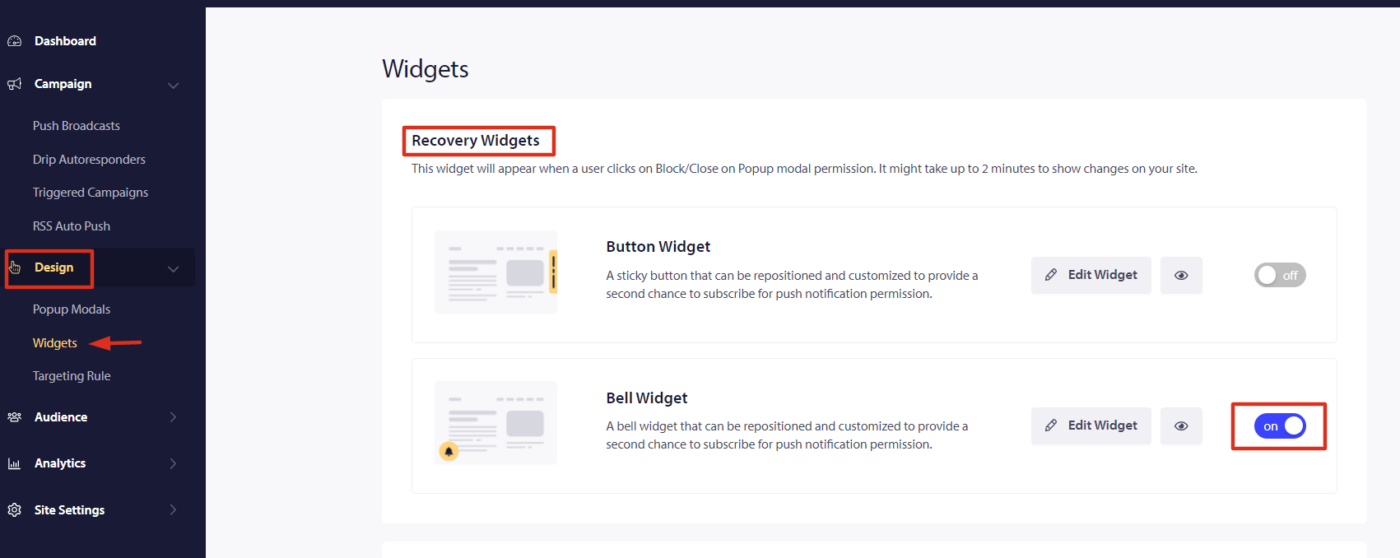
Step 1 : Navigate to Design » Widgets » Recovery Widgets.

Step 2: Select the type of widget to be shown – Button or Bell icon. Enter the Text, background color, Bell/Button color & the widget’s position according to your requirement & click on Update.

Note: The widget will appear when users click deny for push notification permission. Please wait for 2 minutes after the change to go live.

Bell & Button Widgets

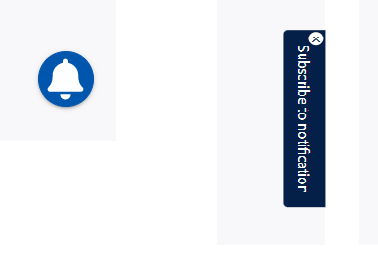
You can choose a Bell or a Button widget. On either of them, your site visitors can subscribe to your notifications. The button widget is suggested over the Bell widget since there is no need to hover over the icon to see the text message you will add to push them to subscribe again.

Below is the preview of the recovery widget.

如果您遇到任何问题,请随时在此处单击联系我们。我们的支持团队将能够帮助您。

仍然卡住了?我们能帮您什么?
最后更新于 2026 年 3 月 9 日

在访客离开您的网站后与他们互动并挽留他们

通过难以忽略的推送通知,增加每次网站访问的价值。

  • 永久免费套餐
  • 轻松设置
  • 五星支持