
Looking for a way to add a WordPress title tag to the webpages and posts on your site?
36% of SEO experts think the title is the most important SEO element. But how do you actually change and optimize your SEO titles for clicks? Sure, you can edit the HTML to add, edit, and optimize your WordPress title tag. But, can you do it without coding?
Short answer: Yes, you can.
You can add a WordPress SEO title from any SEO plugin at all. In this article, we’ll show you how.
Ας ξεκινήσουμε.
What Is an SEO Title in WordPress?
The WordPress SEO title is the title of the page that shows up in the search results of Google and other search engines. It’s also called a WordPress title tag. Here’s an example of a typical Search Engine Results Page (SERP):
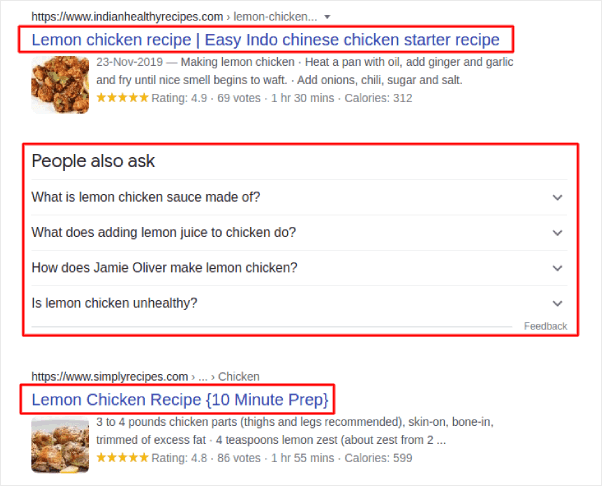
The highlighted box just underneath the URL is the SEO title. The results you see under the People also ask section contains results where the title tag is framed as a direct question. And you can modify it using the HTML title tag in WordPress.
The title tag tells search engines the most about your content. So, it’s super important to optimize it correctly.
Both posts and pages can have a WordPress title tag. And if you use a WordPress SEO plugin, you can add, edit, and optimize your title tags any time you want.
Why Is the WordPress Title Tag Important?
The WordPress title tag is important because it:
- Helps Google and other search engines crawl, index, and rank your content
- Can get you relevant traffic from a keyword it’s optimized for
- Makes people you can serve with your content click through to your site
If your title isn’t good enough, people will ignore it and move on to other results. This results in lower CTR (click through rate) and search rankings because search engines usually reward high CTR pages.
So, if you don’t pay attention to your WordPress title tag, you’re going to lose out on SEO traffic throughout your site.
How to Easily Change the WordPress Title Tag
The WordPress title tag is found in the HTML <head> of every page between the <title> and </title> tags. You can find it at the top of the WordPress post or page editor.
Now, one way to edit your WordPress title tag is to change your post title directly. But because of the way WordPress pages are generated, there’s no easy way to change the SEO title without a plugin.
We recommend using AIOSEO as your WordPress SEO plugin.

All In One SEO is the best WordPress SEO plugin in the world.
Όχι μόνο το AIOSEO είναι αρκετά ισχυρό για να εφαρμόσει τις τελευταίες βέλτιστες πρακτικές SEO, αλλά λαμβάνετε επίσης προηγμένες επιλογές για την επίλυση συγκεκριμένων προβλημάτων SEO απευθείας από το κουτί. Αυτό περιλαμβάνει:
- Ενότητες Τοπικού SEO για μικρές επιχειρήσεις με τοπικό κοινό
- SEO WooCommerce για ηλεκτρονικά καταστήματα
- Ένας βελτιστοποιητής SEO μέσα στον επεξεργαστή σας στο WordPress
- Έξυπνοι Χάρτες Ιστοτόπου (Smart Sitemaps) για άμεση ευρετηρίαση στις Μηχανές Αναζήτησης
- Ένα plugin Schema για να κατατάσσονται τα περιεχόμενά σας στα Εμπλουτισμένα Αποσπάσματα (Rich Snippets)
And of course, you can add, edit, and optimize the WordPress title tag for any page or post on your site! Check out the features in more detail from our review of AIOSEO.
How to Add the WordPress SEO Title for the Home Page
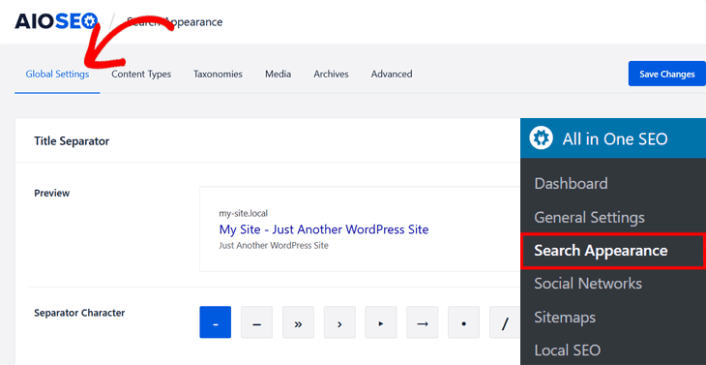
After installing and activating the AIOSEO plugin, go to Search Appearance in the All in One SEO menu and click on the Global Settings tab.
Next, scroll down in the same window to the Home Page section.
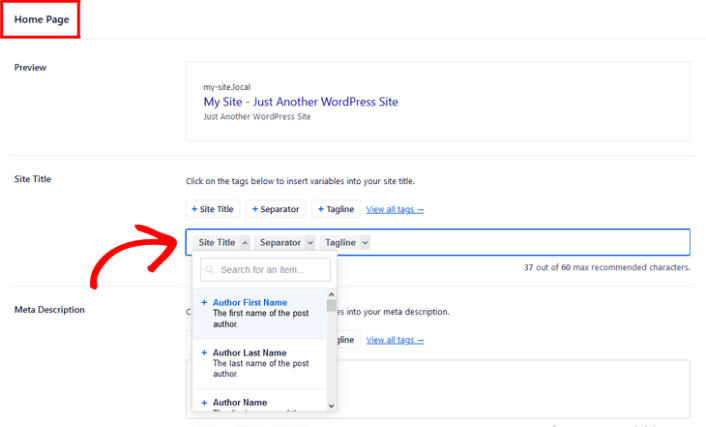
As you can see in the preview, you can set a pattern for the WordPress title tag using variables. Or, you can simply delete the variables and type in a custom SEO title in the Site Title field.
How to Add the WordPress SEO Title on Posts and Pages
To change the SEO title on individual posts and pages, just scroll down to the AIOSEO Settings in the post or page you’re editing.
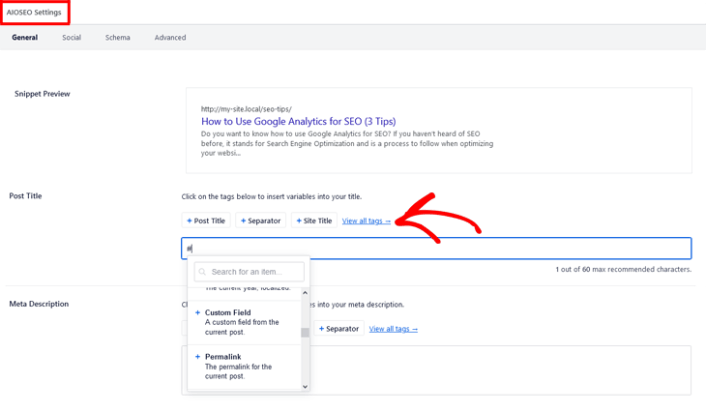
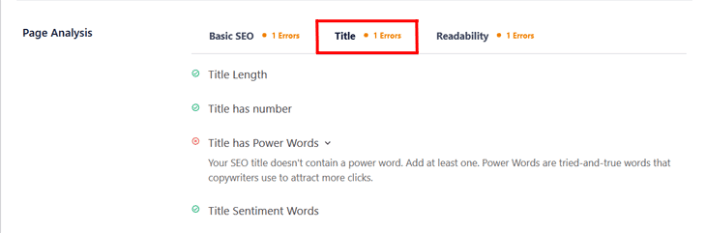
AIOSEO even analyses your title and lets you know if your title has the correct length, is engaging enough, and if it’s click-worthy. To check your title analysis, you simply scroll down to the Page Analysis section and click on the Title tab.
Και αυτό ήταν όλο!
What to do After You Add Your WordPress Title Tag
Now that you know how to add a WordPress title tag on your WordPress website, it’s time to learn how to get even more traffic to your site. SEO is a great way to bring in fresh traffic to your site using just content. But you also need to bring in repeat traffic, website engagement, and sales.
That’s where push notifications can be super useful for your site.
Αν δεν είστε 100% πεπεισμένοι, θα πρέπει να ελέγξετε αυτούς τους πόρους για το πώς να χρησιμοποιήσετε αποτελεσματικά τις ειδοποιήσεις push:
- 7 Έξυπνες Στρατηγικές για την Ενίσχυση της Αφοσίωσης Πελατών
- Είναι Αποτελεσματικές οι Ειδοποιήσεις Push; 7 Στατιστικά + 3 Συμβουλές Ειδικών
- Πώς να Ρυθμίσετε Ειδοποιήσεις Push για Εγκαταλελειμμένα Καλάθια (Εύκολο Οδηγός)
- Πώς να προσθέσετε ένα πρόσθετο WordPress για ειδοποιήσεις ιστού στον ιστότοπό σας
Συνιστούμε τη χρήση του PushEngage για τη δημιουργία των καμπανιών ειδοποιήσεων push. Το PushEngage είναι το #1 λογισμικό ειδοποιήσεων push στον κόσμο. Έτσι, αν δεν το έχετε κάνει ήδη, ξεκινήστε με το PushEngage σήμερα!


