
Αν τα ποσοστά ανοίγματος email μειώνονται και οι αναρτήσεις σας στα social media χάνονται, ίσως είναι καιρός να δοκιμάσετε κάτι διαφορετικό. Μια καμπάνια ειδοποιήσεων push στο web θα μπορούσε να είναι ακριβώς αυτό που χρειάζεστε.
Το web push είναι γρήγορο, άμεσο και εμφανίζεται ακριβώς όταν ο συνδρομητής σας είναι συνδεδεμένος. Χωρίς inbox. Χωρίς αλγόριθμο. Απλά ένα γρήγορο μήνυμα που επαναφέρει τους ανθρώπους στον ιστότοπό σας όταν έχει τη μεγαλύτερη σημασία.
Σε αυτόν τον οδηγό, θα σας δείξω πώς να ρυθμίσετε την πρώτη σας καμπάνια ειδοποιήσεων push στο web χρησιμοποιώντας το PushEngage. Είναι ευκολότερο από ό,τι νομίζετε, και θα δείτε πώς ακόμη και μια απλή καμπάνια μπορεί να φέρει πραγματικά αποτελέσματα.
Ακούγεται καλό; Ας βουτήξουμε κατευθείαν.
Στείλτε Ειδοποιήσεις Push στο Web Σήμερα!
Οι ειδοποιήσεις push είναι ένα εξαιρετικά αποτελεσματικό, χαμηλού κόστους εργαλείο μάρκετινγκ που σας βοηθά να αυξήσετε την επαναλαμβανόμενη επισκεψιμότητα, την αλληλεπίδραση και τις πωλήσεις σας αυτόματα.
Γιατί Λειτουργεί το Web Push (Ακόμα και Όταν Άλλα Κανάλια Αποτυγχάνουν)
Οι ειδοποιήσεις push στο web διαπερνούν τον θόρυβο με έναν τρόπο που το email και τα social media απλά δεν μπορούν.
- Δεν χρειάζεστε αριθμό τηλεφώνου ή διεύθυνση email για να αυξήσετε τη λίστα σας
- Τα μηνύματα εμφανίζονται ενώ ο συνδρομητής σας περιηγείται ενεργά
- Μπορείτε να αυτοματοποιήσετε τα πάντα — από την ανάκτηση καλαθιού μέχρι τις κυκλοφορίες προϊόντων
- Λειτουργεί σε όλες τις συσκευές και προγράμματα περιήγησης (δεν απαιτείται εφαρμογή)
Είναι σαν να έχετε το δικό σας ιδιωτικό κανάλι κίνησης… ένα που πραγματικά γίνεται αντιληπτό. Σκεφτείτε το… πότε ήταν η τελευταία φορά που αγνοήσατε μια ειδοποίηση προγράμματος περιήγησης που εμφανίστηκε με το όνομά σας, έναν ελκυστικό τίτλο και μια παρότρυνση για δράση που σας ενδιέφερε;
⚡ Άμεση Ορατότητα: Σε αντίθεση με τα email που μένουν αδιάβαστα για μέρες, οι ειδοποιήσεις push φτάνουν αμέσως. Ακριβώς στην οθόνη του χρήστη. Desktop, κινητό, δεν έχει σημασία. Δεν περιμένετε να ανοίξουν ένα inbox. Εμφανίζεστε ακριβώς όταν έχει σημασία.
🧠 Δεν Απαιτείται Μνήμη: Οι χρήστες δεν χρειάζεται να θυμούνται τον ιστότοπό σας. Ή το προϊόν σας. Ή ακόμα και τη σύνδεσή τους.
Μόλις εγγραφούν, μπορείτε να τους επαναφέρετε ανά πάσα στιγμή — χωρίς φόρμες, χωρίς τριβή, χωρίς φασαρία. Είναι σαν να έχετε μια γρήγορη λωρίδα απευθείας στον χώρο προσοχής τους.
📈 Τεράστια Αφοσίωση: Τα CTR του web push είναι συχνά 2-3 φορές μεγαλύτερα από το email. Γιατί; Επειδή είναι σύντομο. Απροσδόκητο. Και εγγενές στον τρόπο που περιηγούνται οι άνθρωποι. Επιπλέον, κανείς το inbox του δεν πνίγεται από ειδοποιήσεις push (ακόμα). Έτσι ξεχωρίζετε.
💸 Εσείς Κατέχετε το Κανάλι: Χωρίς αλγορίθμους. Χωρίς δημοπρατήσεις. Χωρίς τεχνάσματα στις ροές των social media. Οι συνδρομητές push είναι δικοί σας. Εσείς αποφασίζετε τι βλέπουν και πότε. Είναι το κοινό σας, όχι ενοικιασμένο από τη Meta ή την Google.
🧪 Ιδανικό για Δοκιμές: Χρειάζεται να μάθετε αν ένας τίτλος λειτουργεί; Αν οι άνθρωποι ενδιαφέρονται για μια νέα λειτουργία; Το push είναι το ταχύτερο εργαλείο A/B testing που δεν ξέρατε ότι είχατε. Στείλτε μια παραλλαγή τίτλου. Δείτε ποια παίρνει περισσότερα κλικ. Μάθετε γρήγορα. Προχωρήστε γρηγορότερα.
Το web push είναι το σπάνιο κανάλι που είναι φθηνό, με υψηλές μετατροπές και απίστευτα αποτελεσματικό όταν χρησιμοποιείται σωστά.
Και το καλύτερο μέρος… χρειάζονται λιγότερο από 10 λεπτά για να ξεκινήσετε την πρώτη σας καμπάνια.
Ας φτιάξουμε μία.
Η σύντομη εκδοχή: οι ειδοποιήσεις web push φτάνουν στους συνδρομητές στην οθόνη τους τη στιγμή που πατάτε αποστολή, χωρίς inbox, αλγόριθμο ή εγκατάσταση εφαρμογής να στέκεται ενδιάμεσα.
Ανάλυση Τύπων Καμπανιών Ειδοποιήσεων Push στο Web
Με τη γενικότερη έννοια, υπάρχουν 3 τύποι καμπανιών ειδοποιήσεων push στο web:
- Ειδοποιήσεις Broadcast
- Καμπάνιες ειδοποιήσεων push στο web τύπου Drip
- Καμπάνιες ειδοποιήσεων push στο web τύπου Triggered
Οι μεταδόσεις είναι ειδοποιήσεις push που στέλνετε ως μία μόνο ειδοποίηση. Μπορείτε να τις προγραμματίσετε, αλλά θα ενεργοποιηθούν μόνο μία φορά. Οι ενεργοποιούμενες καμπάνιες περιλαμβάνουν τη ρύθμιση μιας ειδοποίησης push, τον ορισμό ενός ενεργοποιητή για την ενεργοποίησή της και μιας ροής εργασιών για τον έλεγχο του προγραμματισμού της. Οι αυτοματοποιημένες σταγόνες ειδοποιήσεων είναι μια σειρά από ειδοποιήσεις που ενεργοποιούνται αυτόματα σε συγκεκριμένες ώρες ή όταν πληρούνται συγκεκριμένες συνθήκες.
Για όλους τους σκοπούς, οι ενεργοποιούμενες καμπάνιες και οι αυτοματοποιημένες καμπάνιες σταγόνων φαίνονται ίδιες από έξω. Η κρίσιμη διαφορά είναι ότι οι ενεργοποιούμενες καμπάνιες είναι πολύ πιο ευέλικτες και προσαρμόσιμες. Αν θεωρήσετε ότι οι ειδοποιήσεις push κοστίζουν πολύ λιγότερο από τα περισσότερα άλλα κανάλια, έχει απόλυτο νόημα να χρησιμοποιήσετε έναν συνδυασμό και των τριών για να αναπτύξετε την επιχείρησή σας.
Αν είστε νέοι στις ειδοποιήσεις push, συνιστούμε ανεπιφύλακτα να ξεκινήσετε το ταξίδι σας χρησιμοποιώντας αποδεδειγμένα πρότυπα.
ΣΗΜΕΙΩΣΗ: Οι περισσότερες ενεργοποιούμενες καμπάνιες απαιτούν κάποια εμπειρία ανάπτυξης. Θα χρειαστεί να χρησιμοποιήσετε ένα API για να αξιοποιήσετε καλύτερα τις ενεργοποιούμενες ειδοποιήσεις. Ωστόσο, υπάρχουν κάποιες ενεργοποιούμενες ειδοποιήσεις που μπορείτε να στείλετε απευθείας από το ράφι. Αν είστε περίεργοι, διαβάστε το άρθρο μας για ειδοποιήσεις push ηλεκτρονικού εμπορίου για να πάρετε μια καλύτερη ιδέα.
Η Καλύτερη Υπηρεσία για Αποστολή Καμπάνιας Ειδοποιήσεων Push Ιστού
Ας ξεκινήσουμε λέγοντας ότι οι περισσότερες από τις «δωρεάν υπηρεσίες ειδοποιήσεων push» εκεί έξω είναι στην πραγματικότητα δωρεάν δοκιμές. Μερικοί από τους παρόχους που έχουμε καταγράψει εδώ είναι δοκιμαστικό λογισμικό, ενώ άλλοι έχουν ένα για πάντα δωρεάν πρόγραμμα στο οποίο μπορείτε να επιλέξετε.
Υπάρχουν κάποιες άλλες freemium επιλογές, όπως το Firebase Cloud Messaging (FCM), αλλά αυτό δεν είναι πραγματικά καλή επιλογή. Μπορείτε να διαβάσετε περισσότερα για το γιατί το FCM δεν μπορεί να ανταγωνιστεί έναν πάροχο υπηρεσιών όπως το PushEngage. Αλλά προς το παρόν, απλώς πιστέψτε μας και προχωρήστε στις καλύτερες επιλογές.
Συνιστούμε τη χρήση του PushEngage.

Το PushEngage είναι το #1 plugin ειδοποιήσεων push στον κόσμο.
Οι ειδοποιήσεις push σας βοηθούν να αυξήσετε την επισκεψιμότητα του ιστότοπού σας και την αλληλεπίδραση σε αυτόματο πιλότο. Και αν διαχειρίζεστε ένα online κατάστημα, το PushEngage σας βοηθά επίσης να αυξήσετε τις πωλήσεις σας, βοηθώντας σας να δημιουργήσετε αυτοματοποιημένες ειδοποιήσεις push eCommerce.
Μπορείτε να ξεκινήσετε δωρεάν, αλλά αν σοβαρά θέλετε να αναπτύξετε την επιχείρησή σας, θα πρέπει να αγοράσετε ένα επί πληρωμή πρόγραμμα. Επίσης, πριν αγοράσετε οποιαδήποτε υπηρεσία ειδοποιήσεων push, θα πρέπει να δείτε αυτόν τον οδηγό για το κόστος ειδοποιήσεων push.
Ακολουθεί μια γρήγορη επισκόπηση του τι παίρνετε με το PushEngage:
- Αυτοματοποιημένες εκστρατείες με υψηλή μετατροπή
- Πολλαπλές επιλογές στόχευσης και προγραμματισμού καμπανιών
- Παρακολούθηση στόχων και προηγμένα αναλυτικά στοιχεία
- Έξυπνες δοκιμές A/B
- Πρότυπα καμπάνιας Push
- Ισχυρές επιλογές τμηματοποίησης
- Ένας Αφοσιωμένος Διαχειριστής Επιτυχίας
Και αυτό είναι μόνο η αρχή. Δείτε τη πλήρη λίστα χαρακτηριστικών του PushEngage πριν προχωρήσετε παραπέρα.
Αλλά το πιο ελκυστικό κομμάτι του PushEngage είναι ότι μπορείτε να ξεκινήσετε με ένα δωρεάν πρόγραμμα για πάντα. Και μπορείτε να το χρησιμοποιήσετε για να αναπτύξετε πραγματικά την επιχείρησή σας χρησιμοποιώντας πολλαπλές επιλογές προσαρμογής.
Θα δείτε ότι η PushEngage είναι μακράν η καλύτερη επιλογή αν θέλετε να αυξήσετε την επισκεψιμότητα, την αφοσίωση και τις πωλήσεις για την επιχείρησή σας. Και αν έχετε περιορισμένο προϋπολογισμό, μπορείτε πάντα να γίνετε λίγο δημιουργικοί με τις ειδοποιήσεις push σας.
ΣΗΜΕΙΩΣΗ: Αν διαχειρίζεστε έναν ιστότοπο WordPress, θα πρέπει να εγκαταστήσετε και να ενεργοποιήσετε το plugin PushEngage για WordPress.
Η δωρεάν έκδοση επιτρέπει έως και 200 συνδρομητές και 30 ειδοποιήσεις εφ' όρου ζωής. Αυτό είναι αρκετό για να φτάσετε την επιχείρησή σας σε ένα σημείο όπου μπορείτε εύκολα να αντέξετε οικονομικά τα επί πληρωμή προγράμματα. Ξεκινούν από 9 $/μήνα για τον πρώτο χρόνο (1.000 συνδρομητές, χρεώνονται ετησίως) και κλιμακώνονται με τον αριθμό των συνδρομητών σας· 100.000 συνδρομητές είναι το πρόγραμμα Premium, και τα τρέχοντα στοιχεία βρίσκονται στη σελίδα τιμολόγησης.

Και μην ανησυχείτε αν δεν γνωρίζετε απολύτως τίποτα για τον προγραμματισμό. Μπορείτε να εγκαταστήσετε το PushEngage χρησιμοποιώντας έναν από τους πολλούς οδηγούς εγκατάστασης για οποιονδήποτε ιστότοπο και CMS.
Η βελτιστοποίηση του Pushengage με τεχνητή νοημοσύνη σας βοηθά να δημιουργήσετε καλύτερους τίτλους και μηνύματα, οδηγώντας σε αυξημένη αλληλεπίδραση και επιτυχία καμπάνιας. Αναρωτηθήκατε ποτέ αν οι ειδοποιήσεις push σας θα γράφονταν μόνες τους; Λοιπόν, τώρα μπορούν!
Στην πιθανότερη περίπτωση, μπορείτε να μειώσετε τον χρόνο δημιουργίας καμπάνιας για μεταδόσεις push, καμπάνιες σταγόνων και αυτοματοποιημένες καμπάνιες ενεργοποίησης έως και 50%, βελτιώνοντας παράλληλα την ποιότητα της γραφής σας.
Η AI του PushEngage χρησιμοποιεί καμπάνιες υψηλής απόδοσης ως σημείο αναφοράς για όλη τη γραφή και θα τηρεί πάντα τις βέλτιστες πρακτικές από προεπιλογή.
Και το καλύτερο είναι ότι λειτουργεί για web push, εγγενείς ειδοποιήσεις Android, εγγενείς ειδοποιήσεις iOS, ειδοποιήσεις Flutter και ειδοποιήσεις React Native από τον ίδιο πίνακα ελέγχου!
Μπορείτε να χρησιμοποιήσετε τη δημιουργία κειμένου AI για οποιονδήποτε τύπο καμπάνιας. Για αυτό το παράδειγμα, χρησιμοποιώ μια μετάδοση push για να δείξω τις δυνατότητες. Αλλά αν θέλετε να δείτε το πλήρες δυναμικό της σε δράση, παρακολουθήστε αυτό το βίντεο!
Δημιουργήστε μια νέα καμπάνια ή επιλέξτε οποιαδήποτε από τα Πρότυπα. Στη συνέχεια, μπορείτε να κάνετε κλικ στο κουμπί Δημιουργία Κειμένου.
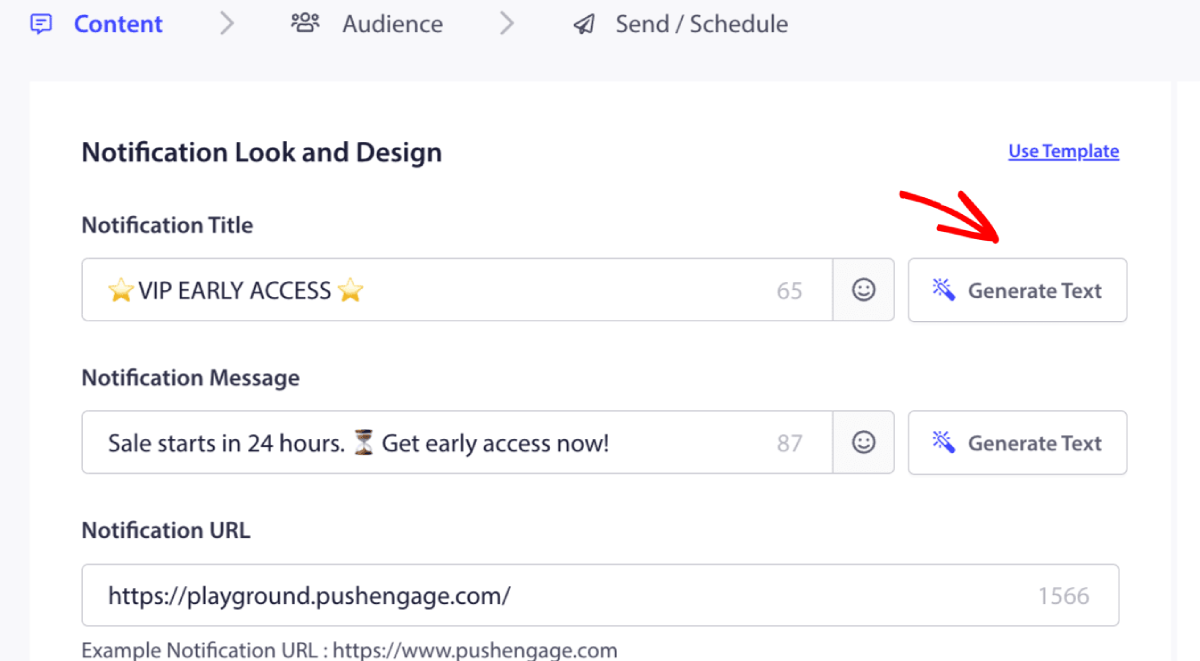
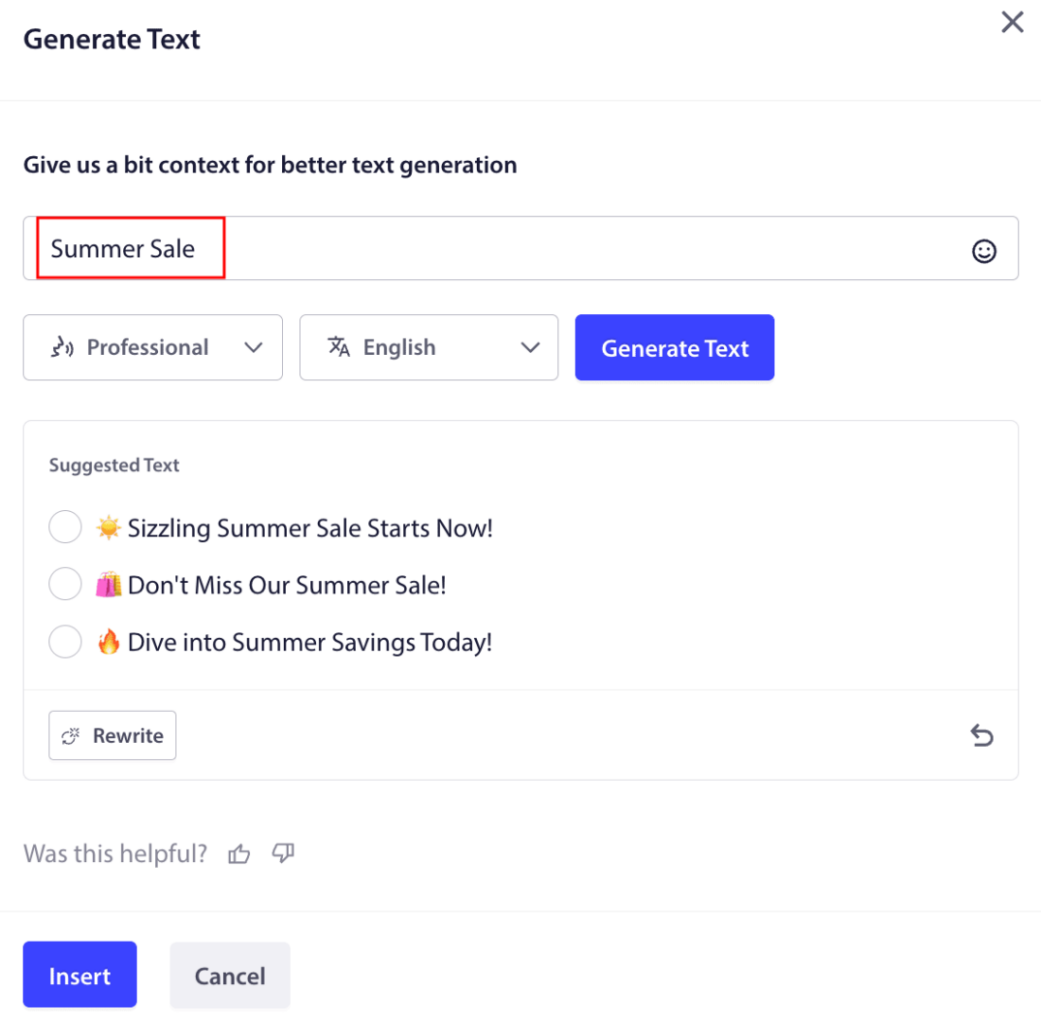
Θα ανοίξει ένα μικρό παράθυρο για τον τίτλο & το μήνυμα της καμπάνιας ειδοποιήσεων push για τον ιστότοπο. Μπορείτε να ξεκινήσετε προσθέτοντας λέξεις-κλειδιά που θα λειτουργούν ως προτροπή για την ΤΝ. Η προτροπή μπορεί να είναι τόσο λεπτομερής όσο θέλετε.
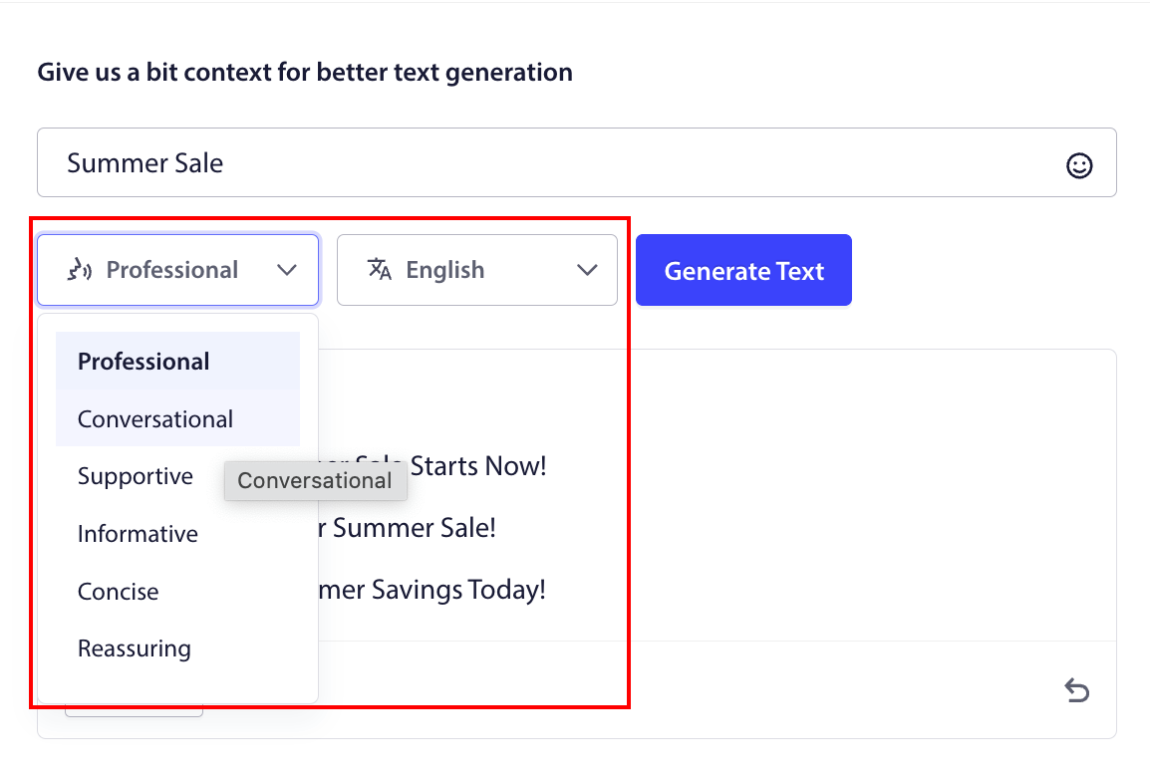
Μπορείτε επίσης να ορίσετε τον τόνο για τον τίτλο ή το μήνυμα της καμπάνιας ειδοποιήσεων push για τον ιστότοπο. Ο τόνος της συνομιλίας είναι πολύ σημαντικός για την απόφαση του τύπου της καμπάνιας που θα δημιουργηθεί. Βεβαιωθείτε ότι αντηχεί με το στυλ της επωνυμίας σας.
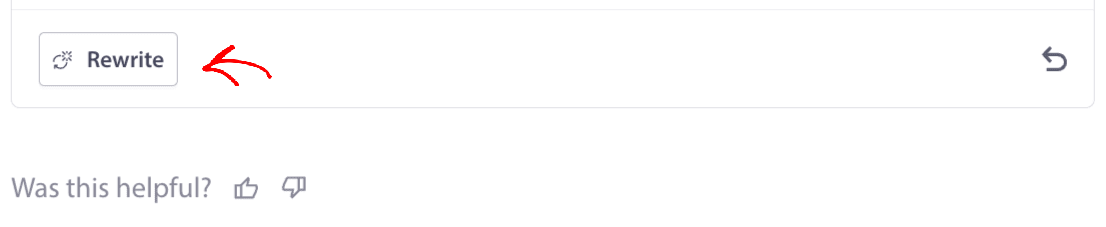
Μόλις ρυθμιστεί, μπορείτε να κάνετε κλικ στο κουμπί Δημιουργία Κειμένου . Δεν είστε ευχαριστημένοι με το κείμενο που δημιουργήθηκε; Απλώς κάντε κλικ στο κουμπί Επανεγγραφή !
Μπορείτε πραγματικά να δημιουργήσετε κείμενο σε ΟΠΟΙΑΔΗΠΟΤΕ ΓΛΩΣΣΑ !
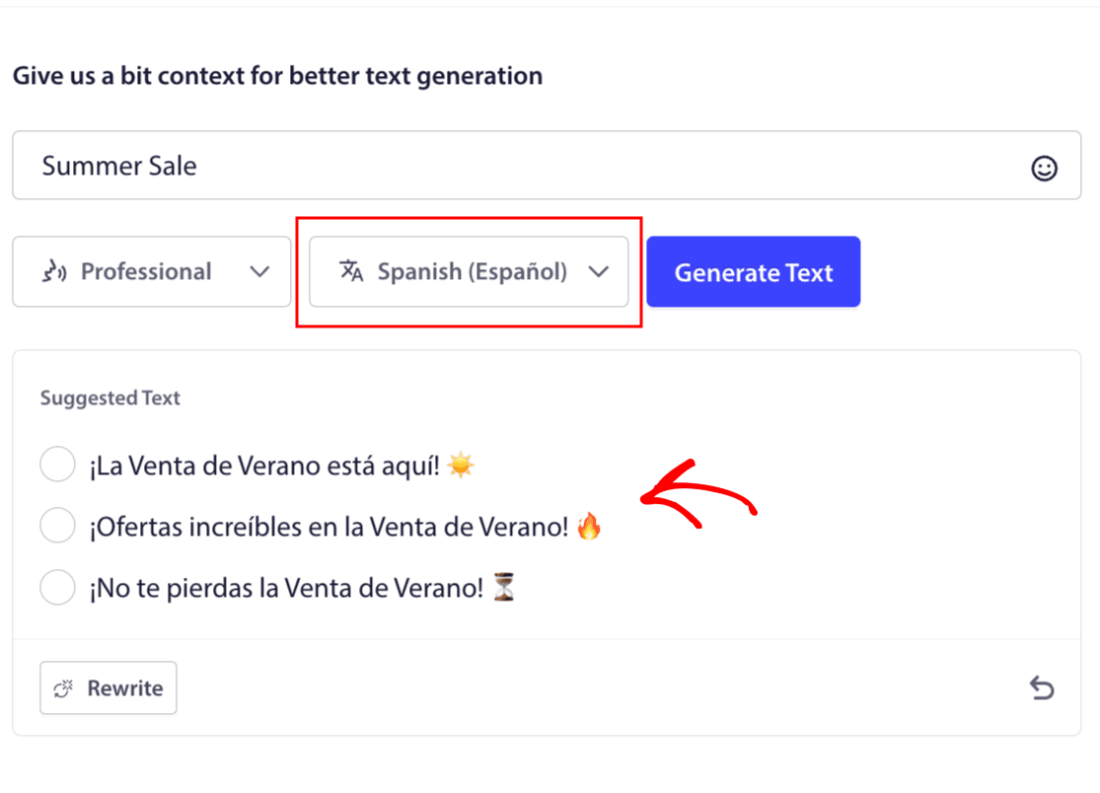
Αυτό το επίπεδο ενσωματωμένης υποστήριξης πολλών γλωσσών απλά δεν υπάρχει σε κανένα άλλο λογισμικό ειδοποιήσεων push. Και μην ανησυχείτε, οι μεταφράσεις είναι ακριβέστατες! Έτσι, μπορείτε να στέλνετε γεωγραφικά συγκεκριμένες καμπάνιες πολύ εύκολα τώρα. Επιλέξτε τη σωστή Ομάδα Κοινού , επιλέξτε τη γλώσσα και αφήστε την ΤΝ μας να κάνει τα μαγικά της.
Πώς να Στείλετε μια Καμπάνια Ειδοποιήσεων Push για τον Ιστότοπο
Τώρα που ξέρετε τι είναι μια καμπάνια ειδοποιήσεων push για τον ιστότοπο και τι υπηρεσία χρειάζεστε για να τις στείλετε, ήρθε η ώρα να δείτε πώς να στέλνετε διαφορετικές ειδοποιήσεις.
Έτσι μοιάζουν οι καμπάνιες ειδοποιήσεων push για τον ιστότοπο στην πράξη:
🛒 Ηλεκτρονικό Εμπόριο:
- Έκπτωση καλωσορίσματος: «Ευχαριστούμε για την εγγραφή! Ορίστε 10% έκπτωση.»
- Ειδοποίηση μείωσης τιμής: «Το τζιν που σου άρεσε; Επιτέλους σε προσφορά.»
- Νέα προϊόντα: «Μόλις έφτασαν νέα προϊόντα. Γίνε ο πρώτος που θα τα αγοράσει.»
📚 Εκδότες & Bloggers:
- Ειδοποίηση νέας ανάρτησης: «Μην χάσετε την ανάλυση αυτής της εβδομάδας για [Θέμα].»
- Εβδομαδιαία περίληψη: «Η λίστα ανάγνωσης της Παρασκευής σας είναι εδώ.»
- Παράδοση οδηγού μολύβδου: «Ορίστε ο δωρεάν οδηγός σας. Πείτε μας τη γνώμη σας.»
💼 SaaS & Εργαλεία:
- Ενημερώσεις λειτουργιών: «Μόλις λανσάραμε κάτι νέο. Δοκιμάστε το δωρεάν.»
- Υπενθυμίσεις δοκιμαστικής περιόδου: «Η δωρεάν δοκιμή σας λήγει αύριο.»
- Εγκαταλελειμμένοι: «Ακόμα το σκέφτεστε; Ορίστε 20% έκπτωση για να μας δοκιμάσετε.»
Ξεκινήστε μικρά. Κλέψτε αυτά. Τροποποιήστε τα για να ταιριάζουν στον τόνο σας. Τέλος.
Για πρακτικούς λόγους, δεν μιλάμε για προσαρμοσμένες καμπάνιες που μπορείτε να δημιουργήσετε χρησιμοποιώντας μια υπηρεσία API εδώ. Αν ενδιαφέρεστε περισσότερο για προσαρμοσμένες ειδοποιήσεις, θα πρέπει να ελέγξετε την τεκμηρίωσή μας .
#1. Καμπάνια Καλωσορίσματος Ειδοποιήσεων Push για τον Ιστότοπο
Μια καμπάνια καλωσορίσματος ειδοποιήσεων push για τον ιστότοπο είναι μια απλή ειδοποίηση push που έχει σκοπό να καλωσορίσει κάθε νέο συνδρομητή.
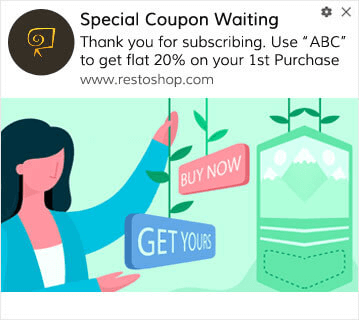
Μπορείτε επίσης να στείλετε μια προσφορά ή ένα δώρο για την εγγραφή σας στις ειδοποιήσεις push. Αυτό είναι αρκετά συνηθισμένο με πολλούς από τους πελάτες μας. Μπορείτε να χρησιμοποιήσετε τις ειδοποιήσεις καλωσορίσματος push για να:
- Μοιραστείτε ένα Κουπόνι Καλωσορίσματος
- Προσφέρετε Premium Λειτουργίες
- Αποστολή Δωρεάν Παράδοσης
- Προσφορά Δωρεάν Δώρων
- Ενσωμάτωση του Συνδρομητή σας με έναν Οδηγό
Τώρα, ας ρυθμίσουμε την πρώτη σας ειδοποίηση καλωσορίσματος push χρησιμοποιώντας το PushEngage.
Δείτε πώς να Ενεργοποιήσετε τις Ειδοποιήσεις Καλωσορίσματος στο PushEngage. Μεταβείτε στον πίνακα ελέγχου του PushEngage και κατευθυνθείτε στο Καμπάνια » Αυτόματοι Αποστολείς Drip και κάντε κλικ στο Δημιουργία Νέου Αυτόματου Αποστολέα Drip :

Στη συνέχεια, δώστε ένα όνομα στην καμπάνια σας (προτείνουμε κάτι σαν Welcome Drip) και κάτω από το Content, επιλέξτε την επιλογή που λέει, “Send notification immediately after user subscribes“):

Σε αυτό το σημείο, μπορείτε να κάνετε κλικ στο βέλος δίπλα στην ειδοποίηση για να επεξεργαστείτε το περιεχόμενο της ειδοποίησής σας. Εάν έχετε πρόγραμμα Premium ή Enterprise με το PushEngage, θα μπορείτε να προσθέσετε περισσότερες από μία ειδοποιήσεις για να δημιουργήσετε μια σειρά αυτοματοποιημένων μηνυμάτων καλωσορίσματος. Απλώς κάντε κλικ στο Add New Notification και επεξεργαστείτε το περιεχόμενο.
Μόλις τελειώσετε, κάντε κλικ στο Drip Settings και επιλέξτε την επιλογή αποστολής της καμπάνιας καλωσορίσματός σας σε όλους τους συνδρομητές:

Στη συνέχεια, κάντε κύλιση προς τα κάτω για να ορίσετε τις δικές σας παραμέτρους UTM για να παρακολουθείτε τις ειδοποιήσεις push:
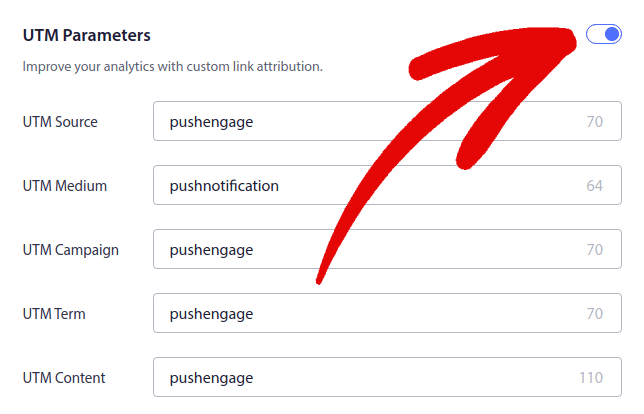
Και όταν τελειώσετε, κάντε κύλιση προς τα πάνω και κάντε κλικ στο κουμπί Activate Autoresponder:

Τώρα ξέρετε γιατί είναι σημαντικό να δημιουργήσετε μια καμπάνια καλωσορίσματος ειδοποιήσεων push. Ξέρετε επίσης πώς να τη δημιουργήσετε. Προχωρήστε και ενεργοποιήστε τις ειδοποιήσεις καλωσορίσματος push για να επαναπροσεγγίσετε νέους συνδρομητές, ή ελέγξτε αυτό το άρθρο για μηνύματα καλωσορίσματος στον ιστότοπο για έμπνευση.
#2. Εκστρατεία Ειδοποιήσεων Push Ιστού για Εγκαταλελειμμένα Καλάθια
Η εγκατάλειψη καλαθιού αγορών συμβαίνει όταν ένας πιθανός πελάτης προσθέτει ένα προϊόν στο καλάθι αγορών και δεν ολοκληρώνει τη διαδικασία ολοκλήρωσης αγοράς.
Η δουλειά σας είναι να μειώσετε την εγκατάλειψη καλαθιού όσο το δυνατόν περισσότερο.
Ένας τρόπος για να ανακτήσετε τις χαμένες πωλήσεις σας είναι να χρησιμοποιήσετε μια εκστρατεία ειδοποιήσεων push ιστού για εγκαταλελειμμένα καλάθια. Εκστρατείες ανάκτησης εγκαταλελειμμένων καλαθιών στοχεύουν συνδρομητές με εγκαταλελειμμένο καλάθι και τους στέλνουν ειδοποιήσεις, υπενθυμίσεις, προσφορές, κουπόνια και εκπτώσεις.
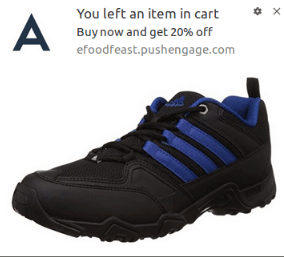
Είναι μια απλή ιδέα: Κάντε όσο το δυνατόν περισσότερους ανθρώπους να αγοράσουν κάτι.
Οι ειδοποιήσεις push εγκατάλειψης καλαθιού έχουν πολύ πραγματικό αντίκτυπο στο κάτω μέρος της γραμμής σας. Για παράδειγμα, η WickedWeasel λαμβάνει 2.000 – 4.000 $ ανά εβδομάδα σε πρόσθετες πωλήσεις από την καμπάνια push εγκατάλειψης καλαθιού.
Τώρα, ας πάμε και ας ρυθμίσουμε την πρώτη σας καμπάνια εγκαταλελειμμένου καλαθιού με το PushEngage.
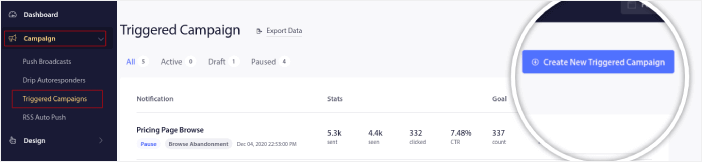
Μεταβείτε στον πίνακα ελέγχου του PushEngage και πηγαίνετε στο Campaign » Triggered Campaigns, και κάντε κλικ στο Create New Triggered Campaign:
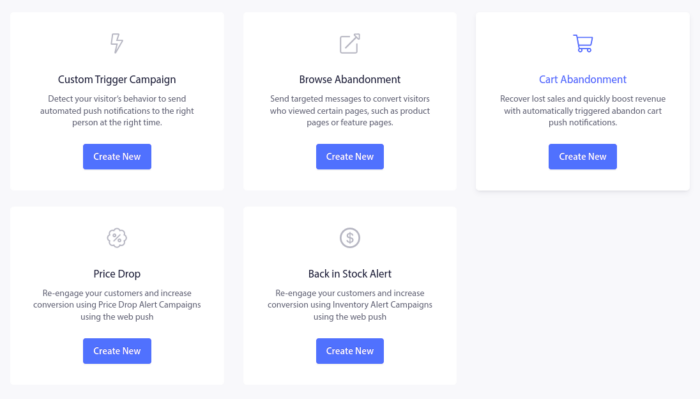
Στη συνέχεια, επιλέξτε το πρότυπο Cart Abandonment και κάντε κλικ στο Create New:
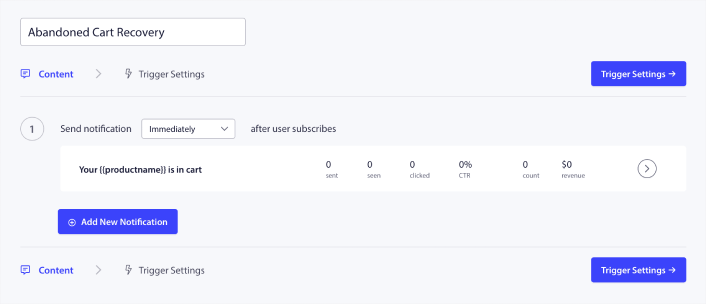
Και μπορείτε να αρχίσετε να συντάσσετε έναν αυτοματοποιημένο απόκριση εγκαταλελειμμένου καλαθιού. Στην καρτέλα Περιεχόμενο, μπορείτε να δημιουργήσετε μια σειρά από ειδοποιήσεις push:
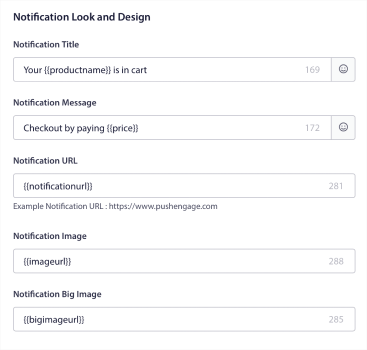
Για να επεξεργαστείτε μια ειδοποίηση, απλώς κάντε κλικ στο βέλος δίπλα της, και μπορείτε να προσαρμόσετε την ειδοποίηση push:
Για ένα πιο αναλυτικό σεμινάριο, ελέγξτε αυτό το άρθρο σχετικά με το πώς να ρυθμίσετε ειδοποιήσεις push εγκαταλελειμμένου καλαθιού.
#3. Εκστρατείες Ειδοποιήσεων Push Ιστού για Εγκαταλελειμμένες Περιηγήσεις
Εγκατάλειψη περιήγησης είναι ακριβώς όπως ακούγεται. Είναι όταν ένας επισκέπτης ιστοτόπου περιηγείται στον ιστότοπό σας και αποφασίζει να φύγει ξαφνικά. Αυτά τα περιστατικά είναι επίσης γνωστά ως εγκατάλειψη καναλιού από άλλους προμηθευτές.
Η εγκατάλειψη περιήγησης είναι ένα πολύ συνηθισμένο περιστατικό σε σχεδόν κάθε κλάδο.
Και είναι πολύ δύσκολο να μειωθεί ή να ελεγχθεί, επειδή δεν υπάρχει τρόπος να παρακινήσετε έναν τυχαίο χρήστη να παραμείνει στον ιστότοπό σας. Εδώ είναι που οι καμπάνιες εγκατάλειψης περιήγησης είναι τόσο ισχυρές.
Ακολουθεί ένα παράδειγμα ειδοποιήσεων push εγκατάλειψης περιήγησης για έναν εκδότη:
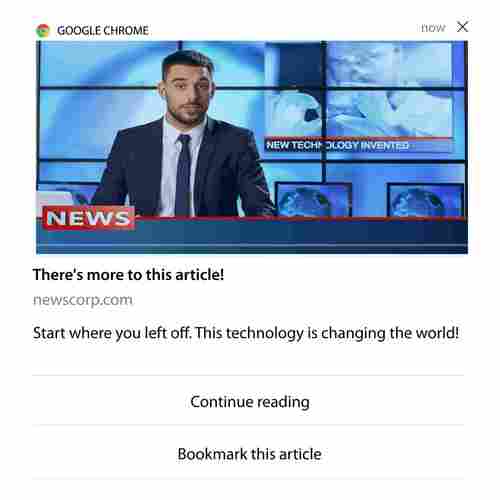
Το εντυπωσιακό στοιχείο του PushEngage είναι ότι μπορείτε να ρυθμίσετε καμπάνιες για σχεδόν οποιονδήποτε κλάδο. Έτσι, μπορείτε να στείλετε ειδοποιήσεις push εγκατάλειψης περιήγησης για ιστοτόπους SaaS και ταξιδιών.
Λοιπόν, πώς ρυθμίζετε καμπάνιες εγκατάλειψης περιήγησης;
Με την εγκατάλειψη καλαθιού, υπάρχει μια πολύ σαφής παράμετρος για να ενεργοποιήσετε τις ειδοποιήσεις push. Για την εγκατάλειψη περιήγησης, ίσως θελήσετε να εξετάσετε παραμέτρους όπως:
- Προστέθηκε το προϊόν στη Λίστα Επιθυμιών
- Είδε το ίδιο προϊόν περισσότερες από X φορές
- Περιηγήθηκε σε περισσότερα από X προϊόντα στην ίδια κατηγορία
- Έκανε αναζήτηση στον ιστότοπο για ένα συγκεκριμένο προϊόν
- Παρέμεινε στον ιστότοπο για τουλάχιστον X λεπτά πριν φύγει
Η ιδέα πίσω από αυτήν την καμπάνια για έναν ιστότοπο ηλεκτρονικού εμπορίου είναι να κάνει τον συνδρομητή να προσθέσει το προϊόν στο καλάθι του. Για τους εκδότες, θα μπορούσε να είναι ένα κλικ ή μια λήψη στο άρθρο που διάβαζαν.
Μεταβείτε ξανά στον πίνακα ελέγχου του PushEngage και πηγαίνετε στο Campaign » Triggered Campaigns για να δημιουργήσετε μια νέα καμπάνια ενεργοποίησης:

Στη συνέχεια, δημιουργήστε μια νέα καμπάνια εγκατάλειψης περιήγησης κάνοντας κλικ στο κουμπί Create New:

Στη συνέχεια, θα μπορείτε να ρυθμίσετε ολόκληρη την ακολουθία των ειδοποιήσεων push μαζί με μια καθυστέρηση μεταξύ κάθε ειδοποίησης:
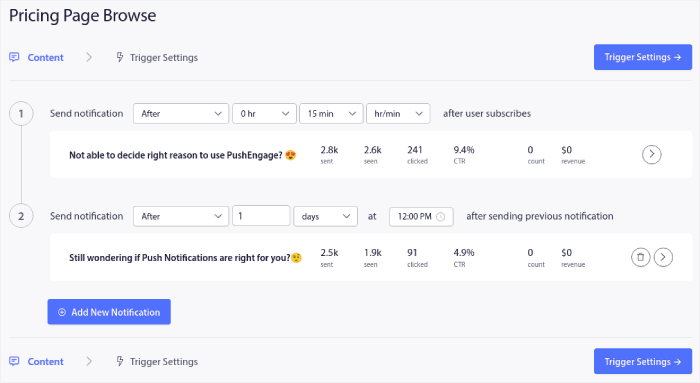
Αν είστε νέοι στις ειδοποιήσεις push, θα πρέπει να διαβάσετε το άρθρο μας σχετικά με τις βέλτιστες πρακτικές για ειδοποιήσεις push. Όταν είστε ικανοποιημένοι με το περιεχόμενο της ειδοποίησης push, κάντε κλικ στο Trigger Settings. Θα δείτε ότι οι συνθήκες για μια καμπάνια εγκατάλειψης περιήγησης έχουν προδιαμορφωθεί στην ακολουθία.
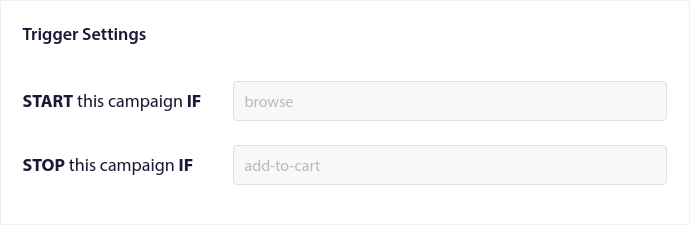
Κάντε κλικ στο κουμπί Integration Code για να λάβετε το απόσπασμα κώδικα που χρειάζεστε για να ενσωματώσετε την καμπάνια εγκατάλειψης περιήγησης στον ιστότοπό σας.
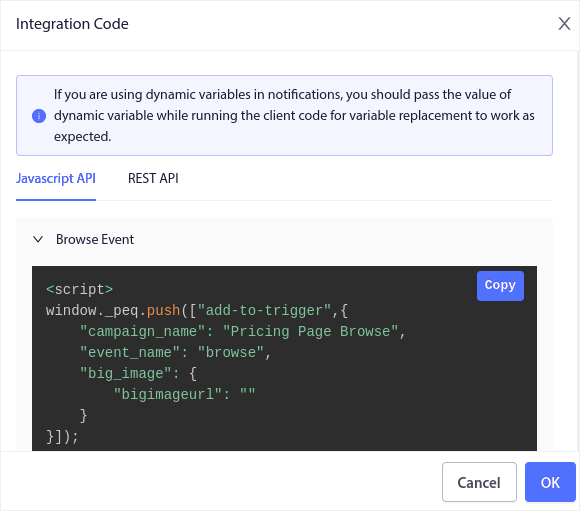
Στη συνέχεια, αντιγράψτε τον κώδικα και επικολλήστε τον στον ιστότοπό σας. Θέλετε να επικολλήσετε αυτόν τον κώδικα στην ενότητα <head> του HTML της σελίδας που θέλετε να παρακολουθήσετε. Τέλος, κάντε κλικ στο κουμπί Activate Triggered Campaign:
Και τελειώσατε!
#4. Εκστρατεία Ειδοποιήσεων Push Ιστού Ροής RSS
Το RSS Auto Push σας επιτρέπει να αυτοματοποιήσετε τις ειδοποιήσεις σας μέσω RSS.
Το PushEngage ελέγχει κάθε 10 λεπτά για μια νέα ανάρτηση που προστέθηκε στο RSS feed σας. Εάν βρεθεί μια νέα ανάρτηση, το PushEngage τη μετατρέπει σε ειδοποίηση push και την αποστέλλει σε όλους τους συνδρομητές σας. Το καλύτερο είναι ότι συμβαίνει σε πλήρη αυτόματο πιλότο.
Οι καμπάνιες RSS Feed είναι ιδανικές για εκδότες και ειδησεογραφικούς ιστότοπους:
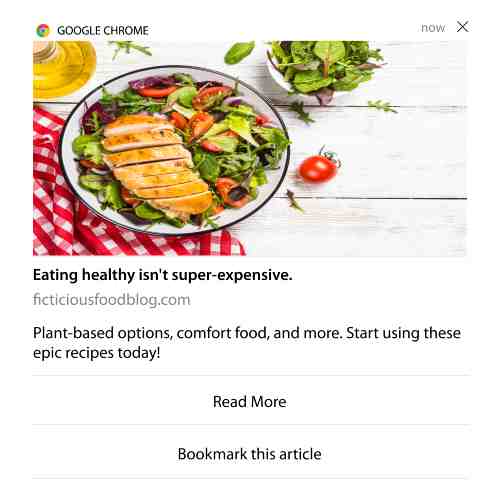
Αν είστε μεγάλος εκδότης και δημοσιεύετε περισσότερες από 1 ανάρτηση ανά 30 λεπτά, το PushEngage διατηρεί μια καθυστέρηση 5 λεπτών μεταξύ 2 ειδοποιήσεων ανάρτησης.
Πριν προχωρήσουμε, θα πρέπει να διαβάσετε αυτό το άρθρο σχετικά με το πώς να χρησιμοποιήσετε τα RSS feeds για περισσότερες επικές συμβουλές και κόλπα.
Τώρα, ας στήσουμε μια εκστρατεία ειδοποιήσεων push ιστού ροής RSS στο PushEngage.
Δημιουργία Νέας Εκστρατείας Ειδοποιήσεων Push Ιστού RSS
Μόλις εγκαταστήσετε το PushEngage στον ιστότοπό σας, μεταβείτε στον πίνακα ελέγχου του PushEngage και πηγαίνετε στο Campaign » RSS Auto Push και κάντε κλικ στο Create New Campaign:
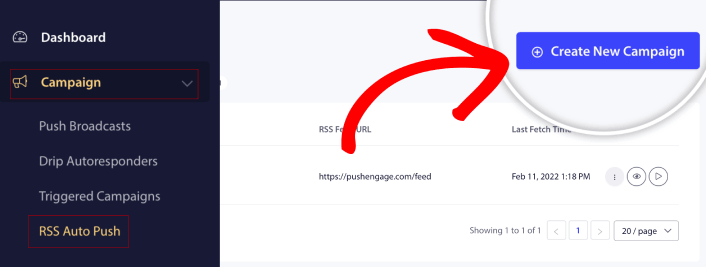
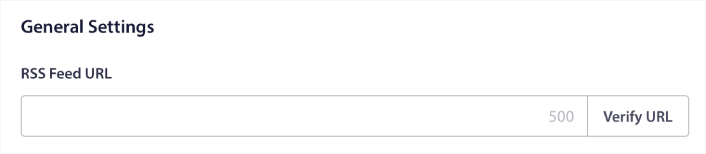
Αυτό θα δημιουργήσει μια ολοκαίνουργια εκστρατεία ειδοποιήσεων push ιστού RSS. Μπορείτε να ρυθμίσετε πολλαπλές εκστρατείες ροής RSS στο PushEngage. Ξεκινήστε δίνοντας ένα περιγραφικό όνομα στην εκστρατεία σας. Στη συνέχεια, επικολλήστε το URL της ροής RSS σας:
Ρύθμιση Ρυθμίσεων Ειδοποιήσεων RSS
Στη συνέχεια, θέλετε να ορίσετε τη Συχνότητα Εκστρατείας:
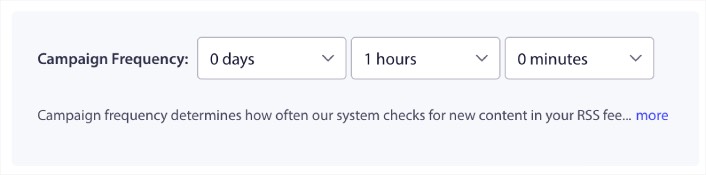
Η Συχνότητα Εκστρατείας είναι πόσο συχνά η εκστρατεία ειδοποιήσεων push ιστού ροής RSS αναζητά νέο περιεχόμενο στο ιστολόγιό σας για να στείλει μια αυτοματοποιημένη ειδοποίηση push. Η ελάχιστη τιμή είναι 15 λεπτά και η μέγιστη τιμή είναι 7 ημέρες.
Συνιστούμε να αναζητάτε περιεχόμενο προς προώθηση κάθε 2 ημέρες, εκτός αν είστε ειδησεογραφικό πρακτορείο. Για τα ειδησεογραφικά πρακτορεία, θα πρέπει να το περιορίσετε στα 15 λεπτά. Λάβετε υπόψη ότι το PushEngage θα αναζητήσει νέο περιεχόμενο μόνο αφού ρυθμίσετε και δημοσιεύσετε την καμπάνια σας RSS feed.
Επιλογή Αναρτήσεων για Προώθηση
Μπορείτε να επιλέξετε ποιες αναρτήσεις θα προωθήσετε. Μπορείτε να επιλέξετε μεταξύ Μόνο το τελευταίο στοιχείο ή Όλα τα στοιχεία. Εάν ρυθμίσετε τις ειδοποιήσεις push RSS για να επιλέξετε μόνο το τελευταίο στοιχείο, το PushEngage στέλνει μόνο την τελευταία ανάρτηση:
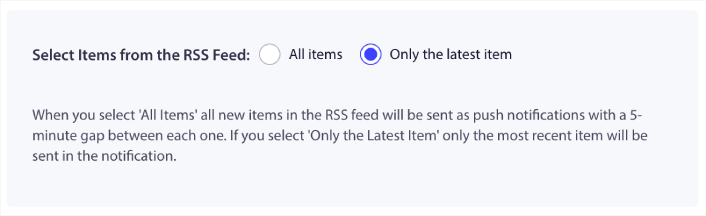
Εναλλακτικά, μπορείτε να επιλέξετε την επιλογή Όλα τα στοιχεία. Σε αυτήν την περίπτωση, η εκστρατεία θα επιλέξει όλες τις αναρτήσεις στον ιστότοπό σας και θα στείλει μια εκστρατεία ειδοποιήσεων push ιστού για καθεμία με ένα κενό 5 λεπτών μεταξύ τους.
Ορισμός Εικονιδίου Ειδοποιήσεων Push RSS
Το εικονίδιο ειδοποίησης push σας καθορίζει την ταυτότητα της επωνυμίας σας στις ειδοποιήσεις push RSS. Συνιστούμε να χρησιμοποιήσετε το σήμα της επωνυμίας σας, ώστε οι συνδρομητές σας να γνωρίζουν αμέσως ότι η ειδοποίηση προέρχεται από την επωνυμία σας.
Τώρα, υπάρχουν δύο επιλογές εδώ. Μπορείτε είτε να ανεβάσετε χειροκίνητα το εικονίδιο ειδοποίησης:
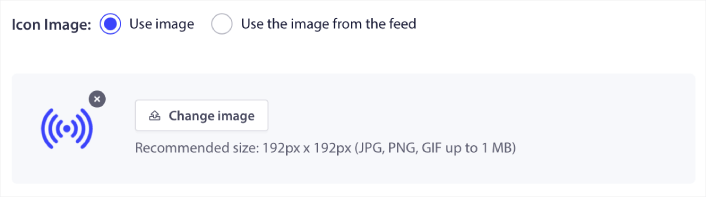
Και αυτό είναι πραγματικά απλό να γίνει. Απλώς κάντε κλικ στο Αλλαγή εικόνας και ανεβάστε το εικονίδιο ειδοποίησής σας. Εναλλακτικά, μπορείτε να το ανακτήσετε από τη ροή RSS σας:
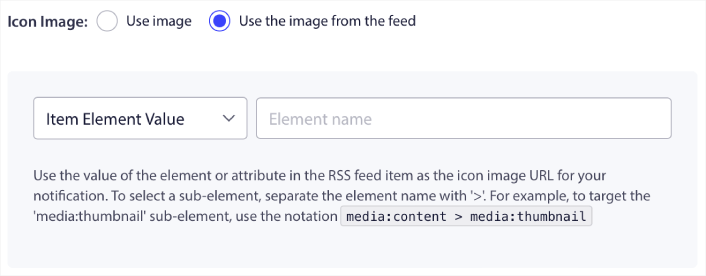
Μπορείτε είτε να επιλέξετε το στοιχείο του αντικειμένου είτε το χαρακτηριστικό μέσα σε ένα στοιχείο για να επιλέξετε δυναμικά το εικονίδιο ειδοποίησής σας από τη ροή. Συνήθως, οι περισσότερες ροές RSS θα περιέχουν το εικονίδιο του ιστότοπου μέσα στο στοιχείο media:content. Ακόμα πιο συγκεκριμένα, συνήθως βρίσκεται μέσα στο χαρακτηριστικό media:thumbnail του στοιχείου media:content.
Για να στοχεύσετε το στοιχείο, μπορείτε να επιλέξετε την επιλογή Τιμή Στοιχείου Στοιχείου και να την ορίσετε σε media:content. Εναλλακτικά, μπορείτε να επιλέξετε την επιλογή Τιμή Χαρακτηριστικού Στοιχείου και να την ορίσετε σε media:content > media:thumbnail.
ΣΗΜΕΙΩΣΗ: Συνιστούμε τη χρήση αυτής της επιλογής μόνο εάν γνωρίζετε πώς να διαβάζετε XML. Οι ροές RSS ενδέχεται να μην περιέχουν το εικονίδιο του ιστότοπου στις ίδιες ετικέτες XML με το παράδειγμά μας. Επομένως, εάν δεν είστε σίγουροι πώς να ανακτήσετε το εικονίδιο ειδοποίησης από τη ροή RSS, συνιστούμε να το ανεβάσετε χειροκίνητα.
Επιλογή Μεγάλης Εικόνας για Ειδοποιήσεις Ροής RSS
Τώρα, θα επιλέξουμε τη μεγάλη εικόνα για τις ειδοποιήσεις push της ροής RSS σας. Και πάλι, υπάρχουν δύο τρόποι για να το κάνετε αυτό. Μπορείτε να αφήσετε το PushEngage να βρει αυτόματα την εικόνα από τη ροή RSS:

Εναλλακτικά, μπορείτε να επιλέξετε χειροκίνητα ποια εικόνα θέλετε από τη ροή:
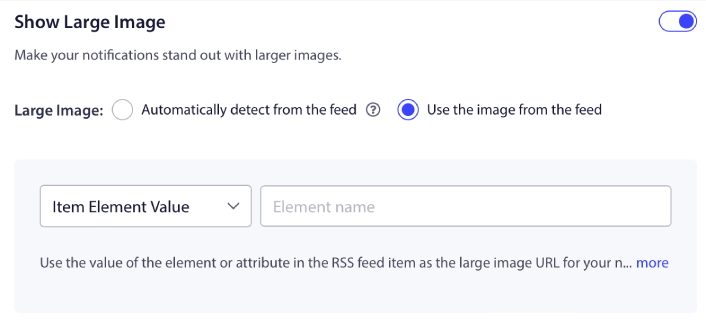
Αυτό είναι ακριβώς το ίδιο με την επιλογή του εικονιδίου ειδοποίησης από τη ροή RSS. Μπορείτε για άλλη μια φορά να επιλέξετε την εικόνα από το στοιχείο XML που την περιέχει ή μπορείτε να επιλέξετε το συγκεκριμένο χαρακτηριστικό που περιέχει την προτιμώμενη εικόνα σας.
ΣΗΜΕΙΩΣΗ: Συνιστούμε την επιλογή μιας διεύθυνσης URL από τη ροή RSS σας μόνο εάν γνωρίζετε πώς να διαβάζετε XML. Εάν δεν είστε σίγουροι πώς να διαβάζετε XML, είναι καλύτερο να αφήσετε το PushEngage να βρει την καλύτερη εικόνα για τις ειδοποιήσεις σας.
Ορισμός Διάρκειας Εκστρατείας Ειδοποιήσεων Push Ιστού
Η διάρκεια της εκστρατείας ειδοποιήσεων push ιστού είναι το χρονικό διάστημα που η ειδοποίηση παραμένει στο συρτάρι ειδοποιήσεων του συνδρομητή σας πριν διαγραφεί αυτόματα.
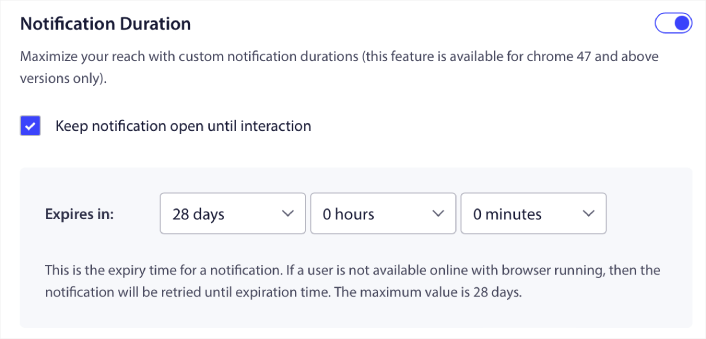
Αν δεν θέλετε να κατακλύσετε τους συνδρομητές σας με πολλές μη αναγνωσμένες ειδοποιήσεις, είναι καλύτερο να αφήσετε τις ειδοποιήσεις push να λήξουν σε μερικές ημέρες.
Σε αντίθεση με τις ειδοποιήσεις εκπομπής ή ακόμη και άλλες αυτοματοποιημένες ειδοποιήσεις push ιστού, δεν μπορείτε πραγματικά να προγραμματίσετε ειδοποιήσεις push RSS. Έτσι, έχετε πάντα την επιλογή να διατηρείτε την ειδοποίηση ανοιχτή μέχρι ο συνδρομητής σας να αλληλεπιδράσει μαζί της, ακόμη και εντός του ορίου λήξης.
Ορισμός Παραμέτρων UTM
Σχεδόν τελειώσαμε. Κάντε κύλιση προς τα κάτω για να ορίσετε τις δικές σας παραμέτρους UTM για να παρακολουθείτε τις ειδοποιήσεις push:
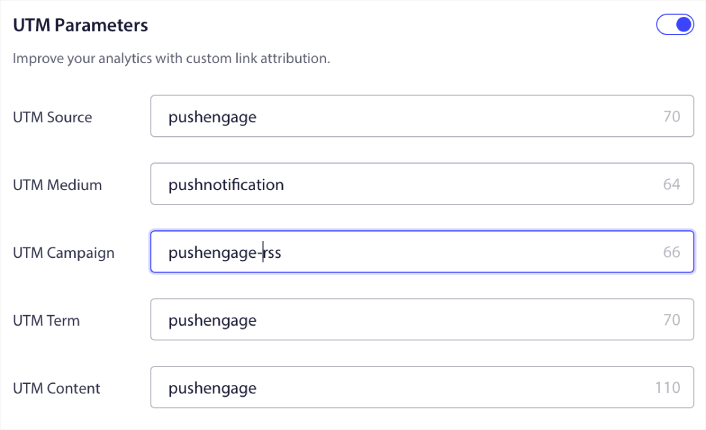
Με αυτόν τον τρόπο, μπορείτε εύκολα να αποδώσετε την επισκεψιμότητά σας από αυτές τις ειδοποιήσεις push στο Google Analytics.
Επιλογή Ομάδας Κοινού
Τέλος, θα επιλέξουμε μια Ομάδα Κοινού για να στείλουμε την εκστρατεία ειδοποιήσεων push RSS. Μπορείτε είτε να στείλετε την εκστρατεία ροής RSS σε όλους τους συνδρομητές σας, είτε μπορείτε να δημιουργήσετε Ομάδες Κοινού για να στείλετε εξατομικευμένες ειδοποιήσεις push ακόμη και από τη ροή RSS σας.
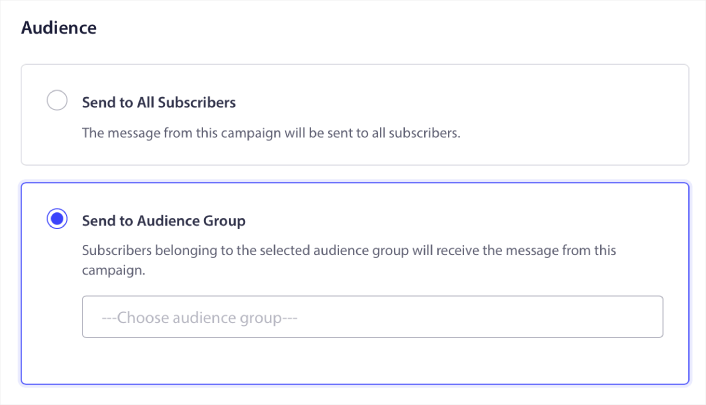
Και αυτό είναι όλο! Αυτό είναι πραγματικά όλο.
Τώρα, κάθε φορά που δημοσιεύετε μια νέα ανάρτηση, οι συνδρομητές ειδοποιήσεων push στην επιλεγμένη Ομάδα Κοινού θα λαμβάνουν αυτόματα μια ειδοποίηση push σχετικά με το νέο σας περιεχόμενο.
Αυτό ήταν! Είστε έτοιμοι. Κάθε φορά που δημοσιεύετε μια νέα ανάρτηση, θα πηγαίνει αυτόματα σε όλους τους συνδρομητές σας.
#5. Αυτοματοποιημένες Ειδοποιήσεις Επανενεργοποίησης
Μπορείτε να ρυθμίσετε αυτοματοποιημένες καμπάνιες επανενεργοποίησης για συνδρομητές που δεν έχουν αλληλεπιδράσει με το περιεχόμενό σας για λίγο.
Αλλά γιατί να το κάνετε εξαρχής;
Τι θα λέγατε για αυτό:
- Το κόστος απόκτησης νέων πελατών είναι 5 φορές μεγαλύτερο από το κόστος διατήρησης υπαρχόντων πελατών
- Είναι εύκολο να στοχεύσετε και να επαναπροωθήσετε σε ένα γνωστό κοινό του οποίου τις προσωπικές προτιμήσεις κατανοούμε ήδη.
- Μακροπρόθεσμα, οι αφοσιωμένοι πελάτες προσφέρουν περισσότερες επιχειρήσεις στην εταιρεία από κάποιον που συνδέεται ελάχιστα με την επωνυμία σας.
Η Ofertia κατάφερε να αυξήσει τους επαναλαμβανόμενους χρήστες της κατά 39% χρησιμοποιώντας ειδοποιήσεις push προσφέροντας εξατομικευμένες προσφορές. Δεν είναι οι μόνοι. Μπορείτε να το χρησιμοποιήσετε για έναν ιστότοπο eCommerce με μεγάλη επιτυχία:
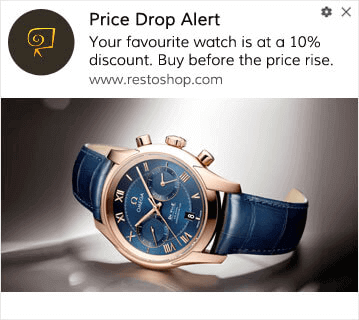
Υπάρχουν πολλοί τρόποι για να επανενεργοποιήσετε τους συνδρομητές σας.
Φανταστείτε αυτό:
- Ένας χρήστης επισκέπτεται τον ιστότοπό σας. Βλέπει μια διακριτική επιλογή. Κάνει κλικ στο “Να επιτρέπεται”.
- Λαμβάνει αμέσως μια ειδοποίηση καλωσορίσματος με έκπτωση ή το επόμενο βήμα.
- Φεύγει από τον ιστότοπό σας…
- Αργότερα εκείνη την ημέρα, βλέπουν μια υπενθύμιση: “Ακόμα το σκέφτεστε;”
- Κάνουν κλικ, επιστρέφουν και αγοράζουν.
Αυτό είναι ένα βασικό χωνί push – και δεν κάνατε τίποτα μόλις ήταν σε λειτουργία.
Τώρα, φανταστείτε να προσθέτετε τμηματοποίηση και αυτοματοποιημένες εκστρατείες. Τότε γίνεται διασκεδαστικό. Χρησιμοποιώντας δυναμικά τμήματα, μπορείτε να μάθετε πολλά για τους συνδρομητές σας και να τους στείλετε εξατομικευμένο περιεχόμενο που θα λατρέψουν.
Στον πίνακα ελέγχου του PushEngage, μεταβείτε στην ενότητα Τμηματοποίηση και δημιουργήστε ένα νέο Τμήμα:
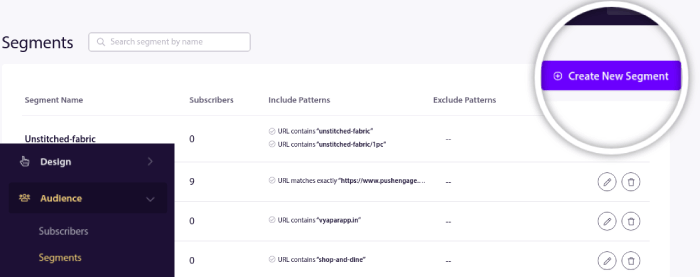
Αυτό σας επιτρέπει να δημιουργείτε τμήματα βάσει συμπεριφοράς και προτύπων περιήγησης. Μπορείτε πραγματικά να ρυθμίσετε μια ακολουθία λειτουργιών AND/OR που καθορίζουν πότε ορισμένα τμήματα λαμβάνουν αυτοματοποιημένες ειδοποιήσεις push.
Μπορείτε ακόμη και να τμηματοποιήσετε τους χρήστες σας όταν εγγράφονται για ειδοποιήσεις push. Μεταβείτε στην ενότητα Σχεδίαση » Αναδυόμενα Παράθυρα και επιλέξτε το Μεγάλο στυλ Safari με Τμήμα.
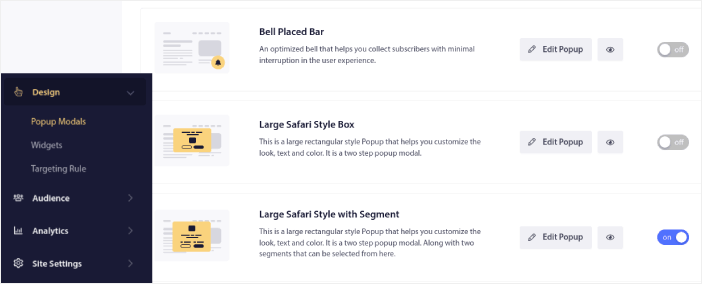
Αν χρειάζεστε ακόμη περισσότερους τρόπους για να τμηματοποιήσετε τους χρήστες σας, μπορείτε να δημιουργήσετε προσαρμοσμένα τμήματα βάσει ενεργειών χρηστών χρησιμοποιώντας το PushEngage Javascript API.
#6. Εκστρατεία Ειδοποιήσεων Push Ιστού Επίσκεψης Σελίδας
Οι ενεργοποιήσεις επίσκεψης σελίδας είναι μια επέκταση των τμημάτων ειδοποιήσεων push. Το μόνο που έχετε να κάνετε είναι να δημιουργήσετε ένα τμήμα όταν ένας επισκέπτης ιστότοπου περιηγείται σε μια διεύθυνση URL με μια συγκεκριμένη φράση ή μοτίβο.
Στη συνέχεια, απλώς μεταβείτε στην ενότητα Κοινό » Τμήματα και ορίστε το κοινό σας σε ένα συγκεκριμένο τμήμα:
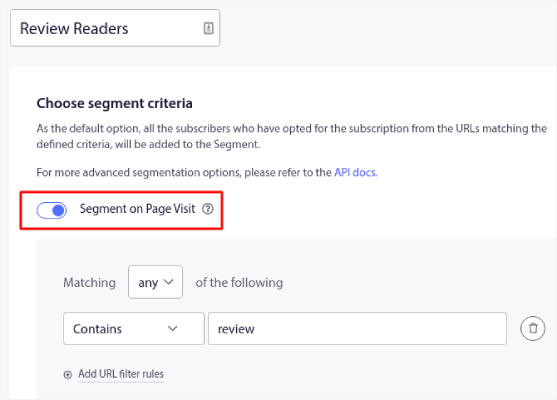
Αυτό σας επιτρέπει να δημιουργείτε πραγματικά εξατομικευμένες και αυτοματοποιημένες ειδοποιήσεις push.
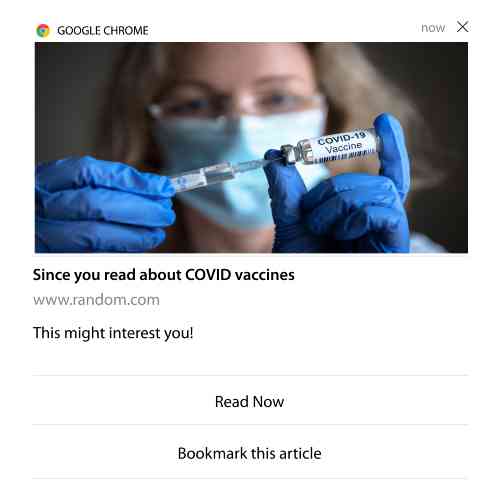
Και το καλύτερο είναι ότι μπορείτε να δημιουργήσετε προσαρμοσμένα τμήματα στο PushEngage μέσα σε λίγα λεπτά.
#7. Αυτοματοποιημένες Ειδοποιήσεις Push από Click-Through
Δεν μπορείτε να δημιουργήσετε ειδοποιήσεις push που ενεργοποιούνται όταν οι συνδρομητές σας κάνουν κλικ σε μια παραδοθείσα ειδοποίηση χρησιμοποιώντας το PushEngage.
Αλλά υπάρχει μια πολύ έξυπνη λύση.
Μπορείτε να δημιουργήσετε ένα τμήμα με βάση τη διεύθυνση URL στην οποία οδηγεί μια συγκεκριμένη ειδοποίηση. Κάθε φορά που κάποιος προσγειώνεται σε αυτήν τη διεύθυνση URL, προστίθεται στο τμήμα και μπορείτε να χρησιμοποιήσετε αυτό το τμήμα για να στείλετε στοχευμένες ειδοποιήσεις.
Οι καμπάνιες κλικ μέσω ειδοποιήσεων push είναι ουσιαστικά μια επέκταση του τυπικού τμηματοποίησης κοινού για καμπάνιες στάγδην.
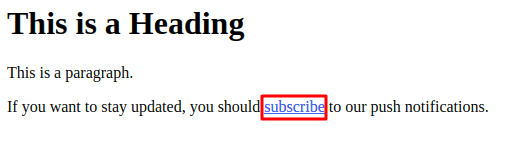
Δείτε αυτό το σεμινάριο για το πώς να δημιουργήσετε ένα κουμπί click-to-subscribe.
#8. Επαναλαμβανόμενες Αυτοματοποιημένες Ειδοποιήσεις Push
Φανταστείτε ότι έχετε…
- Μια εβδομαδιαία προσφορά για μια υπαίθρια αγορά·
- Ή μια προσφορά Σαββατοκύριακου;
- Ή μια εκκαθάριση αποθεμάτων;
- Ή μια μηνιαία προσφορά αστραπή.
Πόσο άβολο θα ήταν να πρέπει να δημιουργείτε ειδοποιήσεις push για κάθε συμβάν χειροκίνητα;
Ευτυχώς, μπορείτε να ορίσετε επαναλαμβανόμενες ειδοποιήσεις με το PushEngage.
Οι επαναλαμβανόμενες ειδοποιήσεις είναι προγραμματισμένες και αυτοματοποιημένες ειδοποιήσεις push για ένα επαναλαμβανόμενο συμβάν. Μπορείτε να τις ρυθμίσετε μία φορά, να καθορίσετε ένα πρόγραμμα και τελειώσατε.
Αυτός είναι μόνο ένας από τους τρόπους με τους οποίους το MyDeal χρησιμοποιεί ειδοποιήσεις push. Φροντίστε να διαβάσετε την πλήρη μελέτη περίπτωσης!
Μεταβείτε στο Campaign και προσθέστε μια αυτοματοποιημένη ειδοποίηση στον πίνακα ελέγχου του PushEngage. Στη συνέχεια, κάντε κύλιση προς τα κάτω στην ενότητα προγραμματισμού και μεταβείτε στην καρτέλα Send/Schedule:

Απλώς ρυθμίστε την ώρα και τελειώσατε!
#9. Ειδοποιήσεις Ζώνης Ώρας Συνδρομητή
Οι ειδοποιήσεις ζώνης ώρας συνδρομητή είναι ακριβώς όπως ακούγονται. Στέλνετε αυτοματοποιημένες ειδοποιήσεις push στους συνδρομητές σας στη ζώνη ώρας τους.
Γιατί είναι τόσο μεγάλο θέμα;
Οι ειδοποιήσεις ζώνης ώρας συνδρομητή έχουν υψηλότερα ποσοστά ανοίγματος. Συνήθως, οποιαδήποτε ειδοποίηση push παραδίδεται ακόμα κι αν ο συνδρομητής σας είναι εκτός σύνδεσης. Αυτές οι ειδοποιήσεις συσσωρεύονται και αγνοούνται όταν ο συνδρομητής σας συνδεθεί τελικά.
Από την άλλη πλευρά, μια εκστρατεία ειδοποιήσεων push ιστού ζώνης ώρας συνδρομητή θα παραδοθεί όταν ΓΝΩΡΙΖΕΤΕ ότι ο συνδρομητής σας είναι πιθανότατα σε απευθείας σύνδεση.
Επαγγελματική Συμβουλή: Χρησιμοποιήστε A/B testing για να βρείτε την ιδανική ώρα για να στείλετε στους συνδρομητές σας μια ειδοποίηση push.
Οι ειδοποιήσεις ζώνης ώρας συνδρομητή αισθάνονται πολύ πιο εξατομικευμένες. Και αν είστε έξυπνοι, μπορείτε να τις συνδυάσετε με δεδομένα γεωγραφικής τοποθεσίας για να εξατομικεύσετε τις ειδοποιήσεις σας ακόμη περισσότερο. Αυτό ακριβώς έκανε η Phooto όταν χρησιμοποίησε τοπικές γλώσσες για να εκτοξεύσει τα ποσοστά ανοίγματός της.
Ας ρυθμίσουμε τώρα τις ειδοποιήσεις ζώνης ώρας συνδρομητή στο PushEngage.
Όταν δημιουργείτε μια νέα ειδοποίηση, μεταβείτε στις επιλογές προγραμματισμού και κάντε κλικ στο πλαίσιο ελέγχου που λέει Send Notifications in Subscriber Timezone:
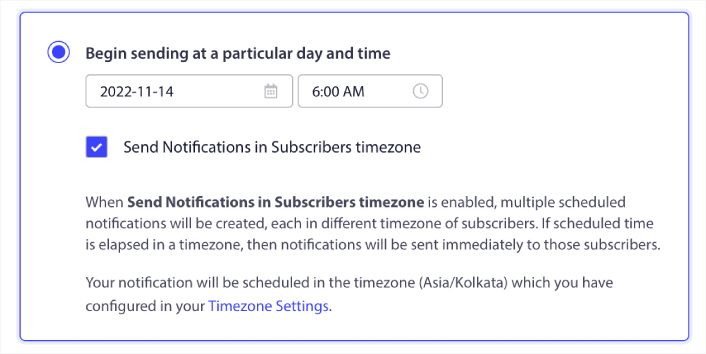
Αυτό είναι όλο! Θα πρέπει να κάνετε το ίδιο και για τις καμπάνιες σταγόνας σας, αλλά τα αποτελέσματα αξίζουν την προσπάθεια του κλικ ενός κουμπιού για κάθε καμπάνια.
Ξεκινήστε με 1–2 μηνύματα την εβδομάδα. Αυξήστε μόλις δείτε τι λειτουργεί.
Ορίστε μια απλή ροή για να ξεκινήσετε:
- Εβδομάδα 1: Μήνυμα καλωσορίσματος + 1 προώθηση προϊόντος ή περιεχομένου
- Εβδομάδα 2: Υπενθύμιση ή παρακολούθηση έκπτωσης
- Εβδομάδα 3: Νέα κυκλοφορία, ανάρτηση ιστολογίου ή επισήμανση χαρακτηριστικού
Αν οι χρήστες σταματήσουν να κάνουν κλικ, μειώστε. Αν συνεχίσουν να κάνουν κλικ; Διπλασιάστε.
Επαγγελματική Συμβουλή: Οι δύο τελευταίες τακτικές αφορούσαν τον προγραμματισμό ειδοποιήσεων push. Αλλά αυτές οι δύο δεν είναι οι μόνες μέθοδοι για τον προγραμματισμό αυτοματοποιημένων ειδοποιήσεων push. Δείτε το άρθρο μας σχετικά με το πώς να προγραμματίσετε ειδοποιήσεις push για περισσότερα επικά κόλπα.
#10. Ειδοποιήσεις Εγγραφής Email
Το μάρκετινγκ μέσω email ήταν ανέκαθεν ο καλύτερος τρόπος για τη δημιουργία και την καλλιέργεια leads. Το καλύτερο με τις αυτοματοποιημένες ειδοποιήσεις push είναι ότι μπορείτε να δημιουργήσετε περισσότερους συνδρομητές email χρησιμοποιώντας τις.
Είναι πολύ απλό στη ρύθμιση, και η χρήση ενός συνδυασμού καμπανιών email και ειδοποιήσεων web push είναι πολύ πιο αποτελεσματική από τη χρήση της μιας ή της άλλης.
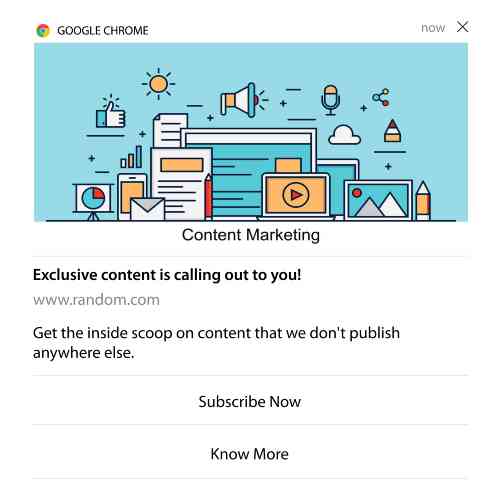
Το μόνο που έχετε να κάνετε είναι να στείλετε μια ειδοποίηση ενεργοποίησης που ζητά από τον χρήστη να επιλέξει ειδοποιήσεις email.
Απλώς δημιουργήστε ένα προσαρμοσμένο κουμπί παρότρυνσης για ενέργεια (CTA) και εισαγάγετε έναν σύνδεσμο εγγραφής ως διεύθυνση URL του κουμπιού. Αυτό είναι πραγματικά το μόνο που χρειάζεστε. Αν δεν είστε σίγουροι πώς να αποκτήσετε ένα κουμπί εγγραφής, απλώς ακολουθήστε.
Σε οποιαδήποτε ειδοποίηση, μπορείτε να κάνετε κύλιση προς τα κάτω και να ενεργοποιήσετε τα κουμπιά Πολλαπλών Ενεργειών:
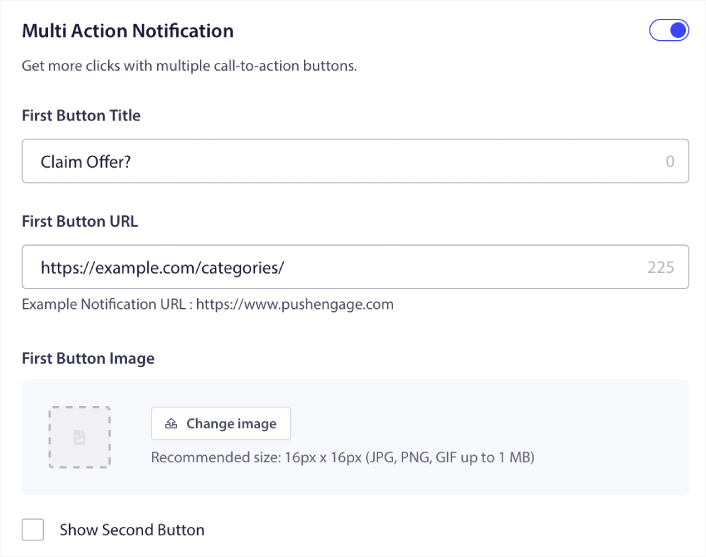
Η διεύθυνση URL πρέπει να είναι ένας σύνδεσμος προς μια φόρμα εγγραφής email. Μπορείτε να δημιουργήσετε μία χρησιμοποιώντας σχεδόν οποιονδήποτε πάροχο υπηρεσιών email, όπως το Drip. Το μόνο που έχετε να κάνετε είναι να κάνετε κλικ στις επιλογές κοινής χρήσης για τη φόρμα εγγραφής και να αντιγράψετε αυτήν τη διεύθυνση URL. Στη συνέχεια, επικολλήστε την στη διεύθυνση URL του κουμπιού για την ειδοποίηση push σας.
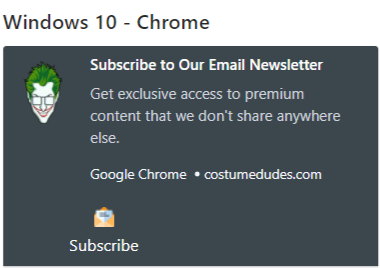
Δείτε το σεμινάριό μας για τα κουμπιά πολλαπλών ενεργειών για περισσότερες λεπτομέρειες. Μπορείτε ακόμη και να προσθέσετε ένα εικονίδιο email στο κουμπί σας για να είναι πολύ σαφές ότι ζητάτε από τους χρήστες σας να εγγραφούν στις ειδοποιήσεις email σας:
Συμβουλή Επαγγελματία: Μπορείτε να χρησιμοποιήσετε την ίδια ιδέα για να αναπτύξετε και το κανάλι σας στο YouTube. Απλώς προσθέστε το «?sub_confirmation=1» στο τέλος της διεύθυνσης URL του καναλιού σας και επικολλήστε το στη διεύθυνση URL του κουμπιού ειδοποίησης push.
Κάθε φορά που κάποιος κάνει κλικ στο κουμπί εγγραφής στην ειδοποίηση push σας, θα ανακατευθύνεται στο κανάλι σας στο YouTube και θα του ζητηθεί να εγγραφεί σε αυτό.
Ιδέες Τμημάτων που Μπορείτε να Κλέψετε
Τα τμήματα είναι ένας πραγματικά εξαιρετικός τρόπος για να στέλνετε στοχευμένες καμπάνιες push. Και θα πρέπει να αποτελούν μεγάλο μέρος της στρατηγικής σας για ειδοποιήσεις push. Αλλά πώς θα ξεκινήσετε; Τι είδους τμήματα θα πρέπει να δημιουργείτε;
Για αρχή, δεν θα πρέπει να εστιάζετε στη δημιουργία μόνο ενός τύπου τμήματος. Θα σας καθοδηγήσουμε στους διαφορετικούς τύπους τμηματοποίησης που έχουμε βρει ότι είναι οι πιο αποτελεσματικοί.
Ορίστε μερικά τμήματα υψηλού αντίκτυπου που αξίζει να δημιουργήσετε:
- Ενεργοί αγοραστές: Άτομα που έκαναν κλικ σε 2+ ειδοποιήσεις την περασμένη εβδομάδα
- Εγκαταλείψεις καλαθιού: Άτομα που επισκέφτηκαν ένα προϊόν αλλά δεν αγόρασαν
- Λάτρεις κατηγορίας: Χρήστες που συνεχίζουν να ελέγχουν μια κατηγορία προϊόντων (π.χ., «Sneakerheads»)
- Γεωγραφικά στοχευμένα: Προσαρμόστε τα μηνύματα με βάση τη χώρα ή την πόλη
Όσο πιο συγκεκριμένοι γίνεστε, τόσο περισσότερα κλικ θα κερδίζετε. Αν είστε προχωρημένος marketer, θα πρέπει να δημιουργείτε τμήματα όπως θα κάνατε για μια καμπάνια email με διαφορετικά μοντέλα τμηματοποίησης:
- Γεωγραφικά τμήματα
- Τμήματα συμπεριφοράς
- Τμήματα βάσει περίστασης
- Πολιτισμικά τμήματα
- Δημογραφικά τμήματα
- Ψυχογραφικά τμήματα
Δυναμικά τμήματα σας επιτρέπουν να μιλάτε στους συνδρομητές σαν πραγματικούς ανθρώπους… όχι απλώς στατιστικά κίνησης.
Και αν θέλετε να εξατομικεύσετε περαιτέρω τα μηνύματά σας, μπορείτε να χρησιμοποιήσετε ομάδες κοινού.
Πώς να Δημιουργήσετε μια Ομάδα Κοινού για Ειδοποιήσεις Push
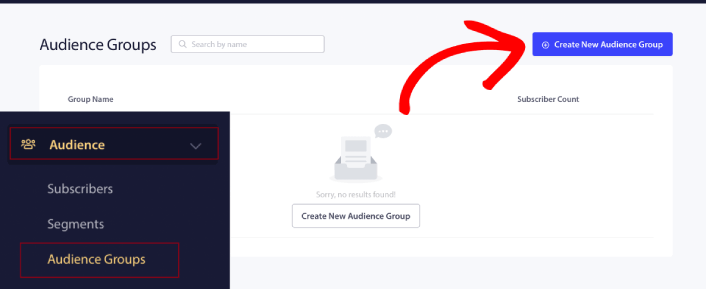
Για να ξεκινήσετε, μεταβείτε στον πίνακα ελέγχου PushEngage και πηγαίνετε στο Κοινό » Ομάδες Κοινού και κάντε κλικ στο κουμπί Δημιουργία Νέας Ομάδας Κοινού:
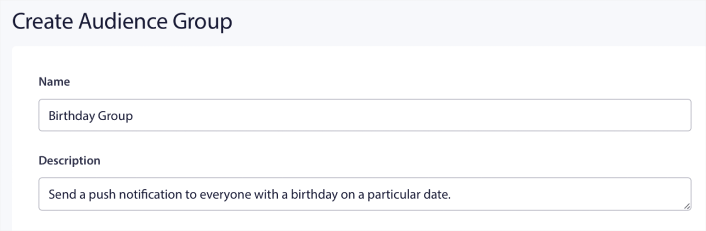
Πριν μπορέσετε να χρησιμοποιήσετε τις Ομάδες Κοινού σας για να στείλετε στοχευμένες εκπομπές push, θα χρειαστεί να δημιουργήσετε μια Ομάδα Κοινού με κανόνες για τη δημιουργία αυτής της ομάδας. Μπορείτε να ξεκινήσετε με ένα όνομα και μια περιγραφή για την Ομάδα Κοινού σας.
Δημιουργήστε ένα Κριτήριο Επιλογής
Στη συνέχεια, δημιουργήστε ένα κριτήριο επιλογής για να φιλτράρετε και να στοχεύσετε το σωστό κοινό:
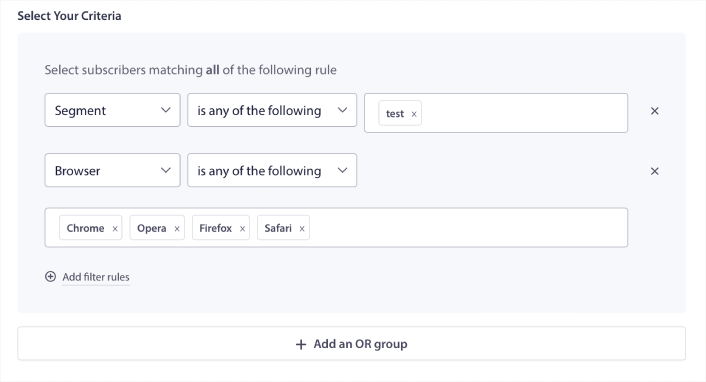
Μπορείτε να κάνετε κλικ στο Προσθήκη κανόνων φίλτρου για να επιλέξετε συνδρομητές που ταιριάζουν με ΟΛΟΥΣ τους κανόνες φίλτρου ή, μπορείτε να κάνετε κλικ στο Προσθήκη ομάδας Ή για να δημιουργήσετε ένα φίλτρο όπου οι συνδρομητές πληρούν τουλάχιστον ένα από τα κριτήρια επιλογής.
Η συμπεριφορά χρήστη είναι ο πιο θεμελιώδης τρόπος στόχευσης των συνδρομητών σας στις ειδοποιήσεις push. Όπως είπαμε και πριν, τα τμήματα συνδρομητών συνήθως ομαδοποιούν επισκέπτες που τους αρέσει να περιηγούνται σε παρόμοιο περιεχόμενο. Αλλά ακόμη και μέσα σε αυτήν την ομάδα συνδρομητών που αγαπούν το ίδιο περιεχόμενο, υπάρχουν μικρές εξατομικεύσεις που μπορείτε να κάνετε.
Ακόμη πιο συγκεκριμένα, μπορείτε να συνδυάσετε πολλαπλά τμήματα συνδρομητών για να τους στείλετε ένα κοινό, σχετικό μήνυμα.
Φιλτράρισμα με βάση το Τμήμα Συνδρομητή
Αν δεν το έχετε κάνει ήδη, θα πρέπει να αρχίσετε να τμηματοποιείτε τους συνδρομητές ειδοποιήσεων push αμέσως. Διαφορετικά, αυτό το φίλτρο απλά δεν θα λειτουργήσει. Αλλά αν έχετε ήδη τμήματα, τότε μπορείτε να επιλέξετε πολλαπλά τμήματα ως βάση για την ομάδα κοινού σας.

Μετά από αυτό, μπορείτε να προσθέσετε άλλα φίλτρα για να βελτιώσετε τη στόχευσή σας.
Φιλτράρισμα με βάση το Χαρακτηριστικό Συνδρομητή
Ενώ τα χαρακτηριστικά είναι κυρίως για ειδοποιήσεις push τύπου drip, μπορείτε να τα χρησιμοποιήσετε και για μαζικές ειδοποιήσεις push. Τώρα, τα χαρακτηριστικά ειδοποιήσεων push είναι κυρίως χρήσιμα για ιστοσελίδες eCommerce. Αλλά μπορείτε επίσης να τα χρησιμοποιήσετε για να στείλετε εξατομικευμένες ειδοποιήσεις push αν έχετε ένα εργαλείο Διαχείρισης Σχέσεων Πελατών (CRM).
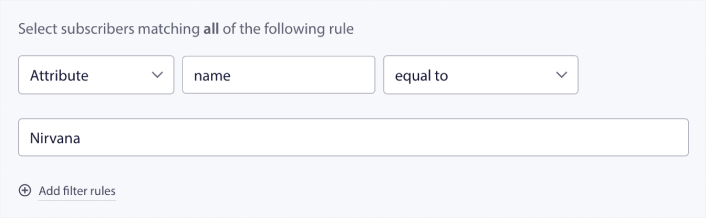
Τα χαρακτηριστικά μπορούν να περιέχουν προσωπικές πληροφορίες όπως ονόματα συνδρομητών, ημερομηνία γέννησης, οποιαδήποτε άλλη πληροφορία που θα αποθηκεύατε στο CRM σας για εξατομικευμένες καμπάνιες μάρκετινγκ.
Φιλτράρισμα με βάση τη Συσκευή και το Πρόγραμμα Περιήγησης του Συνδρομητή
Σε πολλές περιπτώσεις, είναι κρίσιμο να γνωρίζετε πώς οι συνδρομητές σας λαμβάνουν τα μηνύματά σας.
Υπάρχει μια πραγματικά ωραία ιστορία για τον Michael Jackson. Κάθε φορά που ηχογραφούσε ένα τραγούδι, το άκουγε σε ένα ραδιόφωνο. Όχι στην ηχογραφική σουίτα του εκατομμυρίων δολαρίων με κορυφαία ποιότητα ήχου, αλλά σε ένα φτηνό ραδιόφωνο όπως θα έκανε αργότερα το μεγαλύτερο μέρος του κοινού του. Αν του άρεσε πώς ακουγόταν το τραγούδι ακόμα και στη φθηνότερη συσκευή της αγοράς, θα έδινε την έγκρισή του για την κυκλοφορία του τραγουδιού.
Δεν είναι περίεργο που το Billie Jean έγινε Πλατινένιο 29 φορές!
Για τις ειδοποιήσεις push σας, δεν διαφέρει.
Φιλτράρισμα ανά Πρόγραμμα Περιήγησης Συνδρομητή
Διαφορετικά προγράμματα περιήγησης έχουν διαφορετικά όρια χαρακτήρων για τις ειδοποιήσεις push. Έτσι, όταν στέλνετε μια μαζική ειδοποίηση push, πρέπει να προσέχετε αυτά τα όρια. Το καλό είναι ότι μπορείτε να αποθηκεύσετε διαφορετικές ομάδες κοινού για να στοχεύσετε διαφορετικά προγράμματα περιήγησης. Δεν χρειάζεται να δημιουργείτε τμήματα κάθε φορά.
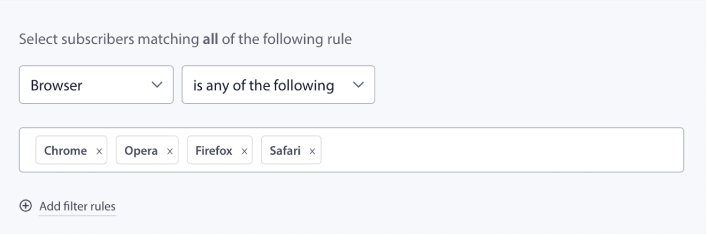
Φιλτράρισμα ανά Συσκευή Συνδρομητή
Υπάρχει διαφορά στους τύπους των rich push notifications που μπορείτε να στείλετε σε συσκευές iOS, Android και Windows. Έτσι, δεν θα φαίνεται κάθε καμπάνια που στέλνετε ίδια σε όλες τις συσκευές. Στην πραγματικότητα, πολλοί τύποι ειδοποιήσεων push δεν θα εμφανίζονται καν σε όλες τις συσκευές. Διαφορετικές συσκευές έχουν επίσης διαφορετικά μεγέθη οθόνης. Έτσι, ίσως θέλετε να βελτιστοποιήσετε την εμφάνιση των ειδοποιήσεων push πριν τις στείλετε.
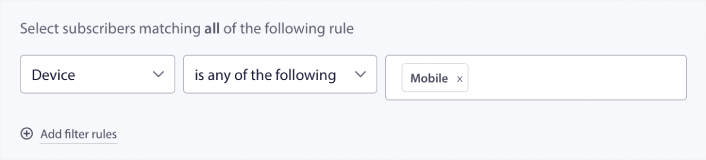
Αλλά τώρα που μπορείτε να φιλτράρετε το κοινό σας ανά συσκευή, αυτό δεν θα πρέπει να είναι πλέον πρόβλημα.
Πώς να Φιλτράρετε ανά Γεωγραφική Τοποθεσία
Μπορείτε επίσης να φιλτράρετε ανά γεωγραφική τοποθεσία για να εξατομικεύσετε περαιτέρω τις καμπάνιες σας. Το φίλτρο σας επιτρέπει να επιλέξετε μια ομάδα κοινού ανά χώρα, πόλη και πολιτεία:
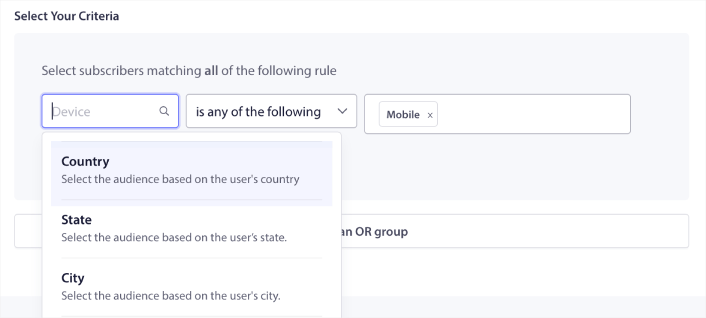
Η Phooto χρησιμοποίησε τη γεωγραφική τοποθεσία για να στείλει ειδοποιήσεις push σε τοπικές γλώσσες. Και αυτό τους βοήθησε να αυξήσουν γρήγορα τα ποσοστά αφοσίωσής τους. Διαβάστε την πλήρη μελέτη περίπτωσης.
Πώς να Φιλτράρετε ανά Μετρικές Αλληλεπίδρασης
Ένα από τα καλύτερα πράγματα σχετικά με τις Ομάδες Κοινού είναι ότι μπορεί να σας βοηθήσει να δημιουργήσετε καμπάνιες επαναστόχευσης χρησιμοποιώντας ειδοποιήσεις push. Μπορείτε να φιλτράρετε το κοινό σας κατά:
- Ημερομηνία Συνδρομής
- Ημερομηνία Τελευταίας Αποστολής
- Ημερομηνία Τελευταίου Κλικ
- Ημερομηνία Τελευταίας Προβολής
Η χρήση αυτών των μετρήσεων μπορεί να σας βοηθήσει να επαναστοχεύσετε συνδρομητές με χαμηλά ποσοστά αλληλεπίδρασης ή να πουλήσετε σε συνδρομητές με υψηλά ποσοστά αλληλεπίδρασης.
Εναλλακτικά, μπορείτε να φιλτράρετε το κοινό κατά:
- Συνολικός Αριθμός Αποστολών
- Συνολικός Αριθμός Προβολών
- Συνολικός Αριθμός Κλικ
Αυτοί οι αριθμοί μπορούν να σας βοηθήσουν να βρείτε συνδρομητές που λαμβάνουν τα λιγότερα μηνύματα από εσάς, ώστε να βρείτε καλύτερους τρόπους εξατομίκευσης των ειδοποιήσεων. Μπορείτε επίσης να βρείτε τους συνδρομητές που αλληλεπιδρούν συχνότερα με τις ειδοποιήσεις push σας.
Επαγγελματική Συμβουλή: Συνδυάστε δύο ή περισσότερα φίλτρα για να βρείτε τους καλύτερους τρόπους επαναδέσμευσης με τους συνδρομητές σας. Για παράδειγμα, οι συνδρομητές με υψηλό Συνολικό Αριθμό Προβολών και υψηλό Συνολικό Αριθμό Κλικ θα σας δώσουν συνδρομητές που αλληλεπιδρούν μαζί σας εδώ και καιρό. Αυτοί είναι πιστοί συνδρομητές που αξίζουν μια ανταμοιβή.
Πώς να Φιλτράρετε κατά Αναγνωριστικά
Τα αναγνωριστικά είναι ο τρόπος με τον οποίο το PushEngage αναγνωρίζει τους συνδρομητές σας. Δεδομένου ότι το PushEngage συμμορφώνεται με τον GDPR από προεπιλογή, το λογισμικό μας δεν αποθηκεύει ποτέ προσωπικά αναγνωρίσιμα δεδομένα για κανέναν από τους συνδρομητές σας. Αντ' αυτού, εκχωρούμε σε κάθε συνδρομητή ένα αναγνωριστικό προφίλ και μια κρυπτογράφηση συνδρομητή.
Λάβετε υπόψη σας ότι θα χρησιμοποιείτε κυρίως αναγνωριστικά προφίλ και hashes συνδρομητών ως μέρος προηγμένων καμπανιών. Με άλλα λόγια, θα χρειαστεί να χρησιμοποιήσετε το PushEngage API για να δημιουργήσετε προσαρμοσμένες καμπάνιες που χρησιμοποιούν αυτούς τους αναγνωριστικούς.
Τα αναγνωριστικά είναι εκπληκτικά για την αποστολή ειδοποιήσεων push συναλλαγών όπως αυτή:
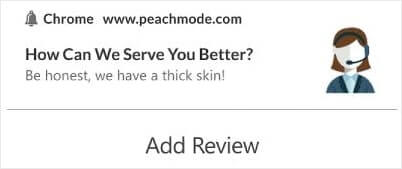
Είναι ιδανικές για προσαρμοσμένες eCommerce push notifications. Έτσι, δεν τις συνιστούμε πραγματικά για οτιδήποτε άλλο εκτός από τη δοκιμή μαζικών ειδοποιήσεων push από τον πίνακα ελέγχου.
Τι να κάνετε αφού ρυθμίσετε καμπάνιες ειδοποιήσεων web push
Η εκκίνηση μιας καμπάνιας ειδοποιήσεων web push δεν εγγυάται την επιτυχία. Όπως με οποιοδήποτε εργαλείο μάρκετινγκ, πρέπει να δοκιμάζετε και να βελτιώνετε τα μηνύματά σας και τα τμήματά σας.
Μην χάνεστε στις λεπτομέρειες. Εστιάστε σε τρεις αριθμούς:
- Ποσοστό κλικ (CTR): Αλληλεπιδρούν οι χρήστες;
- Ποσοστό εγγραφής: Λειτουργεί η προτροπή σας;
- Μη εγγραφές: Στέλνετε πολλά;
Μπόνους αν παρακολουθείτε τα έσοδα ανά αποστολή — αλλά ακόμη και χωρίς αυτό, το CTR και το ποσοστό εγγραφής σας δίνουν έναν γρήγορο βρόχο ανάδρασης. Δυστυχώς, δεν μπορείτε να κάνετε A/B testing αυτοματοποιημένων ειδοποιήσεων απευθείας. Αλλά αυτοί οι πόροι θα σας βοηθήσουν να μπείτε στον γρήγορο δρόμο:
- Πώς να Εγκαταστήσετε ένα Plugin WordPress για Ειδοποιήσεις Ιστού στον Ιστότοπό σας
- Πώς να Κάνετε A/B Testing Ειδοποιήσεων Push (Καλύτερες Πρακτικές)
- 7 Βέλτιστες πρακτικές ειδοποιήσεων push για άμεση επισκεψιμότητα
- 21 Καλύτερα Plugins WordPress για eCommerce το 2022 (Δωρεάν και Επί πληρωμή)
- 7 Καλύτερα Plugins WordPress για Ειδήσεις το 2022 (Συγκριτικά)
Επίσης, το PushEngage έρχεται με το δίκαιο μερίδιό του σε ενσωματώσεις. Μπορείτε ακόμη και να ρυθμίσετε ορισμένους προσαρμοσμένους ενεργοποιητές χρησιμοποιώντας το Zapier. Αυτές είναι αρκετά προηγμένες καμπάνιες, και συνιστούμε να τις ρυθμίζετε μόνο αφού εξοικειωθείτε με τις άλλες ενσωματωμένες αυτοματοποιήσεις μας.
Θα πρέπει επίσης να γνωρίζετε ότι το PushEngage Javascript API είναι πολύ ευέλικτο, και μπορείτε να ρυθμίσετε προσαρμοσμένους ενεργοποιητές για σχεδόν οποιαδήποτε ενέργεια στον ιστότοπό σας.
Μόλις περάσετε από όλους αυτούς τους πόρους, θα συνειδητοποιήσετε ότι το PushEngage είναι το λογισμικό ειδοποιήσεων push #1 στην αγορά.
Έτσι, αν δεν το έχετε κάνει ήδη, ξεκινήστε με το PushEngage σήμερα!


