Ψάχνετε οδηγό για τη δημιουργία καμπανιών σταγόνων (drip campaigns) για να αυξήσετε τις πωλήσεις σας;
Το μάρκετινγκ σήμερα είναι ατελές χωρίς αυτοματοποίηση. Βέβαια, μπορείτε να συλλέξετε συνδρομητές και να στείλετε ειδοποιήσεις push και email. Και μετά; Συνεχίστε να τους πουλάτε την επιχείρησή σας με κάθε newsletter και ελπίζετε ότι οι συνδρομητές σας θα μετατραπούν;
Δεν υπάρχει τρόπος να:
- Εξατομικεύσετε τις καμπάνιες σας
- Αποκτήσετε νέους πελάτες αυτόματα
- Διατηρήσετε υπάρχοντες πελάτες με το περιεχόμενό σας
- Κάνετε πωλήσεις upsell ή cross-sell προϊόντων
- Ανακτήσετε χαμένες πωλήσεις
Εκτός αν… χρησιμοποιήσετε καμπάνιες σταγόνων που μετατρέπουν.
Σε αυτό το άρθρο, θα σας δείξουμε πώς να δημιουργήσετε καμπάνιες σταγόνων και να τις αξιοποιήσετε στο έπακρο. Το καλύτερο; Δεν χρειάζεστε καμία προηγούμενη εμπειρία.
Ακούγεται καλό; Ας βουτήξουμε.
Τι Είναι οι Καμπάνιες Σταγόνων;
Σκεφτείτε τις καμπάνιες σταγόνων σαν να στήνετε μια σειρά από email ή ακόμα και ειδοποιήσεις push που θα αποστέλλονται αυτόματα, κάπως σαν ένα σύστημα ποτίσματος για τον κήπο σας. Αντί να ποτίζετε φυτά, στέλνετε μηνύματα σε ανθρώπους που ενδιαφέρονται για αυτά που έχετε να πείτε ή να πουλήσετε.
Δείτε πώς λειτουργεί:
- Δεν είναι μαγεία, είναι αυτοματοποιημένο: Μόλις το ρυθμίσετε, αυτά τα μηνύματα συνεχίζουν να αποστέλλονται από μόνα τους. Δεν χρειάζεται να τα στέλνετε συνεχώς χειροκίνητα.
- Μπορείτε να μιλήσετε στους σωστούς ανθρώπους: Μπορείτε να στείλετε διαφορετικά μηνύματα σε διαφορετικές ομάδες ανθρώπων. Για παράδειγμα, κάποιος που μόλις εγγράφηκε μπορεί να λάβει ένα φιλικό μήνυμα «γεια», ενώ κάποιος άλλος που είναι εδώ και καιρό μπορεί να λάβει ειδικές προσφορές ή ενημερώσεις.
- Είναι προσωπικό: Αυτά τα μηνύματα μπορούν να χρησιμοποιούν το όνομα του ατόμου ή να μιλούν για πράγματα που έχουν δείξει ενδιαφέρον. Τους κάνει να νιώθουν ότι τους μιλάτε πραγματικά, όχι απλώς ότι στέλνετε το ίδιο πράγμα σε όλους.
- Ο συγχρονισμός είναι το παν: Τα μηνύματα αποστέλλονται σε χρονικές στιγμές που έχουν το μεγαλύτερο νόημα – όπως αμέσως μετά την εγγραφή κάποιου ή όταν κοιτάζει κάτι στον ιστότοπό σας.
- Κάθε μήνυμα έχει έναν σκοπό: Κάθε email ή ειδοποίηση έχει σχεδιαστεί για να κάνει κάτι συγκεκριμένο, όπως να βοηθήσει τους ανθρώπους να γνωρίσουν καλύτερα το προϊόν σας ή να τους υπενθυμίσει κάτι που κοίταξαν αλλά δεν αγόρασαν.
- Μπορείτε να δείτε πώς αποδίδει: Μπορείτε να ελέγξετε πράγματα όπως πόσοι άνθρωποι ανοίγουν τα μηνύματα ή κάνουν κλικ σε συνδέσμους μέσα σε αυτά. Αυτό σας βοηθά να γνωρίζετε αν τα μηνύματά σας λειτουργούν καλά.
Οι καμπάνιες σταγόνων δεν είναι μόνο για email – λειτουργούν και για ειδοποιήσεις push εφαρμογών και ειδοποιήσεις push web. Είναι εξαιρετικές για να διατηρείτε επαφή με άτομα που ενδιαφέρονται για τα προϊόντα σας, χωρίς να τα υπερφορτώνετε. Είναι ένας έξυπνος τρόπος για να κρατάτε τους ανθρώπους αφοσιωμένους και ενδιαφερόμενους για ό,τι κάνετε.
Τύποι Καμπανιών Σταγόνων
Ας δούμε τους διάφορους τύπους καμπανιών σταγόνων. Όπως ακριβώς το παγωτό έρχεται σε διάφορες γεύσεις, έτσι και οι καμπάνιες σταγόνων έχουν διαφορετικούς τύπους. Κάθε είδος είναι προσαρμοσμένο για έναν συγκεκριμένο σκοπό ή κοινό. Εδώ είναι μερικοί από τους πιο συνηθισμένους:
- Σειρά Καλωσορίσματος: Αυτό είναι σαν να λες «Γεια!» σε κάποιον νέο. Όταν κάποιος εγγράφεται στα email ή τις ειδοποιήσεις σας, του στέλνετε μερικά φιλικά μηνύματα για να τον/την συστήσετε στην επωνυμία ή την υπηρεσία σας. Είναι σαν να στρώνετε το κόκκινο χαλί για τους νέους σας καλεσμένους.
- Εκστρατείες Ενσωμάτωσης: Σκεφτείτε το σαν έναν χρήσιμο οδηγό. Όταν κάποιος αγοράζει ένα προϊόν ή εγγράφεται σε μια υπηρεσία, αυτά τα μηνύματα τον/την καθοδηγούν στο πώς να το χρησιμοποιήσει, προσφέρουν χρήσιμες συμβουλές ή του/της δείχνουν πράγματα που μπορεί να μην γνωρίζει. Είναι σαν να κάνετε μια ξενάγηση σε κάποιον νέο στην πόλη.
- Υπενθυμίσεις Εγκαταλελειμμένου Καλαθιού: Έχετε βάλει ποτέ κάτι στο καλάθι αγορών σας στο διαδίκτυο και μετά το ξεχάσατε; Αυτές οι εκστρατείες είναι μικρές υπενθυμίσεις για να θυμίζετε στους ανθρώπους πράγματα που τους ενδιέφεραν αλλά δεν αγόρασαν. Είναι σαν ένα απαλό χτύπημα στον ώμο που λέει, «Γεια, το ξεχάσατε αυτό;»
- Εκστρατείες Επανενεργοποίησης: Αυτές είναι για να προσεγγίσετε άτομα που αλληλεπιδρούσαν με την επωνυμία σας στο παρελθόν, αλλά έχουν καιρό να το κάνουν. Είναι σαν να καλείτε έναν παλιό φίλο και να λέτε, «Γεια, ας τα πούμε!» Μπορεί να τους προσφέρετε μια ειδική προσφορά ή απλώς να τους υπενθυμίσετε την επωνυμία σας.
- Εκπαιδευτικό Περιεχόμενο: Εδώ, ο στόχος είναι να διδάξετε στο κοινό σας κάτι πολύτιμο σχετικά με το προϊόν ή τον κλάδο σας. Είναι σαν ένα μίνι-μάθημα, που παραδίδεται σε μικρά, εύπεπτα μηνύματα. Σκεφτείτε το σαν μια σειρά από διασκεδαστικά και ενημερωτικά μαθήματα.
- Ενημερώσεις Προϊόντων: Έχετε κάτι νέο ή βελτιωμένο; Αυτός ο τύπος εκστρατείας κρατά το κοινό σας ενήμερο για νέα χαρακτηριστικά, προϊόντα ή υπηρεσίες. Είναι σαν να δείχνετε το τελευταίο σας gadget σε φίλους.
- Προσκλήσεις Εκδηλώσεων: Διοργανώνετε ένα webinar, ένα εργαστήριο ή μια άλλη εκδήλωση; Αυτές οι εκστρατείες αφορούν το να ενθουσιάσετε τους ανθρώπους και να τους κάνετε να εγγραφούν στις εκδηλώσεις σας. Είναι σαν να στέλνετε ωραίες προσκλήσεις σε ένα πάρτι.
- Εποχιακές Εκστρατείες: Αυτές συνδέονται με συγκεκριμένες εποχές του χρόνου, όπως γιορτές, εποχές ή ειδικές εκδηλώσεις. Είναι σαν να στολίζετε το κατάστημά σας για τα Χριστούγεννα ή να κάνετε μια καλοκαιρινή προσφορά.
Κάθε τύπος εκστρατείας drip έχει τη δική του γοητεία και σκοπό. Αντιστοιχίζοντας τον σωστό τύπο εκστρατείας με το κοινό και τους στόχους σας, μπορείτε να δημιουργήσετε ουσιαστικές συνδέσεις και να διατηρήσετε το κοινό σας αφοσιωμένο με έναν τρόπο που να φαίνεται φυσικός και όχι υπερβολικά εμπορικός.
Πώς να Δημιουργήσετε Εκστρατείες Push Notification Drip
Η εγκατάσταση ειδοποιήσεων push σε έναν ιστότοπο δεν είναι δύσκολη. Αλλά έχει μερικά βήματα και θα θέλετε να ακολουθήσετε αυτόν τον οδηγό βήμα προς βήμα.
Μην πηγαίνετε μπροστά στο χρόνο σε καμία περίπτωση και θα είστε εντάξει.
Πριν δημιουργήσετε μια εκστρατεία push notification καλωσορίσματος, πρέπει να επιλέξετε μια υπηρεσία push notification. Μια υπηρεσία push notification είναι ένα λογισμικό που σας επιτρέπει να δημιουργείτε εκστρατείες push χωρίς καμία κωδικοποίηση.
Συνιστούμε τη χρήση του PushEngage.

Το PushEngage είναι το #1 plugin ειδοποιήσεων push στον κόσμο.
Οι ειδοποιήσεις push σας βοηθούν να αυξήσετε την επισκεψιμότητα του ιστότοπού σας και την αλληλεπίδραση σε αυτόματο πιλότο. Και αν διαχειρίζεστε ένα online κατάστημα, το PushEngage σας βοηθά επίσης να αυξήσετε τις πωλήσεις σας, βοηθώντας σας να δημιουργήσετε αυτοματοποιημένες ειδοποιήσεις push eCommerce.
Μπορείτε να ξεκινήσετε δωρεάν, αλλά αν σοβαρά θέλετε να αναπτύξετε την επιχείρησή σας, θα πρέπει να αγοράσετε ένα επί πληρωμή πρόγραμμα. Επίσης, πριν αγοράσετε οποιαδήποτε υπηρεσία ειδοποιήσεων push, θα πρέπει να δείτε αυτόν τον οδηγό για το κόστος ειδοποιήσεων push.
Ακολουθεί μια γρήγορη επισκόπηση του τι παίρνετε με το PushEngage:
- Αυτοματοποιημένες καμπάνιες υψηλής μετατροπής
- Πολλαπλές επιλογές στόχευσης και προγραμματισμού καμπάνιας
- Παρακολούθηση στόχων και προηγμένη ανάλυση
- Έξυπνες δοκιμές A/B
- Ένας Αφοσιωμένος Διαχειριστής Επιτυχίας
Θα δείτε ότι η PushEngage είναι μακράν η καλύτερη επιλογή αν θέλετε να αυξήσετε την επισκεψιμότητα, την αφοσίωση και τις πωλήσεις για την επιχείρησή σας. Και αν έχετε περιορισμένο προϋπολογισμό, μπορείτε πάντα να γίνετε λίγο δημιουργικοί με τις ειδοποιήσεις push σας.
ΣΗΜΕΙΩΣΗ: Αν διαχειρίζεστε έναν ιστότοπο WordPress, θα πρέπει να εγκαταστήσετε και να ενεργοποιήσετε το plugin PushEngage για WordPress.
Πάμε!
Βήμα #1: Δημιουργήστε έναν Δωρεάν Λογαριασμό PushEngage
Μεταβείτε στο PushEngage και κάντε κλικ στο Ξεκινήστε Δωρεάν Τώρα:
Μπορείτε να ξεκινήσετε με το δωρεάν πρόγραμμα. Αλλά αν θέλετε να στείλετε στοχευμένες ειδοποιήσεις push, θα πρέπει να επιλέξετε το Πρόγραμμα Ανάπτυξης. Μόλις γνωρίζετε ποιο πρόγραμμα θέλετε, κάντε κλικ στο Ξεκινήστε για να δημιουργήσετε τον λογαριασμό σας στο PushEngage.
Βήμα #2: Εγγραφείτε στο PushEngage
Τώρα, είναι ώρα να δημιουργήσετε τον λογαριασμό σας στο PushEngage. Ξεκινήστε κάνοντας εγγραφή με μια διεύθυνση email ή ένα αναγνωριστικό Gmail:

Στη συνέχεια, συμπληρώστε τα στοιχεία του λογαριασμού σας:

Και προσθέστε τα στοιχεία της πιστωτικής σας κάρτας για να αγοράσετε το πρόγραμμά σας:

Εάν επιλέξατε τον δωρεάν λογαριασμό, τότε η πιστωτική σας κάρτα δεν θα χρεωθεί ποτέ χρήματα μέχρι να επιλέξετε να αναβαθμίσετε το πρόγραμμά σας. Και τώρα, είστε έτοιμοι να αποκτήσετε πρόσβαση στον πίνακα ελέγχου του PushEngage. Απλώς κάντε κλικ στο Ολοκλήρωση Εγγραφής και Άμεση Πρόσβαση.
Εάν έχετε χρησιμοποιήσει το OneSignal ή το PushAlert στο παρελθόν, θα δείτε ότι το PushEngage σας προσφέρει μια πολύ πιο καθαρή εμπειρία από τον πίνακα ελέγχου. Ο πίνακας ελέγχου του OneSignal δεν είναι σχεδιασμένος για προηγμένες καμπάνιες. Για αυτό, θα χρειαστείτε το API περισσότερο από το plugin του OneSignal.
Βήμα #3: Εγκαταστήστε το Plugin Ειδοποιήσεων Web για WordPress
ΣΗΜΕΙΩΣΗ: Αν δεν διαχειρίζεστε ιστότοπο WordPress, θα πρέπει να δείτε τους οδηγούς εγκατάστασης για να ξεκινήσετε.
Ολοκληρώσατε τη δημιουργία του λογαριασμού σας. Έτσι, μεταβείτε στον πίνακα ελέγχου του PushEngage και ακολουθήστε τα εξής βήματα:

Κάντε κλικ στο Ρυθμίσεις Ιστότοπου » Λεπτομέρειες Ιστότοπου και κάντε κλικ στο κουμπί Κάντε Κλικ Εδώ Για Οδηγίες Εγκατάστασης:

Κάντε κλικ στην καρτέλα WordPress και κάντε κλικ στο κουμπί Εγκατάσταση Πρόσθετου PushEngage WordPress για να εγκαταστήσετε το πρόσθετο στον ιστότοπό σας.

Εδώ είναι το ενδιαφέρον: Όταν δημιουργήσατε τον λογαριασμό σας στο PushEngage, συγχρονίσατε ήδη τον ιστότοπό σας με τον λογαριασμό σας στο PushEngage. Έτσι, κάντε κλικ στον σύνδεσμο εγκατάστασης στον πίνακα ελέγχου του PushEngage για να εγκαταστήσετε αυτόματα το πρόσθετο PushEngage WordPress στον ιστότοπό σας.
Βήμα #4: Συνδέστε τον Ιστότοπό σας WordPress με το PushEngage
Όταν ολοκληρώσετε την εγκατάσταση και ενεργοποίηση του plugin WordPress PushEngage, θα δείτε τον οδηγό ρύθμισης του PushEngage:

Ο οδηγός είναι αρκετά απλός. Εάν είστε νέος χρήστης, κάντε κλικ στο Νέος; Διεκδικήστε τον Δωρεάν Λογαριασμό σας. Και αν έχετε ήδη εγγραφεί, κάντε κλικ στο Σύνδεση του Υπάρχοντος Λογαριασμού σας.
Στη συνέχεια, μπορείτε να επιλέξετε τον ιστότοπό σας από το αναπτυσσόμενο μενού Επιλογή Ιστότοπου κάτω από το Σύνδεση εγγεγραμμένου ιστότοπου εάν έχετε ήδη καταχωρήσει έναν ιστότοπο κατά την εγγραφή:

Εναλλακτικά, μπορείτε να κάνετε κλικ στο Εγγραφή νέου ιστότοπου για να προσθέσετε έναν νέο ιστότοπο εάν έχετε πακέτο τιμολόγησης Premium ή υψηλότερο. Στο επόμενο βήμα, ο οδηγός γνωριμίας θα σας ζητήσει να εγκαταστήσετε άλλα απαραίτητα πρόσθετα WordPress.

Εάν ακολουθήσατε κάθε βήμα σωστά, θα δείτε αυτό το μήνυμα επιτυχίας από τον οδηγό:

Είστε τώρα έτοιμοι να δημιουργήσετε καμπάνιες και αναδυόμενα παράθυρα ειδοποιήσεων push.
Βήμα #4: Αποστολή εξατομικευμένων καμπανιών σταγόνων
Πριν δημιουργήσετε μια καμπάνια, θα πρέπει να ρυθμίσετε τμήματα και ομάδες κοινού για να στείλετε εξατομικευμένα μηνύματα push.
Τίποτα δεν ξεπερνά το επίπεδο εξατομίκευσης που μπορείτε να πετύχετε δημιουργώντας τμήματα και ομάδες κοινού για τους συνδρομητές σας στις ειδοποιήσεις push. Μεταβείτε στο PushEngage » Audience και ξεκινήστε αμέσως τη δημιουργία τμημάτων και ομάδων κοινού.
Στην καρτέλα Segments (Τμήματα), μπορείτε να δημιουργήσετε νέα τμήματα ή να επεξεργαστείτε υπάρχοντα:
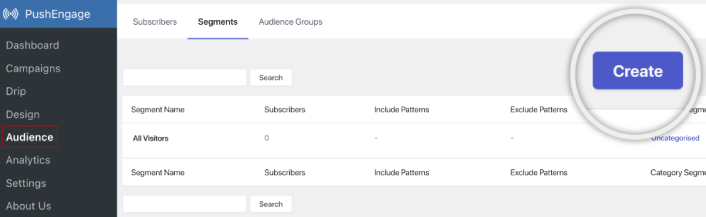
Και αν χρειάζεστε ακόμη βαθύτερη εξατομίκευση, δημιουργήστε μια ομάδα κοινού στην καρτέλα Audience Groups (Ομάδες Κοινού):
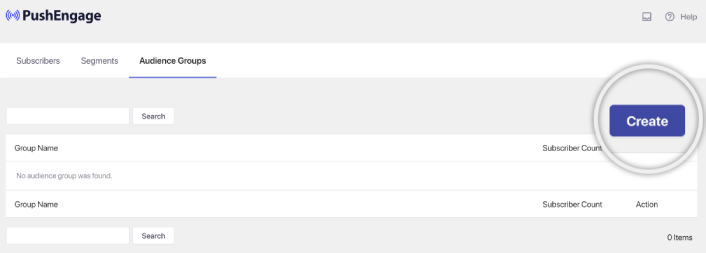
Αν είστε νέοι στα τμήματα ειδοποιήσεων push και στις εξατομικευμένες ειδοποιήσεις push, θα πρέπει να διαβάσετε το άρθρο μας σχετικά με το πώς να δημιουργήσετε τμήματα και την ανακοίνωσή μας σχετικά με την προηγμένη ομαδοποίηση κοινού.
Βήμα #5: Δημιουργήστε την καμπάνια ειδοποιήσεων σταγόνων push
Μεταβείτε στον πίνακα ελέγχου του PushEngage και πηγαίνετε στο Campaign » Drip Autoresponders και κάντε κλικ στο Create New Drip Autoresponder:

Στη συνέχεια, δώστε ένα όνομα στην καμπάνια σας (προτείνουμε κάτι όπως Welcome Drip) και στην ενότητα Content, επιλέξτε την επιλογή που λέει, “Send notification immediately after user subscribes“):

Σε αυτό το σημείο, μπορείτε να κάνετε κλικ στο βέλος δίπλα στην ειδοποίηση για να επεξεργαστείτε το περιεχόμενο της ειδοποίησής σας.
Εάν έχετε πρόγραμμα Premium ή Enterprise με το PushEngage, θα μπορείτε να προσθέσετε περισσότερες από μία ειδοποιήσεις για να δημιουργήσετε μια ακολουθία αυτοματοποιημένων μηνυμάτων καλωσορίσματος. Απλώς κάντε κλικ στο Add New Notification και επεξεργαστείτε το περιεχόμενο.
Μόλις τελειώσετε, κάντε κλικ στο Drip Settings και επιλέξτε την επιλογή για να στείλετε την καμπάνια καλωσορίσματός σας σε όλους τους συνδρομητές:

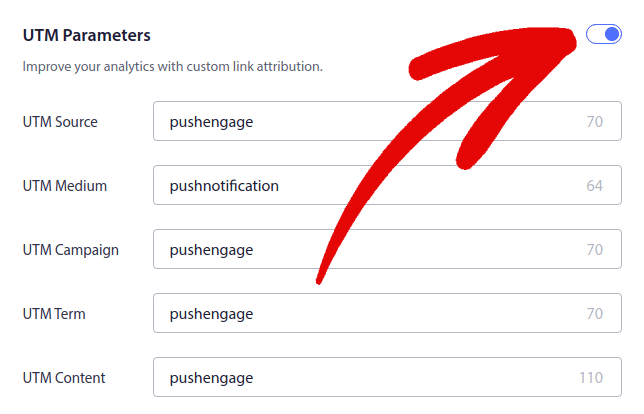
Στη συνέχεια, κάντε κύλιση προς τα κάτω για να ορίσετε τις δικές σας παραμέτρους UTM για παρακολούθηση των ειδοποιήσεων push:
Και όταν τελειώσετε, κάντε κύλιση προς τα πάνω και κάντε κλικ στο κουμπί Activate Autoresponder:

Και τελειώσατε!
Πώς να δημιουργήσετε καμπάνιες email σταγόνων
Ρυθμίζετε αυτές τις έξυπνες αυτοματοποιημένες καμπάνιες σταγόνων στο WordPress; Μπορείτε να το κάνετε εύκολα με ένα εργαλείο μάρκετινγκ email. Ακολουθήστε τον υπόλοιπο οδηγό και είστε έτοιμοι!
Βήμα #1: Επιλέξτε μια υπηρεσία email σταγόνων
Προτείνουμε να δοκιμάσετε το Constant Contact. Είναι σαν ο σούπερ σταρ των υπηρεσιών μάρκετινγκ email. Εξαιρετικά φιλικό προς τον χρήστη και έρχεται με μια ωραία λειτουργία μεταφοράς και απόθεσης για τη δημιουργία email.

Το Constant Contact είναι η καλύτερη υπηρεσία email marketing για τη ρύθμιση αυτοματοποιημένων απαντήσεων για την επιχείρησή σας. Είναι εξαιρετικά εύκολο στη χρήση και προσφέρει άπειρες δυνατότητες αυτοματισμού για τη βελτίωση των καμπανιών email σας.
Ορίστε τι κάνει το Constant Contact μια τόσο εξαιρετική επιλογή για τη δημιουργία καμπανιών email marketing:
- Εύκολο πρόγραμμα δημιουργίας drag and drop για τη δημιουργία email
- Εκατοντάδες προ-σχεδιασμένα πρότυπα email
- Μηνύματα καλωσορίσματος, προσφορές γενεθλίων και αυτοματοποιημένες απαντήσεις για εγκαταλελειμμένα καλάθια
- Εργαλεία δημιουργίας λίστας και φόρμες εγγραφής για την αύξηση του κοινού σας
- Δοκιμές A/B για στοχευμένα email
- Ενσωματώσεις με CRM και υπηρεσίες τρίτων
- Εξαιρετική υποστήριξη μέσω live chat και τηλεφώνου
Για να μην αναφέρουμε, το Constant Contact διαθέτει ένα plugin φόρμας για το WordPress που μπορείτε να χρησιμοποιήσετε για τη δημιουργία δυνητικών πελατών. Μπορείτε επίσης να καλλιεργήσετε και να κλείσετε τους δυνητικούς πελάτες σας με αυτόματους απαντητές.
Αλλά, αυτό δεν είναι το μόνο παιχνίδι στην πόλη. Οι περισσότερες από τις μεγάλες υπηρεσίες μάρκετινγκ email, όπως το Brevo (μπορεί να το γνωρίζετε ως Sendinblue), το HubSpot, και άλλες, έχουν επίσης αυτή τη μαγεία των email σταγόνων.
Με μερικά κλικ, μπορείτε να κάνετε αυτά τα αυτοματοποιημένα email να κυκλοφορούν στους συνδρομητές σας. Επιπλέον, το Constant Contact συνεργάζεται καλά με πρόσθετα WordPress όπως το WPForms και το OptinMonster. Και αν ασχολείστε με το eCommerce, χρησιμοποιώντας WooCommerce ή Shopify, σας καλύπτει για να προσεγγίσετε νέους πελάτες ή να υπενθυμίσετε στους ανθρώπους για τα αντικείμενα που άφησαν στα καλάθια τους.
Έτοιμοι να το δοκιμάσετε; Περάστε από τον ιστότοπο του Constant Contact, εγγραφείτε και μαντέψτε; Μπορείτε να το δοκιμάσετε με δωρεάν δοκιμή 60 ημερών. Είναι σαν να κάνετε test drive αυτοκινήτου, αλλά για μάρκετινγκ email. Με αυτόν τον τρόπο, μπορείτε να δείτε αν είναι η σωστή επιλογή πριν αποφασίσετε να προχωρήσετε σε επί πληρωμή πρόγραμμα.
Βήμα #2: Δημιουργήστε μια λίστα email
Αφού δημιουργήσετε έναν λογαριασμό, μπορείτε να επισκεφθείτε τον πίνακα ελέγχου του Constant Contact για να δημιουργήσετε μια λίστα επαφών.
Το Constant Contact θα έχει ήδη δημιουργήσει μια προεπιλεγμένη λίστα για εσάς. Ωστόσο, μπορείτε να δημιουργήσετε τη δική σας λίστα πηγαίνοντας στην καρτέλα Contacts στο επάνω μενού και στη συνέχεια κάνοντας κλικ στο κουμπί Create List.

Μπορείτε να συνδέσετε τη φόρμα του ενημερωτικού δελτίου του WordPress σας με το Constant Contact και να αρχίσετε να δημιουργείτε μια λίστα email. Θα πρέπει επίσης να δείτε την ανάρτησή μας στο ιστολόγιο σχετικά με το πώς να προσθέσετε ένα widget εγγραφής στο ιστολόγιο του WordPress.
Βήμα #3: Δημιουργία καμπανιών μάρκετινγκ με σταδιακή αποστολή

Τώρα που προσθέσατε συνδρομητές στη λίστα σας στο Constant Contact, το επόμενο βήμα είναι να δημιουργήσετε μια αυτοματοποιημένη καμπάνια σταδιακής αποστολής. Μεταβείτε στην καρτέλα Marketing Campaigns (Καμπάνιες Μάρκετινγκ) και, στη συνέχεια, κάντε κλικ στο κουμπί Create (Δημιουργία).

Το Constant Contact θα σας εμφανίσει πολλές επιλογές για τη δημιουργία μιας καμπάνιας. Προχωρήστε και επιλέξτε την καμπάνια Automations (Αυτοματισμοί).
Από εδώ, μπορείτε να επιλέξετε από διάφορα προκατασκευασμένα πρότυπα καμπανιών για να ρυθμίσετε μια καμπάνια σταδιακής αποστολής. Μπορείτε να δημιουργήσετε έναν Custom Automation (Προσαρμοσμένο Αυτοματισμό) για να ξεκινήσετε από την αρχή, ή μπορείτε να ξεκινήσετε γρήγορα χρησιμοποιώντας οποιοδήποτε από τα πρότυπα καμπανιών.
Για αυτό το σεμινάριο, θα επιλέξουμε το πρότυπο Create custom path (Δημιουργία προσαρμοσμένης διαδρομής) για να ξεκινήσουμε. Επιλέξτε την επιλογή Subscribes for email (Εγγραφές για email) και, στη συνέχεια, κάντε κλικ στο κουμπί Next (Επόμενο).

Δώστε ένα όνομα στην προσαρμοσμένη διαδρομή σας και τελειώσατε! Αυτό το πρότυπο θα ενεργοποιήσει μια καμπάνια σταδιακής αποστολής κάθε φορά που κάποιος νέος εγγράφεται στη λίστα email σας. Έτσι, είναι ιδανικό για μια καμπάνια καλωσορίσματος. Αν θέλετε να δημιουργήσετε μια καμπάνια εισαγωγής, μπορείτε να χρησιμοποιήσετε ετικέτες για να τους βάλετε σε μια ξεχωριστή καμπάνια σταδιακής αποστολής.
Βήμα #4: Δημιουργία ροής καμπάνιας
Ωστόσο, μπορείτε απλά να σύρετε ενέργειες και κανόνες από το μενού στα αριστερά στη διαδρομή. Για παράδειγμα, μπορείτε να προσθέσετε διαφορετικές ενέργειες όπως η αποστολή ενός email ή η αποστολή ενός SMS στη ροή εργασίας σας.
Υπάρχουν επίσης διαφορετικοί κανόνες που σας βοηθούν να προσαρμόσετε τον αυτοματισμό σας. Μπορείτε να προσθέσετε μια χρονική καθυστέρηση και να καθορίσετε πότε θα πρέπει να αποσταλεί το επόμενο email. Ομοίως, υπάρχει μια επιλογή διαίρεσης βάσει συνθηκών που σας επιτρέπει να ορίσετε συνθήκες Ναι και Όχι και να διαχωρίσετε τη διαδρομή.

Η προσαρμογή της αυτοματοποιημένης ροής εργασίας σας είναι επίσης πανεύκολη. Απλώς εντοπίστε το εικονίδιο με τις τρεις τελείες και κάντε κλικ σε αυτό. Επιλέξτε Edit (Επεξεργασία) για να κάνετε αλλαγές. Ας πούμε ότι θέλετε να αλλάξετε την ενέργεια Send an email (Αποστολή email).
Μόλις το κάνετε αυτό, θα εμφανιστεί ένα αναδυόμενο παράθυρο. Εδώ μπορείτε είτε να δημιουργήσετε ένα ολοκαίνουργιο email είτε να χρησιμοποιήσετε ένα που έχετε ήδη φτιάξει.
Δεδομένου ότι είναι η πρώτη φορά που ρυθμίζετε αυτήν τη ροή εργασίας, προχωρήστε και επιλέξτε Create a new email (Δημιουργία νέου email). Βάλτε ένα ωραίο όνομα για το email σας, στη συνέχεια πατήστε Continue (Συνέχεια). Και ακριβώς έτσι, είστε στο δρόμο για να προσαρμόσετε τη ροή εργασίας του email σας!
Βήμα #5: Δημιουργία της καμπάνιας email σας
Μπορείτε να αναζητήσετε ένα πρότυπο με βάση την περίσταση ή να χρησιμοποιήσετε ένα κενό πρότυπο για να δημιουργήσετε ένα email από την αρχή.

Μόλις επιλέξετε ένα πρότυπο, θα ξεκινήσει ο επεξεργαστής email.

Όταν τελειώσετε, πατήστε το κουμπί Save & Close (Αποθήκευση & Κλείσιμο) στο επάνω μέρος. Αυτό θα σας επιστρέψει στο Path Builder (Δημιουργός διαδρομής) στο Constant Contact. Προχωρήστε και ολοκληρώστε τη διαδρομή αυτοματισμού σας προσθέτοντας όσες περισσότερες ενέργειες και κανόνες στη διαδρομή σας και επεξεργαστείτε καθένα από αυτά.

Αφού δημιουργήσετε μια αυτοματοποιημένη ροή εργασίας, μπορείτε απλά να κάνετε κλικ στο κουμπί Activate (Ενεργοποίηση) στο επάνω μέρος. Και τελειώσατε!
Τι να κάνετε αφού δημιουργήσετε μια καμπάνια σταγόνων
Αυτό ήταν για αυτό το θέμα, φίλοι!
Αν βρήκατε αυτό το άρθρο χρήσιμο, φροντίστε να αφήσετε ένα σχόλιο παρακάτω.
Η έναρξη με καμπάνιες σταγόνων μπορεί να φαίνεται τρομακτική. Αλλά αν παρακολουθείτε την παρακολούθηση στόχων και την ανάλυση, θα είστε εντάξει. Το πιο σημαντικό, θα αποκομίσετε πολύ περισσότερα κέρδη με τη βοήθεια καμπανιών ειδοποιήσεων push. Ακολουθούν μερικοί χρήσιμοι πόροι για να ξεκινήσετε:
- Πώς να χρησιμοποιήσετε ειδοποιήσεις push επανα στόχευσης για να διπλασιάσετε τα έσοδά σας
- Πώς να ταξινομήσετε τις ειδοποιήσεις push και να βρείτε επιτυχημένες καμπάνιες
- Πώς να καθαρίσετε τις λίστες συνδρομητών ειδοποιήσεων push (Εύκολο)
- Πώς να στέλνετε αυτόματα ειδοποιήσεις push RSS
- Πώς να χρησιμοποιείτε ειδοποιήσεις push για την προώθηση ενός ειδησεογραφικού ιστότοπου
- Πώς να χρησιμοποιείτε ειδοποιήσεις push cross-selling για να διπλασιάσετε τις πωλήσεις σας
- Πώς να χρησιμοποιείτε ειδοποιήσεις push εγκατάλειψης περιήγησης (4 βήματα)
Αν είστε νέοι στις ειδοποιήσεις push, θα πρέπει να δοκιμάσετε το PushEngage. Το PushEngage είναι το #1 λογισμικό ειδοποιήσεων push στην αγορά. Και οι καμπάνιες σας θα είναι σε ασφαλή χέρια.
Λοιπόν, αν δεν το έχετε κάνει ήδη, ξεκινήστε με το PushEngage σήμερα!


