Αναζητάτε έναν λεπτομερή οδηγό βήμα προς βήμα για τη δημιουργία ειδοποιήσεων push για τη Μαύρη Παρασκευή που μετατρέπουν;
Σίγουρα, μπορείτε να στείλετε μια απλή μαζική ειδοποίηση push. Αλλά θα λειτουργήσει; Έχουμε καταλήξει σε μια στιβαρή διαδικασία για να σας βοηθήσουμε να αυξήσετε τις πωλήσεις σας κατά τη διάρκεια της εορταστικής περιόδου. Και την έχουμε δοκιμάσει πολλές φορές με διάφορες μάρκες.
Σε αυτό το άρθρο, καλύπτουμε πώς δημιουργούμε ειδοποιήσεις push για την προσφορά Black Friday του PushEngage. Και πώς μπορείτε να κάνετε το ίδιο. Θα εξετάσουμε τι χρειάζεστε για να ξεκινήσετε, πώς θα δημιουργήσετε τις καμπάνιες και πώς θα έμοιαζε ένα ιδανικό πρόγραμμα.
Ακούγεται καλό; Ας βουτήξουμε.
Πριν ξεκινήσετε με τις ειδοποιήσεις push για τη Μαύρη Παρασκευή
Οι ειδοποιήσεις push είναι ένα εργαλείο μάρκετινγκ που σας βοηθά να συνδεθείτε με τους επισκέπτες του ιστότοπου, ακόμη και αφού φύγουν από τον ιστότοπό σας. Μπορείτε να στείλετε στοχευμένες ειδοποιήσεις στους συνδρομητές σας και ακόμη και να εξατομικεύσετε τις ειδοποιήσεις σας για διαφορετικά τμήματα πελατών. Αλλά ποια υπηρεσία ειδοποιήσεων push θα πρέπει να επιλέξετε;
Συνιστούμε να χρησιμοποιήσετε το PushEngage για να στείλετε καμπάνιες ειδοποιήσεων push.

Το PushEngage είναι η καλύτερη υπηρεσία ειδοποιήσεων push στον κόσμο. Και δεν μιλάμε μόνο για τη δωρεάν έκδοση. Σας επιτρέπει να συνδεθείτε με επισκέπτες αφού φύγουν από τον ιστότοπό σας με στοχευμένα μηνύματα push.
Το PushEngage είναι η πρώτη μας επιλογή για υπηρεσίες και εργαλεία ειδοποιήσεων push επειδή είναι:
- Είναι τόσο εύκολο στη χρήση
- Αποτελεσματικό σε ιστότοπους HTTP και HTTPS
- Έρχεται με έναν οπτικό κατασκευαστή που απαιτεί λίγο ή καθόλου κώδικα για τη ρύθμιση
- Ρυθμίστε εύκολα πλήρως αυτοματοποιημένες καμπάνιες ειδοποιήσεων push για οποιονδήποτε τύπο ιστοτόπου
- Διαθέτει πολλαπλές επιλογές για την αποστολή εξατομικευμένων ειδοποιήσεων push για υψηλότερα ποσοστά κλικ
- Εξοπλισμένο με προσαρμοσμένη παρακολούθηση στόχων, παραμέτρους UTM και προηγμένα αναλυτικά στοιχεία
Και αυτό είναι μόνο η αρχή. Ελέγξτε την πλήρη λίστα των λειτουργιών του PushEngage πριν προχωρήσετε παραπέρα. Το πιο απίστευτο μέρος του PushEngage είναι ότι έχει ένα για πάντα δωρεάν πρόγραμμα που μπορείτε να δοκιμάσετε πριν λάβετε απόφαση αγοράς.
Επαγγελματική Συμβουλή: Δείτε το άρθρο μας σχετικά με την ανάλυση κόστους ειδοποιήσεων push πριν αγοράσετε οποιαδήποτε υπηρεσία.
Μόλις ολοκληρώσετε τη δημιουργία του λογαριασμού σας, μεταβείτε στον πίνακα ελέγχου του PushEngage και ακολουθήστε τις οδηγίες:

Κάντε κλικ στο Ρυθμίσεις Ιστοτόπου » Λεπτομέρειες Ιστοτόπου και κάντε κλικ στο κουμπί Κάντε Κλικ Εδώ για Οδηγίες Εγκατάστασης:

Κάντε κλικ στην καρτέλα WordPress και κάντε κλικ στο κουμπί Εγκατάσταση Plugin WordPress PushEngage για να εγκαταστήσετε το plugin στον ιστότοπό σας.

Ορίστε το ενδιαφέρον μέρος: Όταν δημιουργήσατε τον λογαριασμό σας στο PushEngage, συγχρονίσατε ήδη τον ιστότοπό σας με τον λογαριασμό σας στο PushEngage. Επομένως, κάντε κλικ στον σύνδεσμο εγκατάστασης στον πίνακα ελέγχου του PushEngage για να εγκαταστήσετε αυτόματα το πρόσθετο PushEngage WordPress στον ιστότοπό σας.
Και τελειώσατε! Έχετε εγκαταστήσει με επιτυχία ένα plugin για ειδοποιήσεις ιστότοπου στο WordPress στον ιστότοπό σας. Δεν χρειάζεται να συνδεθείτε καθόλου στον πίνακα διαχείρισης του WordPress σας. Για έναν πιο λεπτομερή οδηγό, δείτε το άρθρο μας σχετικά με το πώς να εγκαταστήσετε ειδοποιήσεις ιστότοπου στο WordPress.
Πριν ξεκινήσετε να δημιουργείτε ειδοποιήσεις push για τη Μαύρη Παρασκευή, θα πρέπει επίσης να ελέγξετε αυτούς τους πόρους για να σας βοηθήσουν να ξεκινήσετε.
- Πώς να προσθέσετε ένα plugin για ειδοποιήσεις στο WordPress στον ιστότοπό σας
- Πώς να προσθέσετε το εικονίδιο ειδοποίησης push (Ο εύκολος τρόπος)
- 7 Βέλτιστες πρακτικές ειδοποιήσεων push για άμεση επισκεψιμότητα
- Πώς να Ενεργοποιήσετε τις Εγγραφές με Ένα Βήμα για Ειδοποιήσεις Push
- [Ανακοίνωση] Το PushEngage έχει τώρα προηγμένη ομαδοποίηση κοινού
Συνιστώ ανεπιφύλακτα τη χρήση αυτών των πόρων για να ξεκινήσετε γρήγορα με το PushEngage.
Πώς να Δημιουργήσετε την Καμπάνια Ειδοποιήσεων Push
Τώρα που έχουμε μια βασική κατανόηση του πώς λειτουργεί το PushEngage, ας δημιουργήσουμε την καμπάνια μας. Επί του παρόντος, το PushEngage προσφέρει μόνο τη λειτουργία Ομάδα Κοινού για Μαζικές Ειδοποιήσεις Push.
Έτσι, στον πίνακα ελέγχου του PushEngage, μεταβείτε στο Καμπάνια » Μαζικές Ειδοποιήσεις Push για να δημιουργήσετε τις ειδοποιήσεις push σας.

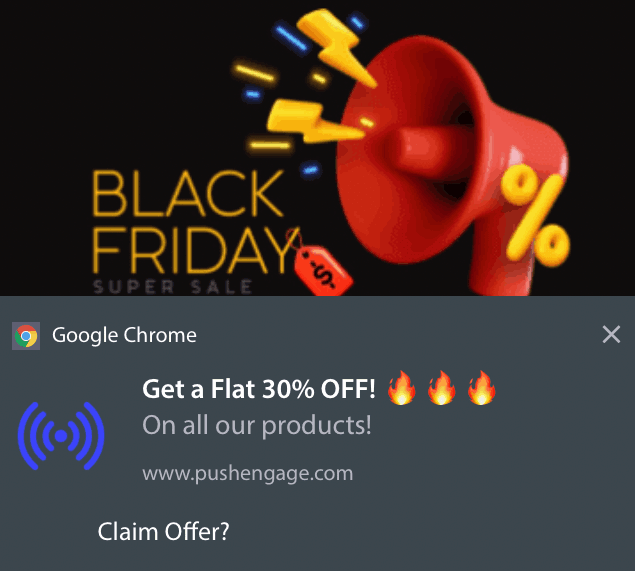
Στη συνέχεια, ακολουθήστε τη διαδικασία βήμα προς βήμα για να δημιουργήσετε μια ισχυρή προσφορά Black Friday. Εάν ακολουθήσετε κάθε βήμα, θα πρέπει να έχετε ισχυρές ειδοποιήσεις push όπως αυτή:
Βήμα #1: Συντάξτε το Περιεχόμενο της Ειδοποίησης Push
Το περιεχόμενο της ειδοποίησης push θα περιλαμβάνει:
- Έναν Τίτλο Ειδοποίησης
- Ένα Μήνυμα Ειδοποίησης
- Ένα URL για ανακατεύθυνση
- Μια Μεγάλη Εικόνα για την Ειδοποίηση
- Κουμπιά Παρότρυνσης για Δράση
- Ένα όριο λήξης ειδοποίησης
Ξεκινήστε με το βασικό περιεχόμενο της ειδοποίησής σας πρώτα:
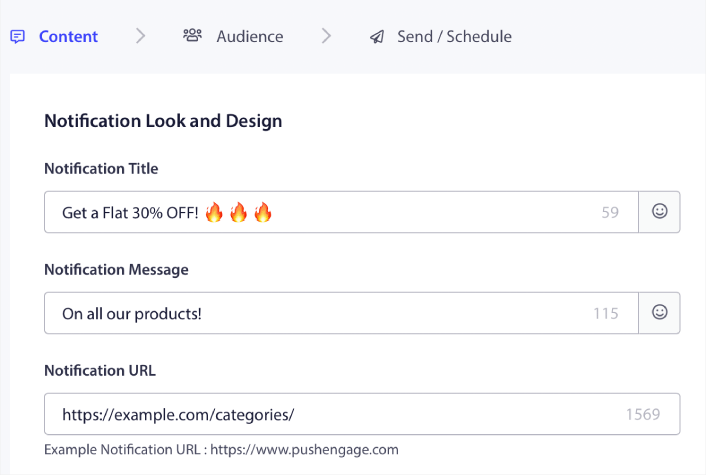
Παρατηρήστε τη χρήση emoji στον Τίτλο Ειδοποίησης. Συνιστούμε τη χρήση emoji στον τίτλο και στο μήνυμα για όλες τις ειδοποιήσεις push σας για υψηλότερα ποσοστά ανοίγματος. Μπορείτε να κάνετε A/B testing στις ειδοποιήσεις σας για καλύτερη απόδοση.
Βήμα #2: Προσθέστε μια Μεγάλη Εικόνα στην Ειδοποίησή σας
Είναι δύσκολο να ξεχωρίσετε από ένα σωρό ειδοποιήσεις στο Κέντρο Ειδοποιήσεων. Γι' αυτό χρειάζεστε μια Μεγάλη Εικόνα για να κάνετε τις ειδοποιήσεις σας να ξεχωρίζουν:
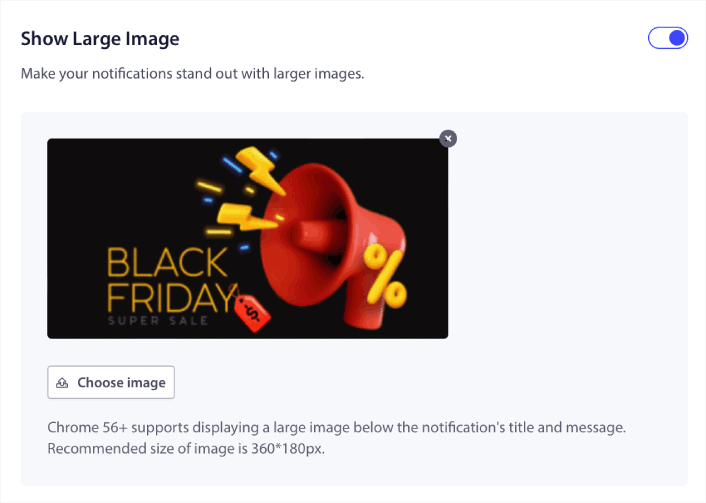
Μπορείτε να χρησιμοποιήσετε μορφές PNG και JPEG για εικόνες.
Βήμα #3: Προσθήκη CTAs για Υψηλότερα Ποσοστά Κλικ
Έχουμε δει ότι η χρήση προσαρμοσμένων κουμπιών παρότρυνσης για δράση αυξάνει τα ποσοστά κλικ στις ειδοποιήσεις σας. Επομένως, συνιστούμε ανεπιφύλακτα τη χρήση της επιλογής Ειδοποίηση Πολλαπλών Ενεργειών για τη δημιουργία προσαρμοσμένου CTA:
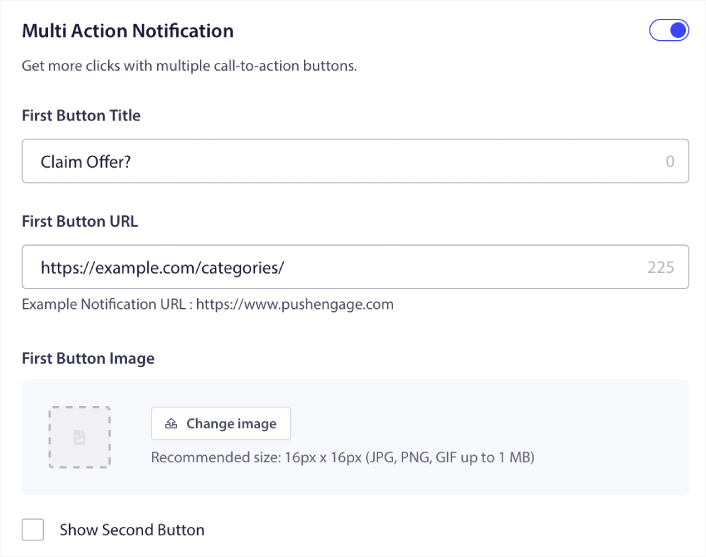
Μπορείτε να προσθέσετε το πολύ δύο CTAs. Αν θέλετε, μπορείτε να δημιουργήσετε ένα split test με ένα CTA ή δύο. Από την εμπειρία μας, είναι συνήθως καλύτερο να χρησιμοποιείτε πολλαπλά CTAs, εκτός αν εστιάζετε αποκλειστικά σε ΜΙΑ ενέργεια.
Ένα πράγμα που θέλετε να προσέξετε είναι τα όρια χαρακτήρων στις ειδοποιήσεις push. Όλα στις ειδοποιήσεις push έχουν όριο χαρακτήρων με βάση το πρόγραμμα περιήγησης και τη συσκευή του συνδρομητή σας. Αν οι ειδοποιήσεις σας είναι υπερβολικά φλύαρες, απλά δεν θα εμφανιστούν σωστά.
Βήμα #4: Ορισμός Διάρκειας Ειδοποίησης
Η Διάρκεια Ειδοποίησης είναι ένα χρονικό όριο μετά το οποίο η ειδοποίηση push σας λήγει. Μετά τη λήξη, ο συνδρομητής σας δεν θα μπορεί να δει την ειδοποίηση, ακόμη κι αν της παραδόθηκε.
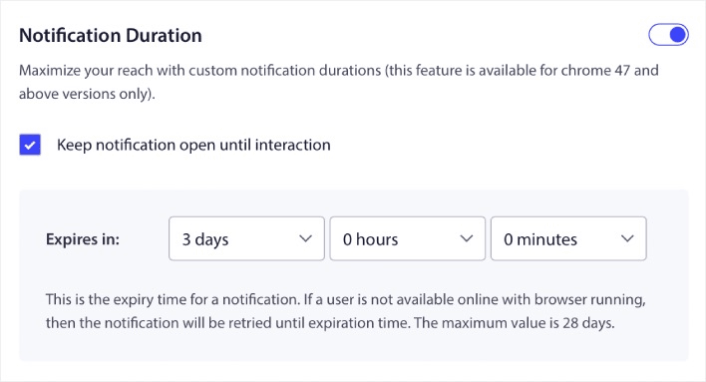
Ο καθορισμός μιας Διάρκειας Ειδοποίησης είναι μια εξαιρετική πρακτική για όλες τις πωλήσεις. Με αυτόν τον τρόπο, οι συνδρομητές σας δεν θα κατακλυστούν από ένα σωρό ειδοποιήσεις.
Επαγγελματική Συμβουλή: Βεβαιωθείτε ότι έχετε ορίσει τη σωστή διάρκεια για μια Προσφορά Αστραπή. Αν οι συνδρομητές σας κάνουν κλικ σε μια προσφορά που έχει ήδη λήξει, θα είναι πολύ δυσαρεστημένοι.
Βήμα #5: Επιλογή Ομάδας Κοινού
Τώρα που έχετε το περιεχόμενό σας έτοιμο, είναι ώρα να βρείτε το σωστό κοινό για τις ειδοποιήσεις σας.
Πώς να Στείλετε την Ειδοποίησή σας σε Όλους τους Συνδρομητές
Θέλουμε τη μέγιστη εμβέλεια για 3 ειδοποιήσεις:
- Ανακοίνωση Πρώιμης Black Friday
- Προσφορά Αστραπή Black Friday
- Προσφορά Cyber Monday
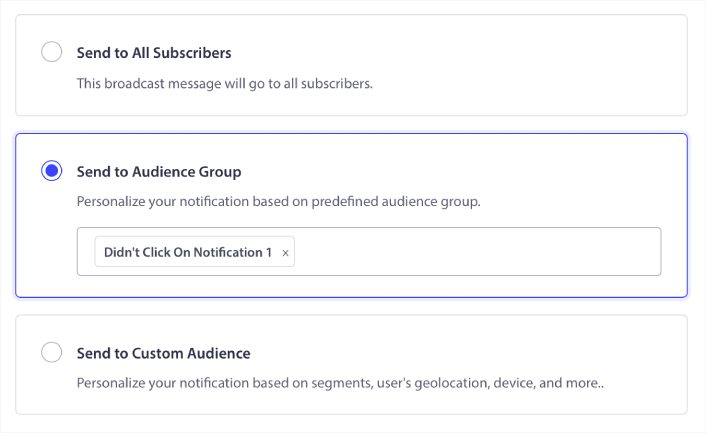
Έτσι, στέλνουμε αυτές τις 3 ειδοποιήσεις σε όλους. Στην καρτέλα Κοινό, επιλέξτε Αποστολή σε Όλους τους Συνδρομητές:

Πώς να Επαναστοχεύσετε Συνδρομητές που δεν Έκαναν Κλικ στην Εκπομπή σε Όλους
Αν δεν στέλνετε την ειδοποίηση σε όλους τους συνδρομητές, θα χρειαστεί να δημιουργήσετε μια Ομάδα Κοινού.
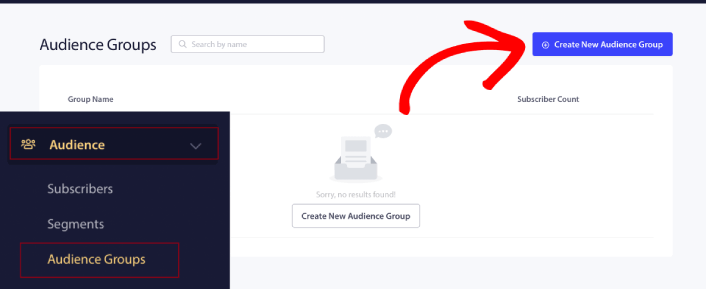
Μεταβείτε στο Κοινό » Ομάδες Κοινού και κάντε κλικ στο Δημιουργία Νέας Ομάδας Κοινού:
Για να στοχεύσετε συνδρομητές που δεν έκαναν κλικ στην τελευταία ειδοποίηση, θα χρειαστεί να φιλτράρετε με βάση την Ημερομηνία Τελευταίου Κλικ:
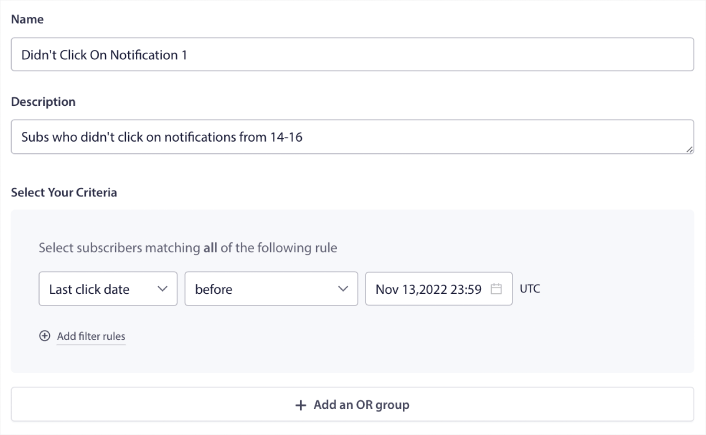
Φιλτράρετε με βάση την ημερομηνία τελευταίου κλικ πριν από την ημερομηνία που στείλατε την προηγούμενη ειδοποίησή σας. Έτσι, αν στείλατε την τελευταία ειδοποίηση push στις 14 Νοεμβρίου, φιλτράρετε για συνδρομητές που έκαναν κλικ σε ειδοποιήσεις μόνο πριν από τις 13 Νοεμβρίου τα μεσάνυχτα.
ΣΗΜΕΙΩΣΗ: Σε αντίθεση με μια καμπάνια email, δεν μπορείτε πραγματικά να φιλτράρετε με βάση το ποσοστό κλικ στην τελευταία ειδοποίηση. Η πλησιέστερη προσέγγιση είναι να φιλτράρετε για κλικ σε ένα εύρος ημερομηνιών.
Όταν τελειώσετε, κάντε κλικ στο Αποθήκευση Ειδοποίησης.
Στη συνέχεια, επιστρέψτε στην εκπομπή της ειδοποίησης push και επιλέξτε Αποστολή σε Ομάδα Κοινού. Από την αναπτυσσόμενη λίστα, επιλέξτε την Ομάδα σας:
Πώς να Επαναστοχεύσετε Συνδρομητές που Έκαναν Κλικ στην Εκπομπή σε Όλους
Αν θέλετε να στοχεύσετε συνδρομητές που έκαναν κλικ στην τελευταία σας ειδοποίηση, μπορείτε να δημιουργήσετε μια άλλη Ομάδα Κοινού.
Φιλτράρετε τους συνδρομητές σας με βάση την Ημερομηνία τελευταίου κλικ μετά την ημερομηνία που στείλατε την προηγούμενη ειδοποίησή σας ΚΑΙ πριν την ημερομηνία που θέλετε να στείλετε την επόμενη ειδοποίησή σας:
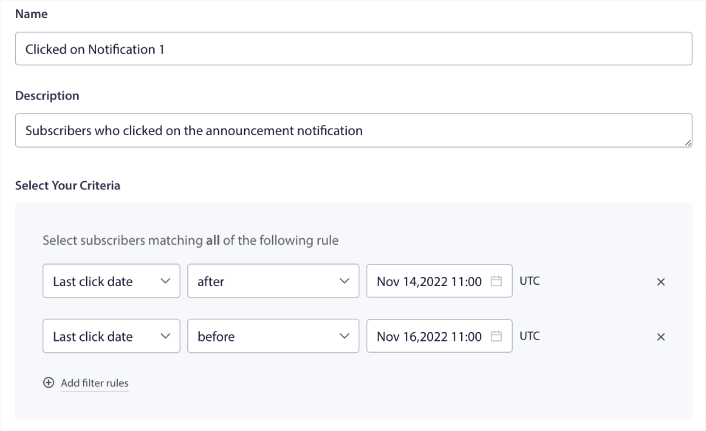
Μπορείτε να προσθέσετε κριτήρια ΚΑΙ στο φίλτρο σας κάνοντας κλικ στο Προσθήκη κανόνων φίλτρου. Ένα φίλτρο σαν αυτό είναι ιδανικό για ειδοποιήσεις push cross-selling.
Βήμα #6: Προγραμματισμός της Ειδοποίησης Push
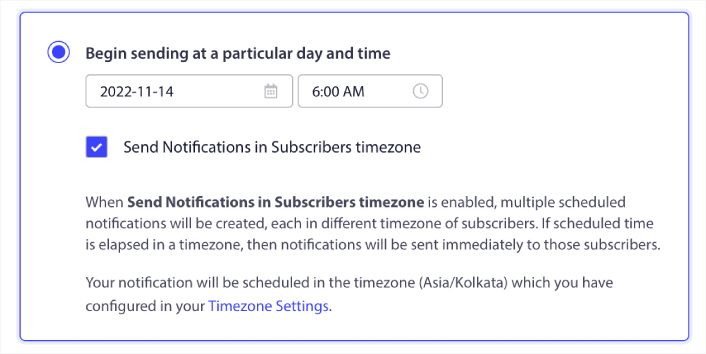
Στην καρτέλα Προγραμματισμός, επιλέξτε Έναρξη αποστολής σε συγκεκριμένη ημέρα και ώρα για λεπτομερείς επιλογές προγραμματισμού.
Στέλνουμε την ειδοποίηση στις 11:00 π.μ. Δεδομένου ότι οι ειδοποιήσεις push του προγράμματος περιήγησης εμφανίζονται ανεξάρτητα από το πότε στείλατε πραγματικά την ειδοποίηση, μπορείτε να την στείλετε ακόμη νωρίτερα αν θέλετε.
Δεδομένου ότι η προεπιλεγμένη ρύθμιση Ζώνης ώρας δεν είναι EST, χρησιμοποιώ την επιλογή Αποστολή ειδοποιήσεων στη ζώνη ώρας των συνδρομητών:
Μην ξεχάσετε να δοκιμάσετε τις ειδοποιήσεις σας κάνοντας κλικ στο κουμπί Δοκιμαστική ειδοποίηση. Όταν τελειώσετε, κάντε κλικ στο Προγραμματισμός ειδοποίησης.
Ποιο είναι το Ιδανικό Πρόγραμμα Ειδοποιήσεων Push για την Black Friday
Δεν υπάρχει ένα σωστό ή λάθος πρόγραμμα για τις εορταστικές καμπάνιες. Αλλά εμείς ακολουθούμε ένα πολύ αυστηρό πρόγραμμα και λειτουργεί:
- 3 ειδοποιήσεις για μια πρώιμη προσφορά Black Friday
- 1 ειδοποίηση για την Black Friday
- 1 ειδοποίηση για το Small Business Saturday
- 1 ειδοποίηση για την Cyber Monday
- 1 ειδοποίηση για την επέκταση προσφορών της Cyber Monday
Και ειδοποιήσεις push επαναστόχευσης για να στοχεύσετε τους συνδρομητές που έκαναν κλικ σε αυτές ή όχι. Ενημερώστε μας πώς λειτουργεί για εσάς. Εν τω μεταξύ, δείτε αυτούς τους πόρους:
- Πώς να αυξήσετε τα κλικ στις ειδοποιήσεις push σας με την περιέργεια
- Πώς να εξατομικεύσετε κάθε ειδοποίηση push
- Πώς να ξεχωρίσετε με πλούσια μέσα στις ειδοποιήσεις push σας
- Πώς να επανενεργοποιήσετε αδρανείς συνδρομητές push
- Πώς να χρησιμοποιήσετε τις ειδοποιήσεις push για να κρατάτε τους πελάτες ενήμερους
- Πώς να χρησιμοποιήσετε emojis στις ειδοποιήσεις push σας για υψηλότερα ποσοστά κλικ
- Πώς να αυξήσετε τις μετατροπές δημιουργώντας αίσθηση επείγοντος
Και αν δεν το έχετε κάνει ήδη, ξεκινήστε με το PushEngage σήμερα.


