Γεια σας, Engagelings.
Συναρπαστικά νέα: Μόλις προσθέσαμε τα Χαρακτηριστικά και τα Πεδία Συνδρομητών στον πίνακα ελέγχου του PushEngage.
Τα Χαρακτηριστικά και τα Πεδία Συνδρομητών ήταν πάντα μέρος του API του PushEngage. Αλλά με αυτή τη νέα ενημέρωση, μπορείτε να δημιουργήσετε και να διαχειριστείτε και τα δύο απευθείας από τον πίνακα ελέγχου.
Με απλά λόγια, το κάναμε έτσι ώστε ο προγραμματιστής σας να μπορεί να ρυθμίσει τα Χαρακτηριστικά και τα Πεδία Συνδρομητών για τη συλλογή και την επισήμανση δεδομένων ως μια εφάπαξ άσκηση. Μετά από αυτό, η ομάδα μάρκετινγκ μπορεί να δημιουργήσει συναρπαστικές ειδοποιήσεις push από τον πίνακα ελέγχου χωρίς να χρειάζεται καμία βοήθεια από τους προγραμματιστές!
Ας ξεκινήσουμε.
Γιατί να σας ενδιαφέρουν τα Χαρακτηριστικά και τα Πεδία Συνδρομητών;
Πριν εμβαθύνουμε στο γιατί πρέπει να γνωρίζετε για τα Χαρακτηριστικά και τα Πεδία Συνδρομητών, ας ρίξουμε μια γρήγορη ματιά στο τι είναι και γιατί είναι σημαντικά εξαρχής.
Το PushEngage συλλέγει μόνο 3 στοιχεία δεδομένων από τους συνδρομητές σας:
- Την τοποθεσία τους
- Το πρόγραμμα περιήγησης
- Ο τύπος συσκευής
Και αυτό είναι που καθιστά το PushEngage συμβατό με τον GDPR. Το λογισμικό δεν συλλέγει κανένα αναγνωριστικό δεδομένο.
Αλλά φυσικά, το API του PushEngage είναι εξαιρετικά ευέλικτο και μπορείτε να αποθηκεύσετε αναγνωριστικά δεδομένα για τους συνδρομητές σας χρησιμοποιώντας προσαρμοσμένο κώδικα. Μπορείτε να συνδέσετε το API του PushEngage με το CRM σας ή μια φόρμα επικοινωνίας και να παρακολουθείτε ποιες ειδοποιήσεις στέλνετε σε ποιον ακριβώς συνδρομητή.
Ακριβώς γι' αυτό πρέπει να σας ενδιαφέρουν τα Χαρακτηριστικά και τα Πεδία Συνδρομητών.
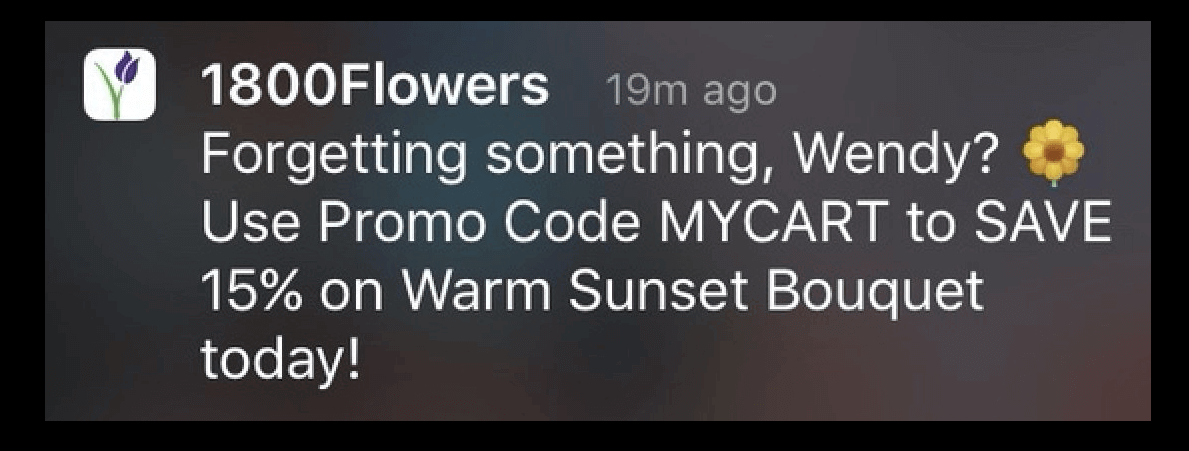
Τα Πεδία Συνδρομητών είναι τα προεπιλεγμένα πεδία που είναι διαθέσιμα για κάθε συνδρομητή. Τα Πεδία Συνδρομητών βοηθούν στην αποθήκευση πρόσθετων πληροφοριών σχετικά με τους συνδρομητές, όπως email, όνομα, και άλλα. Μπορείτε να σχεδιάσετε εξατομικευμένες καμπάνιες για τους συνδρομητές σας χρησιμοποιώντας τις βασικές προσωπικές πληροφορίες αυτού του συνδρομητή.
Για παράδειγμα, αυτή η ειδοποίηση push χρησιμοποιεί το όνομα του συνδρομητή (Wendy) για να στείλει μια εξατομικευμένη ειδοποίηση:
Και μπορείτε να προσθέσετε δεδομένα στα Πεδία Συνδρομητών χρησιμοποιώντας το API Αναγνώρισης Συνδρομητών του PushEngage για χρήση στις καμπάνιες σας.
Τα Χαρακτηριστικά χρησιμοποιούνται για την αποθήκευση πρόσθετων πληροφοριών σχετικά με τους συνδρομητές σας. Οποιαδήποτε δεδομένα μπορείτε να χρησιμοποιήσετε για τη δημιουργία συμπεριφορικών, πολιτισμικών, περιστασιακών και ψυχογραφικών τμημάτων μπορούν να αποθηκευτούν ως χαρακτηριστικά συνδρομητών.
Για παράδειγμα, μπορείτε να δημιουργήσετε ένα χαρακτηριστικό που ονομάζεται ‘payment_expiry_date‘ για να αποθηκεύσετε την ημερομηνία λήξης πληρωμής των συνδρομητών σας και να στείλετε μια καμπάνια υπενθύμισης πριν από την ημερομηνία λήξης.
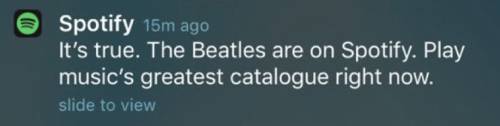
Ή, αν παρακολουθείτε τις προτιμήσεις περιεχομένου στους συνδρομητές σας, μπορείτε να στείλετε εξατομικευμένες προτάσεις περιεχομένου όπως κάνει το Spotify:
Και πάλι, μπορείτε να το ρυθμίσετε αυτό χρησιμοποιώντας το API Χαρακτηριστικών του PushEngage.
Η χρήση Χαρακτηριστικών και Πεδίων Συνδρομητών θα σας προσφέρει υψηλότερα ποσοστά κλικ και περισσότερες μετατροπές σε μια κλίμακα που απλά δεν μπορείτε να επιτύχετε με μηνύματα ένα προς ένα ή ακόμα και με μια γενική εκπομπή ειδοποιήσεων push.
Αλλά όλες αυτές οι επιλογές υπήρχαν εδώ και πολύ καιρό. Λοιπόν, τι ακριβώς αλλάξαμε;
Τι Ακριβώς Είναι η Αλλαγή;
Προηγουμένως, έπρεπε να κάνετε όλα αυτά αποκλειστικά μέσω του API, πράγμα που σήμαινε ότι μόνο ο προγραμματιστής ή η ομάδα ανάπτυξής σας μπορούσε να διαχειριστεί τα Πεδία και τα Χαρακτηριστικά Συνδρομητών. Τώρα, αν μεταβείτε στον λογαριασμό σας στο PushEngage και πάτε στο Κοινό » Χαρακτηριστικά, μπορείτε να διαχειριστείτε και τους δύο τύπους δεδομένων απευθείας από τον πίνακα ελέγχου του PushEngage:
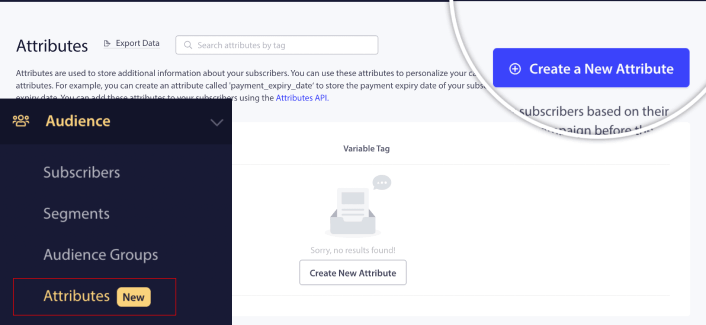
Εδώ, μπορείτε να προσθέσετε ένα νέο Χαρακτηριστικό αρκετά γρήγορα.
ΣΗΜΑΝΤΙΚΟ: Θα εξακολουθείτε να πρέπει να χρησιμοποιείτε τα API για να προσθέτετε δεδομένα στα Χαρακτηριστικά και τα Πεδία Συνδρομητών σας. Ο πίνακας ελέγχου σάς επιτρέπει μόνο να προσθέτετε και να διαχειρίζεστε οπτικά τα Χαρακτηριστικά.
Μόλις δημιουργήσετε ένα Χαρακτηριστικό, μπορείτε να το χρησιμοποιήσετε στις ειδοποιήσεις push σας για να στείλετε δυναμικές, εξατομικευμένες ειδοποιήσεις. Για παράδειγμα, μόλις δημιούργησα ένα Χαρακτηριστικό που αντιστοιχίζει τα προτιμώμενα κανάλια κοινωνικών μέσων για κάθε συνδρομητή.

Τώρα, μπορώ να χρησιμοποιήσω αυτό το χαρακτηριστικό σε οποιαδήποτε ειδοποίηση push στέλνω. Ας υποθέσουμε ότι κάνουμε μια ζωντανή μετάδοση εκδηλώσεων σε πολλά κανάλια κοινωνικών μέσων. Για να έχουμε τη μέγιστη επισκεψιμότητα, μπορώ να ζητήσω από τους συνδρομητές μας να εγγραφούν στην εκδήλωση στο αγαπημένο τους κανάλι κοινωνικών μέσων:
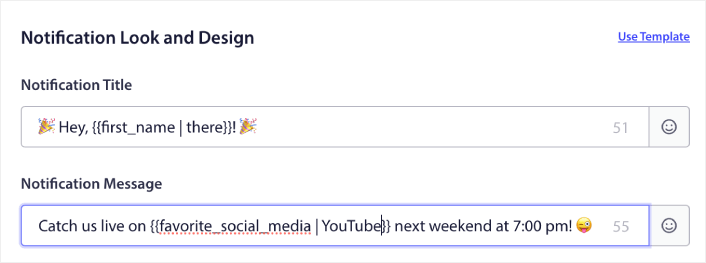
Αυτή η ειδοποίηση αντικαθιστά δυναμικά τη μεταβλητή για το μικρό όνομα με το πραγματικό μικρό όνομα και τα αγαπημένα κοινωνικά μέσα με το πραγματικό όνομα του καναλιού. Και αν αυτά τα δεδομένα δεν είναι διαθέσιμα για αυτόν τον συνδρομητή, η εναλλακτική επιλογή θα δημιουργήσει μια ειδοποίηση που λέει «Γεια σου!» αντί να χρησιμοποιεί το μικρό όνομα και «YouTube» αντί να χρησιμοποιεί το αγαπημένο κανάλι κοινωνικών μέσων.
Αλλά αυτό δεν είναι όλο!
Μπορείτε ακόμη και να δημιουργήσετε ένα Προσαρμοσμένο Κοινό χρησιμοποιώντας αυτά τα Χαρακτηριστικά. Έτσι, αν ήθελα να στείλω έναν διαφορετικό σύνδεσμο εγγραφής ή σύνδεσμο εκδήλωσης για διαφορετικά κανάλια κοινωνικών μέσων, θα μπορούσα να το κάνω δημιουργώντας πολλαπλές εκδόσεις της ίδιας ειδοποίησης και αλλάζοντας τον Σύνδεσμο Ειδοποίησης.
Απλώς μεταβείτε στην καρτέλα Κοινό της ειδοποίησης και επιλέξτε το σωστό χαρακτηριστικό.
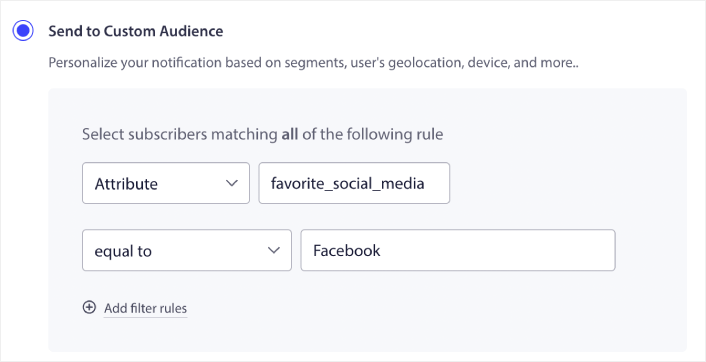
Και στη συνέχεια μπορείτε απλώς να διπλασιάσετε την ειδοποίηση και να αλλάξετε τον σύνδεσμο και την τιμή για το χαρακτηριστικό για να στοχεύσετε συγκεκριμένους χρήστες.
Τι άλλο;
Γνωρίζουμε ότι η ανάπτυξη μιας επιχείρησης είναι σκληρή δουλειά. Στην PushEngage, αναζητούμε πάντα να βελτιώνουμε το προϊόν μας και την εμπειρία σας. Λανσάραμε αυτήν τη νέα λειτουργία για να σας βοηθήσουμε να αντλήσετε ακόμη μεγαλύτερη αξία από τη συνδρομή σας στην PushEngage.
Τώρα, μπορείτε να έχετε τους προγραμματιστές σας να ρυθμίζουν τα Χαρακτηριστικά και τα Πεδία Συνδρομητών μία φορά για τη συλλογή και την επισήμανση των δεδομένων, και στη συνέχεια η ομάδα μάρκετινγκ να στέλνει ισχυρές ειδοποιήσεις push χωρίς να χρειάζεται τους προγραμματιστές κάθε φορά που μια νέα καμπάνια πρέπει να σταλεί.
Σας ευχαριστούμε πολύ που διαβάσατε αυτήν την ανακοίνωση.
Εάν έχετε οποιεσδήποτε ερωτήσεις, η ομάδα Εξυπηρέτησης Πελατών μας είναι εδώ για να βοηθήσει. Απλώς ξεκινήστε μια συνομιλία στο Live Chat ή ελέγξτε τη σελίδα επικοινωνίας μας.
Και σας ευχαριστούμε που χρησιμοποιείτε την PushEngage. Είτε χρησιμοποιείτε τη δωρεάν έκδοση είτε την έκδοση Enterprise, είστε εξίσου σημαντικοί για εμάς. Τα νέα πρότυπα έχουν σχεδιαστεί για να σας βοηθήσουν να πετύχετε και σας ευχόμαστε τα καλύτερα.
Ενημερώστε μας για τις σκέψεις σας στα παρακάτω σχόλια και αν δεν το έχετε κάνει ήδη, ξεκινήστε με την PushEngage σήμερα!


