Οι Κανόνες Στόχευσης σάς βοηθούν να διαχειριστείτε την Εγγραφή Συνδρομητή ή το Παράθυρο Διαλόγου Popup σε συγκεκριμένες σελίδες. Μπορείτε να επιλέξετε να συμπεριλάβετε/εξαιρέσετε συγκεκριμένες σελίδες από τον ίδιο τον πίνακα ελέγχου, αντί να προχωρήσετε και να αφαιρέσετε τον κώδικα κάθε φορά.
Τύποι Κανόνα Στόχευσης
Υπάρχουν δύο τύποι κανόνων στόχευσης – Γενικός Κανόνας Στόχευσης και Τοπικός Κανόνας Στόχευσης των Modal Popup. Εδώ, ο πρώτος παρέχει περισσότερο έλεγχο σχετικά με το ποιες σελίδες εμφανίζεται η Εγγραφή, ενώ ο δεύτερος φροντίζει για το πού θα εμφανιστεί η Εγγραφή, ειδικά όταν θέλετε να έχετε περισσότερα από ένα Popup στον ιστότοπό σας.
Ρύθμιση Κανόνων
Μεταβείτε στο Σχεδίαση » Κανόνας Στόχευσης και Ενεργοποιήστε τον.
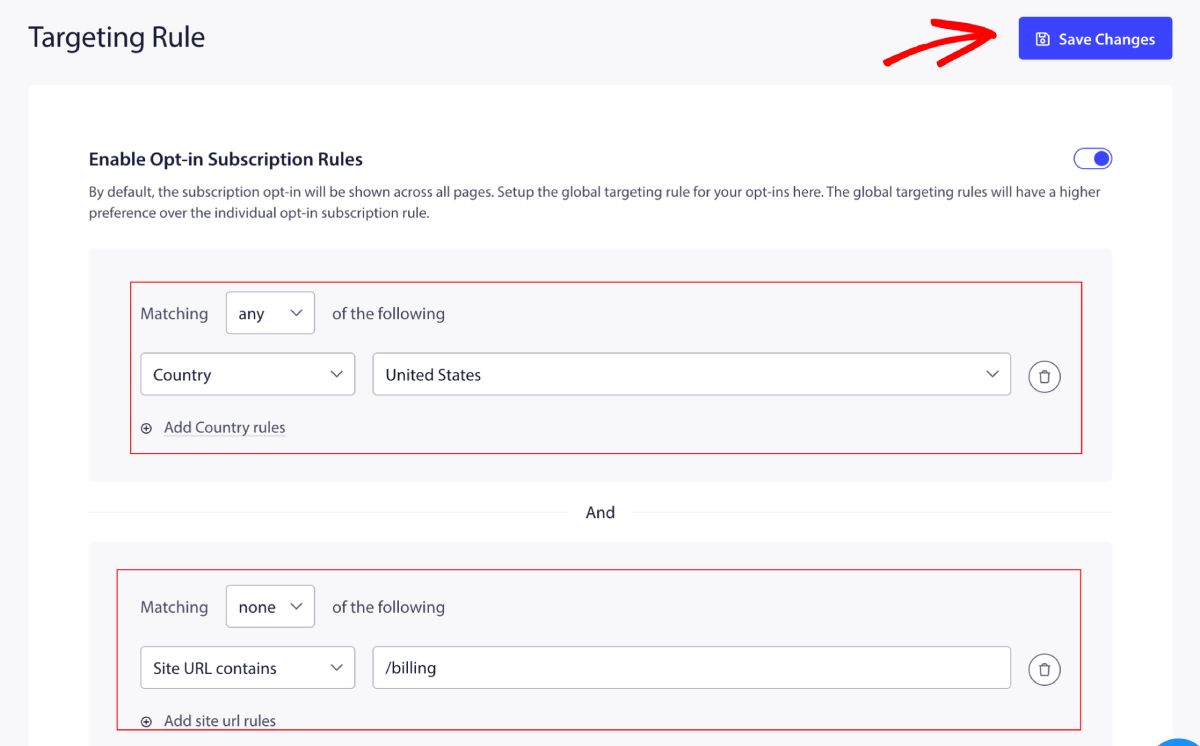
Αφού τον ενεργοποιήσετε, μπορείτε να αποφασίσετε αν θέλετε να προσθέσετε τις διευθύνσεις URL του ιστότοπου ή τη Χώρα σε περίπτωση που δεν θέλετε να εμφανίσετε το Popup Εγγραφής για επισκέπτες από μια συγκεκριμένη χώρα.
Το φίλτρο αντιστοίχισης έχει δύο επιλογές: Οποιοδήποτε – Για συμπερίληψη και Κανένα – Για εξαίρεση της διεύθυνσης URL του ιστότοπου ή των χωρών.
Κατανόηση Τοπικών Κανόνων Στόχευσης
Εάν θέλετε να επιλέξετε περισσότερα από ένα Modal Popup για τη συλλογή συνδρομητών από τον ιστότοπό σας, τότε συνιστάται η χρήση των Τοπικών Κανόνων κατά τη διαμόρφωση του Popup. Με αυτόν τον τρόπο, μπορείτε να διαχειριστείτε διαφορετικά στυλ σε διαφορετικές σελίδες ή χώρες.
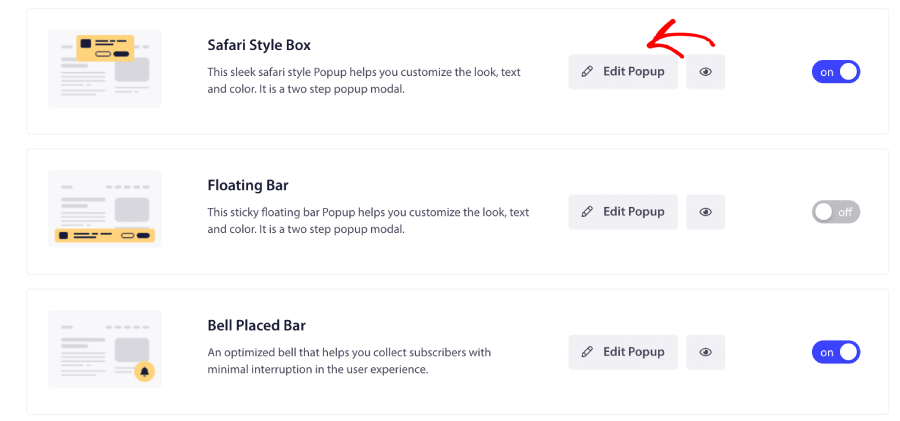
Μπορείτε να επισκεφθείτε το Σχεδίαση » Modal Popup. Μετακινηθείτε στα επιλεγμένα στυλ Popup και κάντε κλικ στο Επεξεργασία Popup.
Τώρα μπορείτε να μετακινηθείτε στους Κανόνες Εγγραφής Συνδρομητή και να τον Ενεργοποιήσετε.
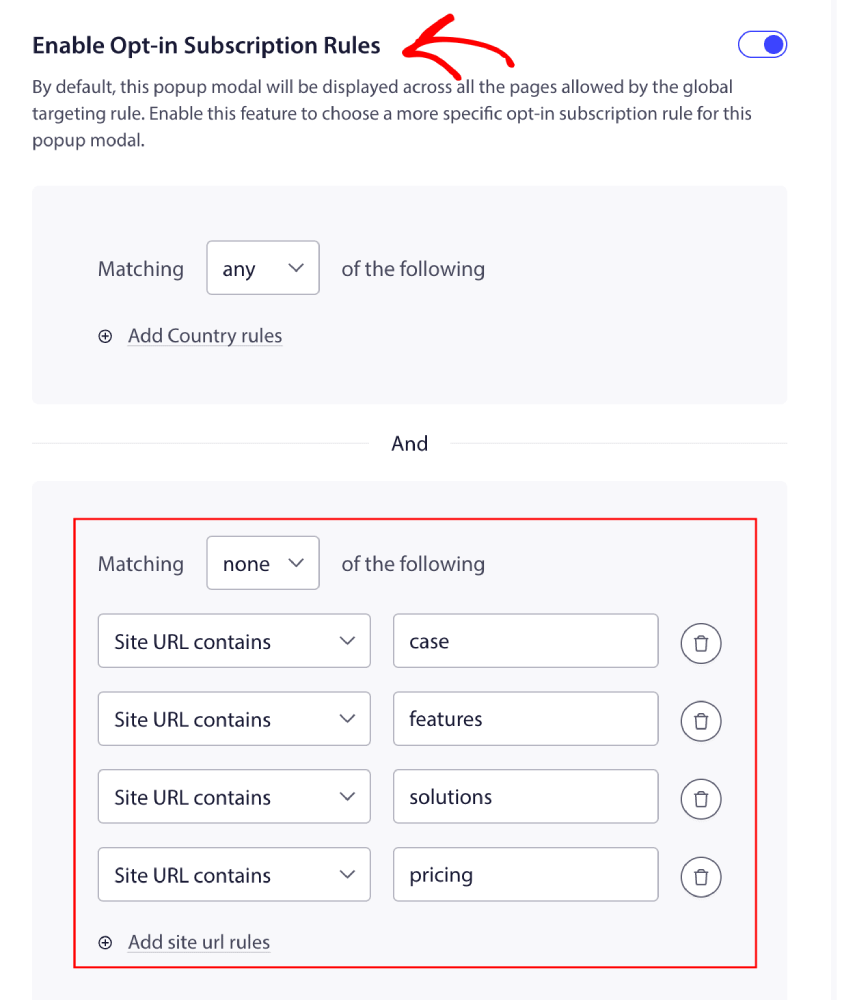
Μπορείτε τώρα να προσθέσετε τους κανόνες και να κάνετε κλικ στο Αποθήκευση και Επιλογή Επιλογών Εμφάνισης.
Αυτό είναι όλο· έτσι μπορείτε να διαχειριστείτε τους κανόνες στόχευσης για το Popup Εγγραφής.
Εάν αντιμετωπίσετε οποιοδήποτε πρόβλημα, παρακαλώ επικοινωνήστε μαζί μας κάνοντας κλικ εδώ. Η ομάδα υποστήριξής μας θα μπορέσει να σας βοηθήσει.