Σημείωση: Δεν υπάρχει διαθέσιμη παλιά τεκμηρίωση για αυτό το στοιχείο, επομένως βλέπετε την τρέχουσα τεκμηρίωση.
The Price Drop Alert campaign sends an automated push notification to subscribers who have opted in to price drop alerts for a specific product on your Shopify store. When you reduce a product’s price in Shopify, PushEngage detects the change and notifies everyone who subscribed to that product’s alert.
Αυτός ο οδηγός εξηγεί πώς λειτουργεί το widget ειδοποίησης, πώς να το ενεργοποιήσετε και να το προσαρμόσετε, και πώς να διαμορφώσετε την εκστρατεία ειδοποιήσεων.
Πριν Ξεκινήσετε
- Το PushEngage είναι εγκατεστημένο στο κατάστημα Shopify σας.
- Price Drop Alert campaigns require a PushEngage Growth plan or Automation Plan.
- Η εκστρατεία είναι προκατασκευασμένη από το PushEngage κατά την αρχική ρύθμιση. Αυτός ο οδηγός καλύπτει την ενεργοποίηση και την προσαρμογή της.
How Price Drop Alerts Work
The Price Drop Alert runs in two parts: a widget on your product pages that customers use to subscribe, and a trigger campaign that fires when a price drops.
- A visitor lands on a product page and sees the Price Drop Alert widget.
- They click Notify me when the price drops and subscribe.
- When you lower the price of that product in your Shopify admin, PushEngage detects the change.
- Every subscriber who opted in for that product receives a push notification with the new price.
Οι συνδρομητές λαμβάνουν ειδοποιήσεις μόνο για τα συγκεκριμένα προϊόντα στα οποία έχουν εγγραφεί. Δεν θα λαμβάνουν ειδοποιήσεις για άλλα προϊόντα, εκτός αν εγγραφούν ξεχωριστά και για αυτά.
Βήμα 1: Ενεργοποίηση του Widget Ειδοποίησης
The widget is what customers see on your product pages to opt in. It must be enabled before the campaign can collect subscribers.
- Συνδεθείτε στο dashboard του PushEngage.
- Μεταβείτε στο Σχεδίαση » Widgets.
- Κάντε κύλιση προς τα κάτω στο Widget Εκστρατείας Ειδοποίησης.
- Ενεργοποιήστε τον διακόπτη στο On.
Προσαρμογή του Widget
Once enabled, you can customize the widget appearance to match your store’s branding.
| Ρύθμιση | Περιγραφή |
|---|---|
| Μήνυμα Widget | The text shown to visitors prompting them to subscribe. Example: “Get notified when this price drops” |
| Κείμενο κουμπιού | The label on the subscribe button. Example: “Notify Me” |
| Χρώματα | Match the widget background and button color to your store’s theme |
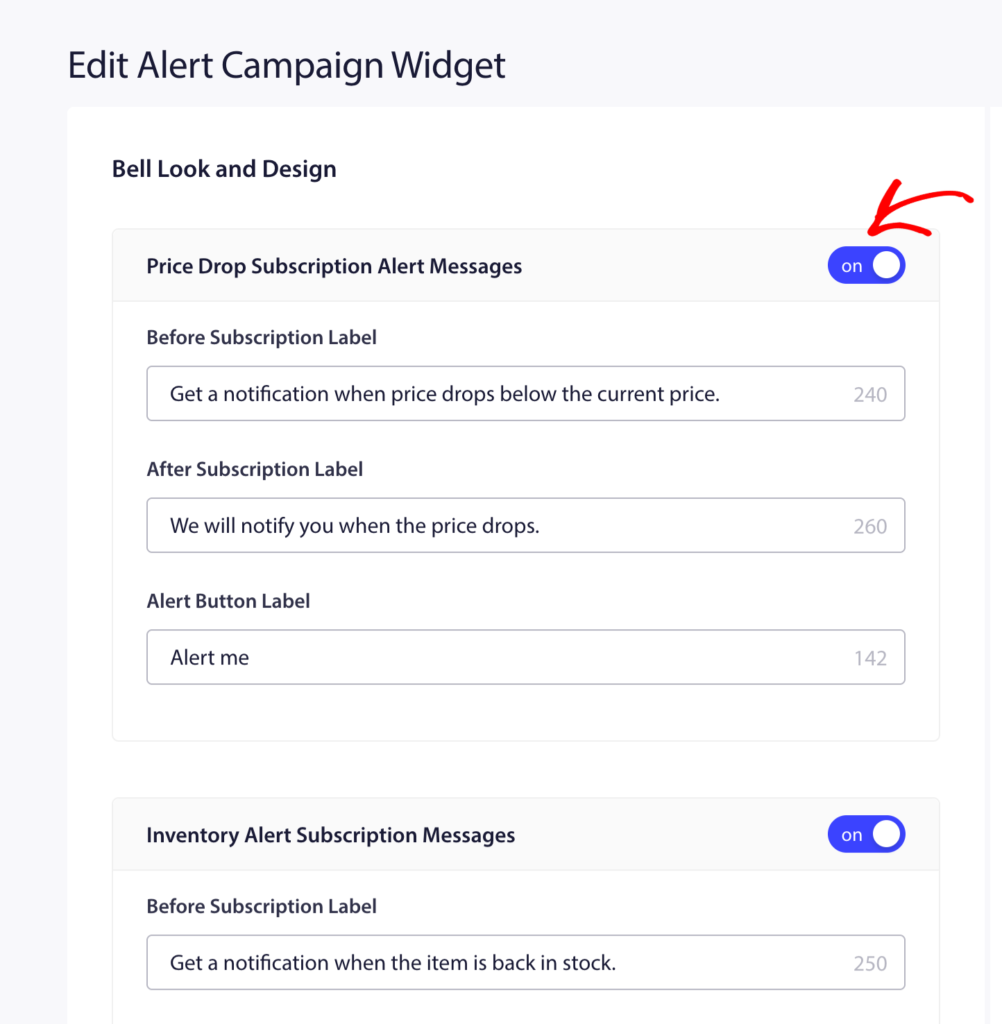
Κάντε κλικ στο Αποθήκευση μετά την πραγματοποίηση αλλαγών.
Step 2: Open the Price Drop Alert Campaign
- Μεταβείτε στο Εκστρατείες » Εκστρατείες Ενεργοποίησης.
- Find Price Drop Alert in the list and click Edit.
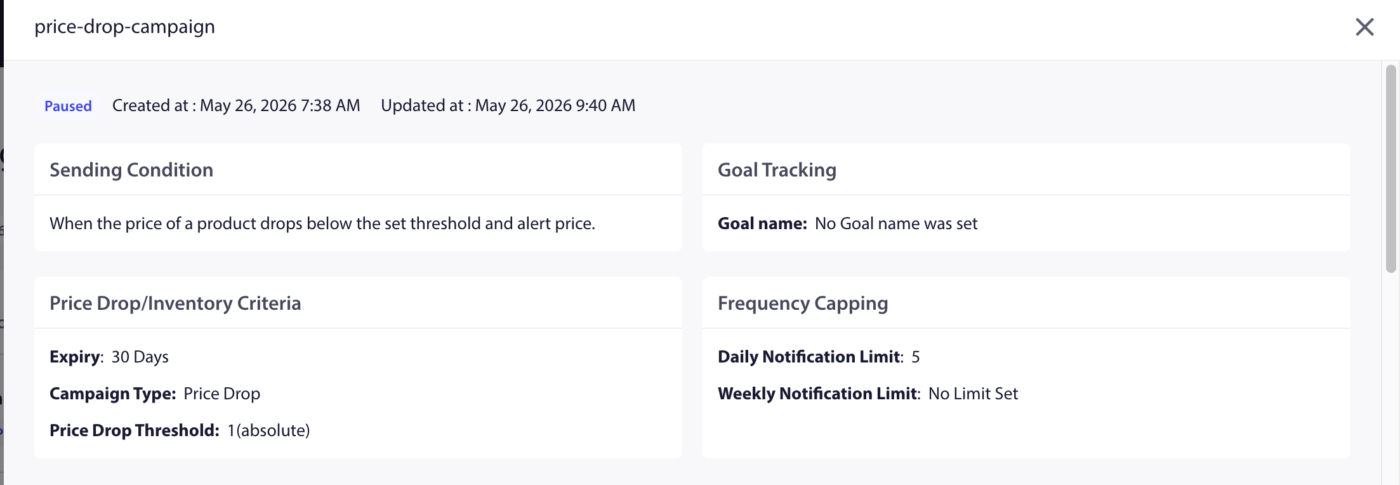
Βήμα 3: Επεξεργασία της Ειδοποίησης
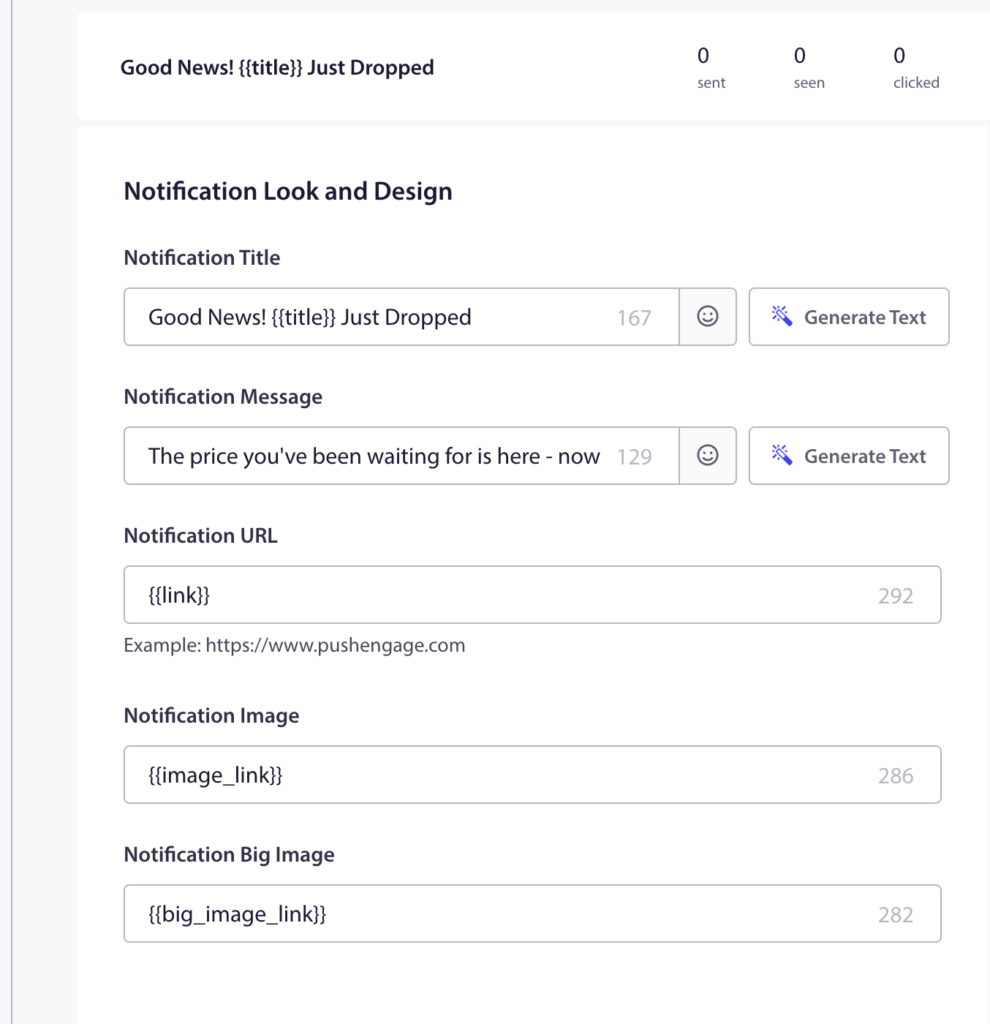
Η προκατασκευασμένη καμπάνια περιέχει μία ειδοποίηση. Κάντε κλικ σε αυτήν για να την επεξεργαστείτε.
Διαθέσιμες Μεταβλητές
| Μεταβλητή | Τι εισάγει |
|---|---|
{productname} | Name of the product whose price dropped |
{price} | The new (lower) price of the product |
{notificationurl} | Απευθείας σύνδεσμος προς τη σελίδα του προϊόντος |
{imageurl} | Το λογότυπο του καταστήματός σας |
{bigimageurl} | Εικόνα προϊόντος |
Σημείωση: Μην αφαιρέσετε αυτές τις μεταβλητές. Αντλούν ζωντανά δεδομένα προϊόντων από το κατάστημα Shopify σας τη στιγμή που ενεργοποιείται η ειδοποίηση.
Προτεινόμενες Ρυθμίσεις Πεδίου
| Πεδίο | Πρόταση |
|---|---|
| Διεύθυνση URL | Χρησιμοποιήστε το {notificationurl} για να συνδέσετε απευθείας στη σελίδα του προϊόντος |
| Εικόνα | Χρησιμοποιήστε το {bigimageurl} για να εμφανίσετε την εικόνα του προϊόντος |
Επιλογές Αντιγραφής
| Επιλογή | Τίτλος | Μήνυμα |
|---|---|---|
| 1 | Price drop on {productname}! | Good news! {productname} is now only {price}. Grab it before it goes back up. |
| 2 | The price just dropped | {productname} is now {price}. You subscribed to this alert. Now is the time to buy. |
| 3 | Your price alert is here | {productname} dropped to {price}. Click to shop now before stock runs out. |
Βήμα 4: Ορισμός Διάρκειας Ειδοποίησης
Set the expiry so the notification does not sit in the subscriber’s notification center too long after it is no longer relevant.
Προτεινόμενη ρύθμιση: 48 ώρες
Enable Keep notification open until user interaction so the push stays visible until the subscriber clicks or dismisses it.
Βήμα 5: Ενεργοποίηση της Καμπάνιας
- Κάντε κλικ στο Save στον επεξεργαστή καμπάνιας.
- Επιστρέψτε στις Καμπάνιες » Καμπάνιες Ενεργοποίησης.
- Click the Play / Resume button next to Price Drop Alert.
The campaign is now active. The next time you reduce a price on any product in your Shopify admin, subscribers who opted in to that product’s price alert will receive the notification automatically.
Παρακολούθηση Απόδοσης
Για να ελέγξετε την απόδοση της καμπάνιας:
- Μεταβείτε στο Εκστρατείες » Εκστρατείες Ενεργοποίησης.
- Click on Price Drop Alert to expand the analytics view.
- Ελέγξτε τις μετρήσεις αποστολής, παράδοσης, κλικ και μετατροπής.
Για την απόδοση εσόδων, ενεργοποιήστε την παρακολούθηση στόχων. Δείτε Πώς να ρυθμίσετε την παρακολούθηση στόχων για οδηγίες.
Συχνές Ερωτήσεις
Does the alert fire for every price reduction, even small ones? Yes. Any price reduction on a product triggers the alert for subscribers of that product. If you want to avoid notifying subscribers of minor adjustments, consider how frequently you change prices.
Can a subscriber receive price drop alerts for multiple products? Yes. Subscribers can opt in to alerts on as many individual products as they want. Each product has its own subscriber list.
What if a product’s price goes back up after the alert fires? The alert only fires when a price drops. Price increases do not trigger any notification. Subscribers remain subscribed to future price drop alerts for the same product.
Can I customize the widget separately for Price Drop vs. Back-in-Stock? The Alert Campaign Widget toggle enables both types. The widget appearance settings apply to both. You cannot style them differently from the same widget panel.
Where do subscribers go when they click the notification? They are taken to the product page via the {notificationurl} variable. You can change this to a cart page or any other URL by editing the URL field in the campaign editor.
Αν αντιμετωπίσετε οποιοδήποτε πρόβλημα, μη διστάσετε να επικοινωνήσετε μαζί μας κάνοντας κλικ εδώ. Η ομάδα υποστήριξής μας θα μπορέσει να σας βοηθήσει.


