Αυτός ο ολοκληρωμένος οδηγός έχει σχεδιαστεί για να σας παρέχει βήμα προς βήμα βοήθεια αντιμετώπισης προβλημάτων, εάν έχετε εγγραφεί σε ειδοποιήσεις push, αλλά δεν λαμβάνετε καμία από τις καμπάνιες στις κινητές συσκευές σας.
Σε πολλές περιπτώσεις, μπορεί να παρατηρήσετε ότι οι ειδοποιήσεις δεν φτάνουν στη κινητή συσκευή σας. Για να το αντιμετωπίσετε, ελέγξτε αν οι ειδοποιήσεις έχουν οριστεί σε «άδεια».
Οι ρυθμίσεις ενδέχεται να διαφέρουν μεταξύ Android και iPhone. Εάν επιτρέπονται οι ειδοποιήσεις στο Android, αλλά εξακολουθείτε να μην τις λαμβάνετε, ίσως χρειαστεί να απεγγραφείτε και στη συνέχεια να εγγραφείτε ξανά ακολουθώντας τα παρακάτω βήματα.
Αντιμετώπιση προβλημάτων για συσκευές Android
Βήματα για επανεγγραφή
Μπορείτε να απεγγραφείτε από τις ειδοποιήσεις του Chrome στο Android μέσω του μενού πληροφοριών. Απλώς επισκεφθείτε τον ιστότοπο από τον οποίο θέλετε να απεγγραφείτε και, στη συνέχεια, πατήστε το εικονίδιο μενού (⋮) στην επάνω δεξιά γωνία.
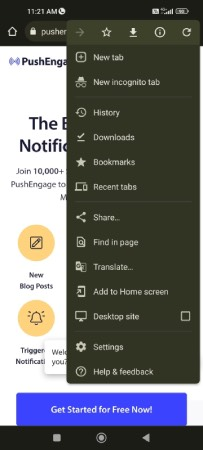
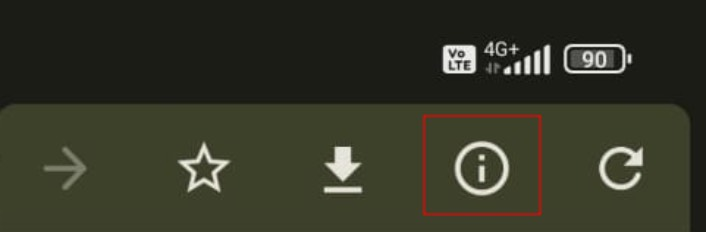
Κάντε κλικ στο εικονίδιο i στην κορυφή του μενού για να δείτε τις πληροφορίες του ιστότοπου:
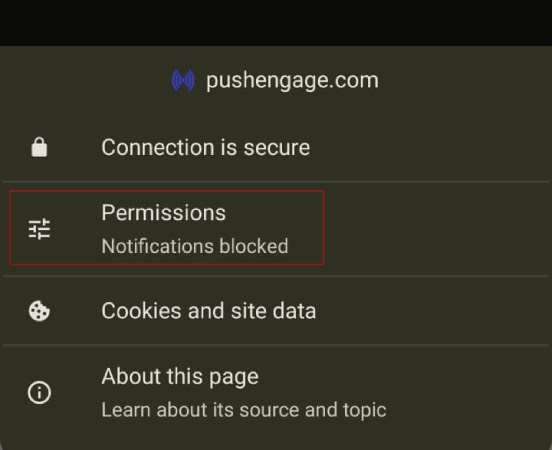
Κάντε κλικ στο Δικαιώματα:
Στη συνέχεια, κάντε κλικ στο Ειδοποιήσεις:
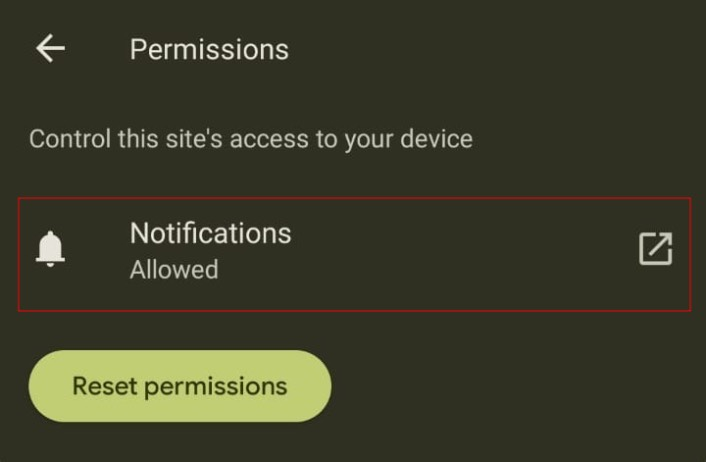
Τέλος, χρησιμοποιήστε την εναλλαγή για να απεγγραφείτε από τις ειδοποιήσεις:
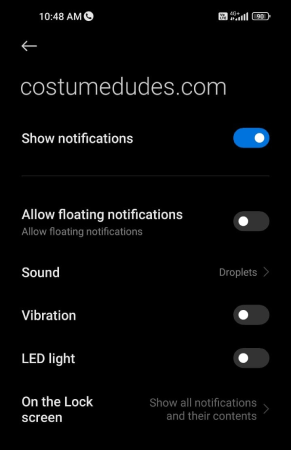
Μετά την απεγγραφή, θα χρειαστεί επίσης να εγγραφείτε ξανά.
Μπορείτε να ανανεώσετε τη σελίδα ή να καθαρίσετε την κρυφή μνήμη, και θα πρέπει να δείτε ένα αναδυόμενο παράθυρο που σας προτρέπει να εγγραφείτε ξανά. Αυτό θα σας επιτρέψει να ενεργοποιήσετε ξανά τις ειδοποιήσεις για αυτόν τον ιστότοπο.
Αντιμετώπιση προβλημάτων για Συσκευές iOS
Οι ειδοποιήσεις δεν εμφανίζονται ή αδυναμία προβολής του αναδυόμενου παραθύρου
Η Apple κυκλοφόρησε τα iOS και iPadOS 16.4, εισάγοντας υποστήριξη για ειδοποιήσεις push μέσω web για εφαρμογές web που προστίθενται στην Αρχική Οθόνη σε συσκευές iPhone και iPad. Έτσι, πολλές φορές, εάν έχετε ολοκληρώσει μόνο την εγκατάσταση και δοκιμάζετε σε iPhone, ενδέχεται να μην δείτε το αναδυόμενο παράθυρο να εμφανίζεται για μια εγγραφή.
Για να ενεργοποιήσετε τη συλλογή συνδρομητών, οι χρήστες πρέπει πρώτα να προσθέσουν τον ιστότοπό σας στην Αρχική τους Οθόνη και στη συνέχεια να ανοίξουν την εφαρμογή web πατώντας το εικονίδιό της. Η εφαρμογή web θα λειτουργεί σαν μια εγγενής εφαρμογή, ανοίγοντας ανεξάρτητα από το πρόγραμμα περιήγησης. Οι χρήστες μπορούν στη συνέχεια να δώσουν άδεια για λήψη ειδοποιήσεων push και να διαχειριστούν αυτές τις ρυθμίσεις στην ενότητα Ειδοποιήσεις, όπως θα έκαναν για οποιαδήποτε άλλη εφαρμογή στο iPhone ή το iPad τους. Εδώ είναι ένας λεπτομερής οδηγός που σας βοηθά να κατανοήσετε πώς να ενεργοποιήσετε το web push στις συσκευές iOS σας.
Εάν αντιμετωπίσετε οποιοδήποτε πρόβλημα, παρακαλώ επικοινωνήστε μαζί μας κάνοντας κλικ εδώ. Η ομάδα υποστήριξής μας θα μπορέσει να σας βοηθήσει.