Σημείωση: Δεν υπάρχει διαθέσιμη παλιά τεκμηρίωση για αυτό το στοιχείο, επομένως βλέπετε την τρέχουσα τεκμηρίωση.
Αυτός ο οδηγός θα σας καθοδηγήσει στα βήματα αντιμετώπισης προβλημάτων εάν έχετε εγγραφεί σε ειδοποιήσεις push και δεν λαμβάνετε καμία καμπάνια. Οι Ειδοποιήσεις Push Ιστού είναι ένας εύκολος τρόπος για να ενημερώνετε τους πελάτες σας για τις τελευταίες ενημερώσεις από τους ιστότοπούς σας. Ωστόσο, εάν αντιμετωπίζετε εσείς πρόβλημα στη λήψη των καμπανιών, μπορούμε να σας βοηθήσουμε να αντιμετωπίσετε προβλήματα με τα δικαιώματά σας.
Δικαιώματα Ειδοποιήσεων Push για τον Ιστότοπο
Θα πρέπει να επιτρέψετε τις ειδοποιήσεις push στον ιστότοπό σας. Πολλές φορές, χωρίς να το γνωρίζετε, καταλήγετε να κάνετε κλικ στο μπλοκάρισμα ή να απορρίπτετε την αποστολή καμπανιών push, γι' αυτό δεν λαμβάνετε ειδοποιήσεις push.
Πρέπει να επισκεφθείτε τον ιστότοπό σας και να κάνετε κλικ στο Εικονίδιο Ρυθμίσεων Ιστότοπου προς τα δεξιά της διεύθυνσής σας URL, όπως αναφέρεται στην παρακάτω εικόνα, και να διασφαλίσετε ότι οι Ειδοποιήσεις έχουν οριστεί σε “Επιτρέψτε”. Εάν θέλετε να επανεγγραφείτε, μπορείτε επίσης να κάνετε κλικ στο Επαναφορά Δικαιωμάτων και στη συνέχεια να εγγραφείτε ξανά.
Βεβαιωθείτε ότι έχετε Επαναφορτώσει τη σελίδα αφού την έχετε ορίσει σε άδεια.
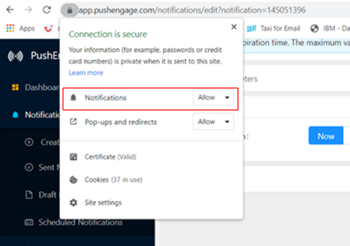
Δικαιώματα Περιηγητή από Ρυθμίσεις Συστήματος
Συχνά, οι ειδοποιήσεις push απορρίπτονται σε Επίπεδο Λειτουργικού Συστήματος, οπότε θα βλέπετε τον αριθμό αποστολής να αυξάνεται, αλλά οι προβολές δεν θα προστίθενται. Μπορείτε να ελέγξετε τις ρυθμίσεις του συστήματός σας ακολουθώντας τα παρακάτω βήματα ανάλογα με το Λειτουργικό σας Σύστημα για να ενεργοποιήσετε τις καμπάνιες push.
MacOS
Για MacOS, πρέπει να ακολουθήσουμε τα παρακάτω βήματα για να ελέγξουμε τις ρυθμίσεις
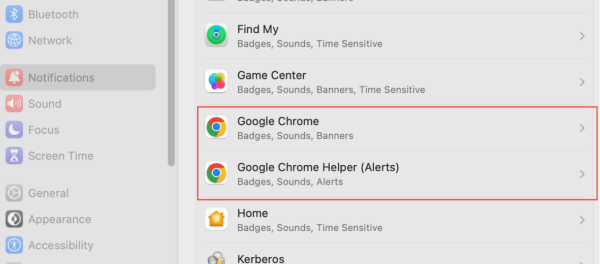
Κάντε κλικ στο Λογότυπο της Apple στην Πάνω Αριστερή Γωνία > στη συνέχεια Επιλέξτε Ρυθμίσεις Συστήματος > Ειδοποιήσεις > Κάτω από τις ειδοποιήσεις, πρέπει να διασφαλίσουμε ότι το Google Chrome και οι Ειδοποιήσεις Βοηθού Google Chrome έχουν ενεργοποιημένες τις ειδοποιήσεις.
Windows
Για Windows, πρέπει να ακολουθήσουμε τα παρακάτω βήματα για να ελέγξουμε τις ρυθμίσεις.
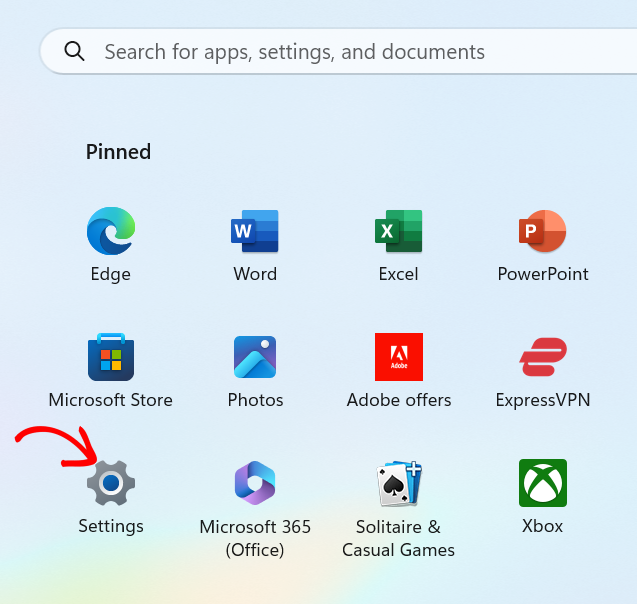
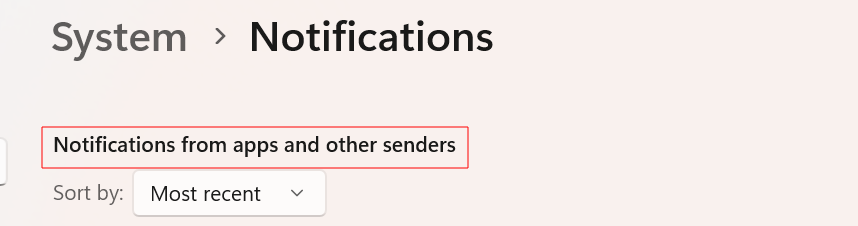
Κάντε κλικ στην καρτέλα ρυθμίσεων και μεταβείτε στο Σύστημα » Ειδοποίηση και ενεργοποιήστε τον Διακόπτη για να λαμβάνετε ειδοποιήσεις από την εφαρμογή και άλλους αποστολείς, όπως φαίνεται στο παρακάτω στιγμιότυπο οθόνης.
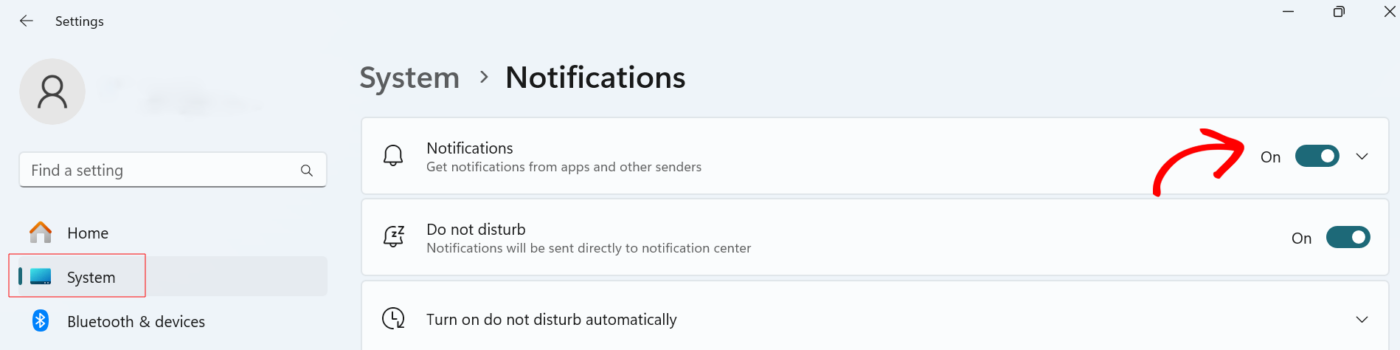
Σε ορισμένες περιπτώσεις, οι ειδοποιήσεις είναι απενεργοποιημένες για συγκεκριμένους ιστότοπους. Για να ενεργοποιήσετε τον διακόπτη, πρέπει να μεταβείτε στο Σύστημα » Ειδοποίηση. Κάντε κύλιση προς τα κάτω στην ενότητα Ειδοποιήσεις από εφαρμογές και άλλους αποστολείς και επιλέξτε την εφαρμογή για την οποία πρέπει να ενεργοποιηθεί ο διακόπτης ειδοποιήσεων.

Εάν όλα αυτά τα δικαιώματα είναι ενεργοποιημένα και δεν μπορείτε να λάβετε καμπάνιες push, μη διστάσετε να επικοινωνήσετε μαζί μας κάνοντας κλικ εδώ. Η ομάδα υποστήριξής μας θα μπορεί να σας βοηθήσει.


