Προσεγγίστε τους πελάτες σας τη σωστή στιγμή με αυτοματοποιημένα μηνύματα WhatsApp. Από ενημερώσεις παραγγελιών έως υπενθυμίσεις καλαθιού, θα σας βοηθήσουμε να ρυθμίσετε έγκαιρα, εξατομικευμένα μηνύματα που αυξάνουν την αλληλεπίδραση και οδηγούν σε περισσότερες μετατροπές, χωρίς να χρειάζεται να τα στέλνετε χειροκίνητα μετά από κάθε συμβάν.
Πριν Ξεκινήσετε
Αυτός ο οδηγός προϋποθέτει ότι έχετε δημιουργήσει την εφαρμογή WhatsApp Business με τη Meta και έχετε δημιουργήσει τα απαιτούμενα tokens. Εάν δεν έχετε ήδη έναν επιχειρηματικό λογαριασμό Meta, μπορείτε να δημιουργήσετε έναν και να δημιουργήσετε τα απαραίτητα tokens ακολουθώντας αυτόν τον οδηγό.
Ενεργοποίηση Εκστρατειών Αυτοματισμού
Αφού ολοκληρώσετε τη ρύθμιση και συνδέσετε τον Λογαριασμό σας WhatsApp Business. Μπορείτε να μεταβείτε στα Εγκατεστημένα Πρόσθετα.
Μεταβείτε στο PushEngage και κάντε κλικ στο WhatsApp
Μπορείτε να μεταβείτε στην Καρτέλα Αυτοματισμού εδώ.
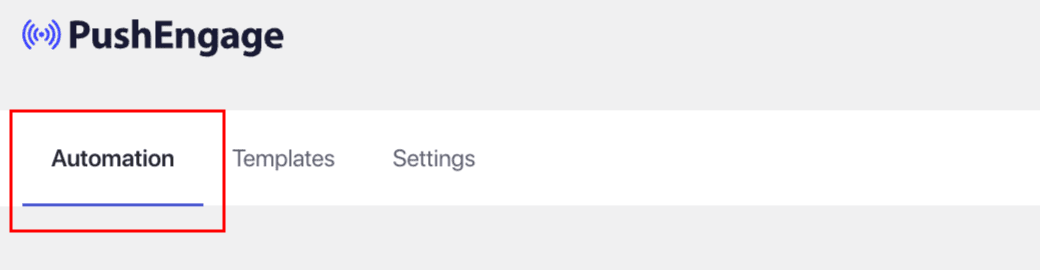
Σε αυτήν την Καρτέλα Αυτοματισμού, θα δείτε διάφορες ροές εργασίας σε ισχύ, οι οποίες θα έχουν ήδη προετοιμασμένα πρότυπα και ενεργοποιημένους ενεργοποιητές.
Με βάση την περίπτωσή σας, μπορείτε να επιλέξετε τις ροές εργασίας Αυτοματισμού που πρέπει να ενεργοποιήσετε στον ιστότοπό σας.
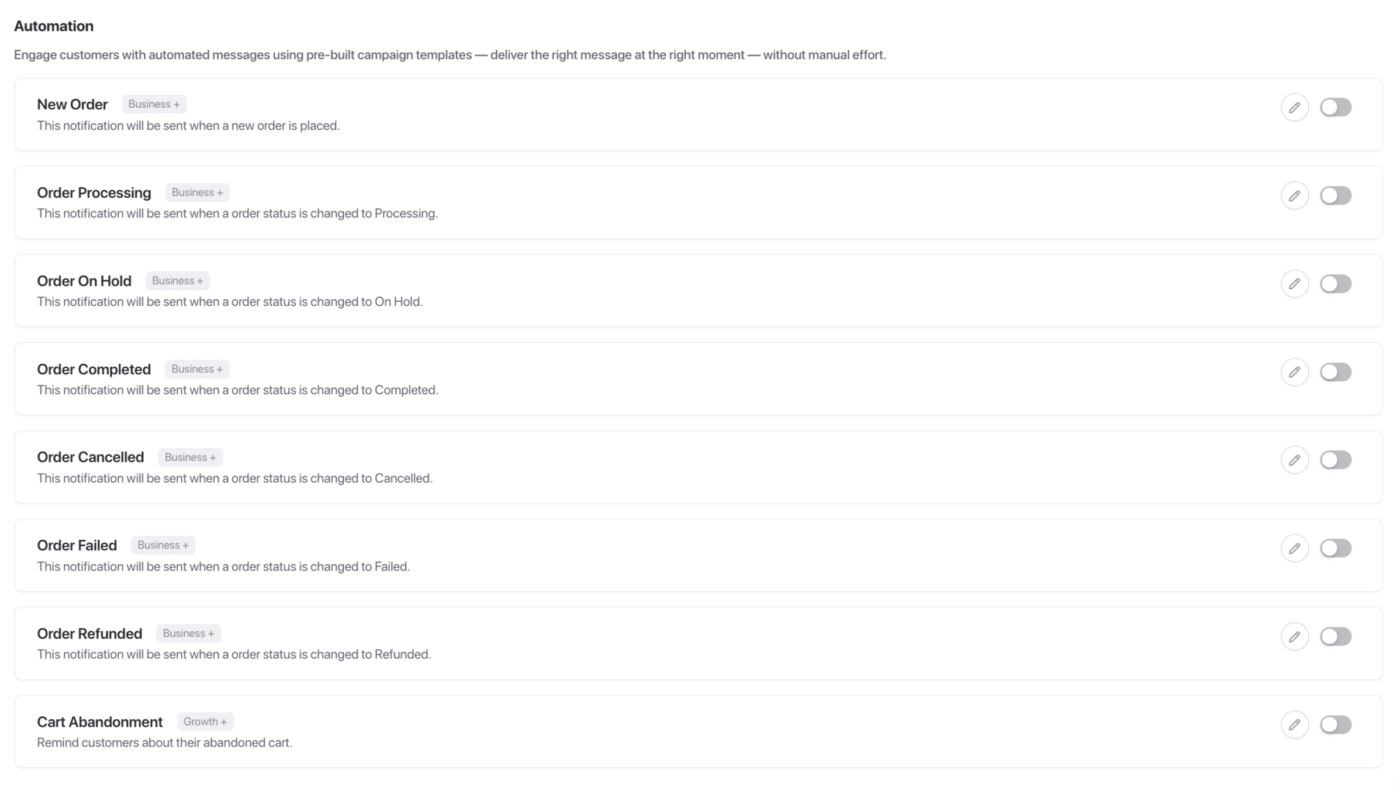
Όλες αυτές οι εκστρατείες είναι χρήσιμες αν έχετε ένα Ηλεκτρονικό Κατάστημα. Μπορείτε να ενεργοποιήσετε ή να επεξεργαστείτε αυτές τις εκστρατείες.
Για παράδειγμα, επεξεργαζόμαστε την Εκστρατεία Νέας Παραγγελίας. Κάθε φορά που ένας χρήστης κάνει μια παραγγελία, αυτή θα αποστέλλεται.
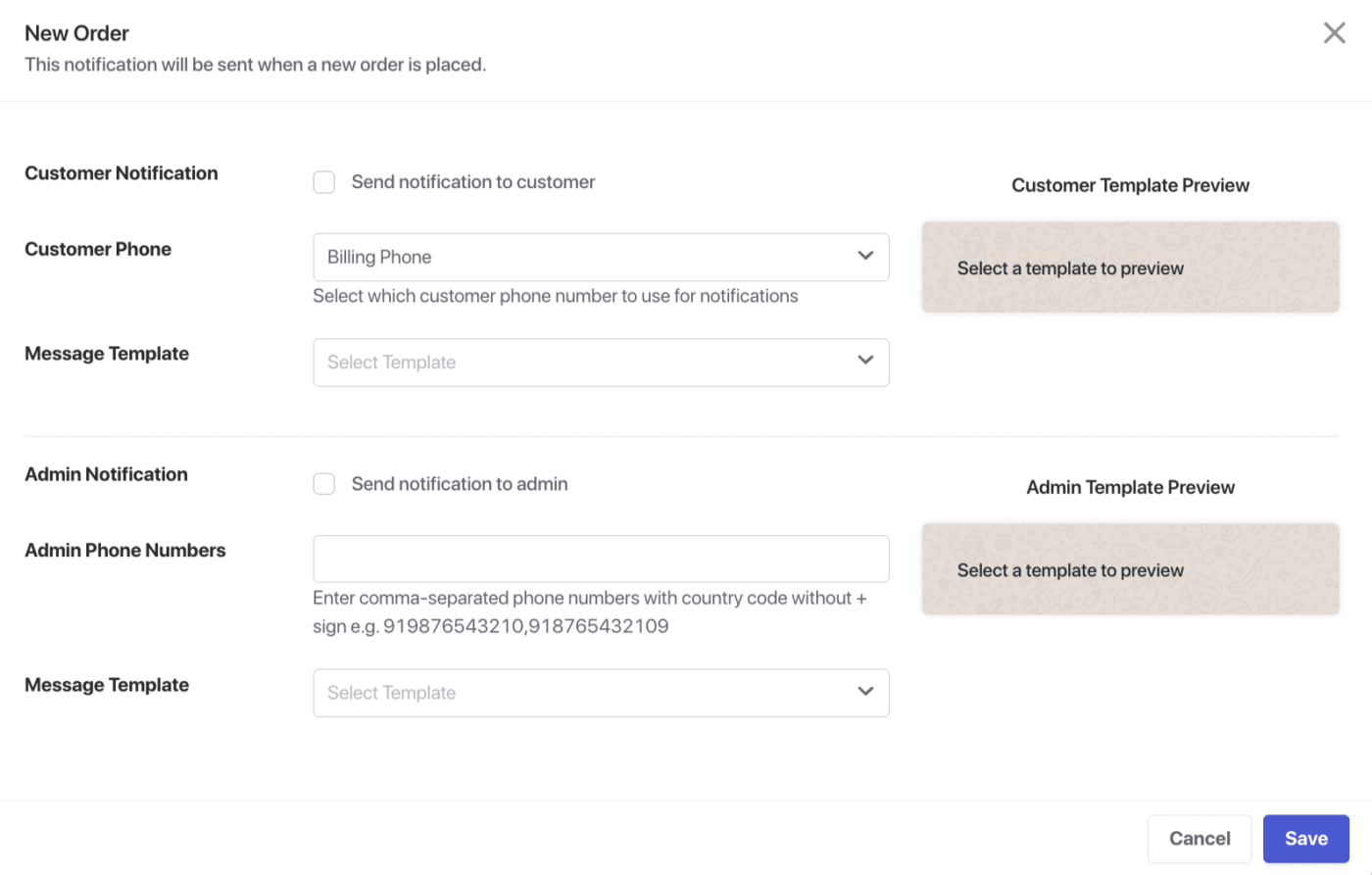
Μπορείτε να στείλετε εκστρατείες στον πελάτη ή στον Διαχειριστή και να επιλέξετε ποιον αριθμό τηλεφώνου θα χρησιμοποιηθεί.
Υπάρχει μια ποικιλία εγκεκριμένων προτύπων στον λογαριασμό σας Meta που μπορούν να επιλεγούν για αποστολή στους πελάτες σας.
Λίστα Διαθέσιμων Ροών Εργασίας Αυτοματισμού
Αυτές οι εκστρατείες είναι διαθέσιμες τόσο για τον Πελάτη όσο και για τον Διαχειριστή του καταστήματός σας.
Νέα Παραγγελία – Λάβετε άμεση ειδοποίηση όταν τοποθετείται μια νέα παραγγελία στο κατάστημά σας.
Επεξεργασία Παραγγελίας – Μείνετε ενημερωμένοι όταν μια παραγγελία μεταβαίνει στο στάδιο επεξεργασίας.
Παραγγελία σε Αναμονή – Λάβετε ειδοποίηση όταν μια παραγγελία τίθεται σε αναμονή.
Παραγγελία Ολοκληρώθηκε – Λάβετε ειδοποίηση όταν μια παραγγελία ολοκληρώνεται επιτυχώς.
Παραγγελία Ακυρώθηκε – Ενημερωθείτε όταν μια παραγγελία ακυρώνεται από τον πελάτη ή τον διαχειριστή.
Αποτυχία Παραγγελίας – Παρακολουθήστε τις αποτυχημένες παραγγελίες με ειδοποιήσεις σε πραγματικό χρόνο.
Επιστροφή Χρημάτων Παραγγελίας – Μάθετε αμέσως πότε εκδίδεται επιστροφή χρημάτων για μια παραγγελία.
Εγκατάλειψη Καλαθιού – Ανακτήστε χαμένες πωλήσεις υπενθυμίζοντας στους πελάτες τα αντικείμενα που άφησαν στο καλάθι τους.
Αυτό ήταν, έχετε ενεργοποιήσει τις εκστρατείες Αυτοματισμού για τα Μηνύματα WhatsApp σας.
Σε περίπτωση που αντιμετωπίσετε οποιοδήποτε πρόβλημα, μη διστάσετε να επικοινωνήσετε μαζί μας κάνοντας κλικ εδώ. Η ομάδα υποστήριξής μας θα μπορέσει να σας βοηθήσει.