Το ClickFunnels είναι μια πλατφόρμα που σας επιτρέπει να σχεδιάζετε και να δημιουργείτε σελίδες πωλήσεων και landing pages. Σας επιτρέπει να διαχειριστείτε ολόκληρη τη ροή πωλήσεών σας. Εάν είστε πρόθυμοι να ενσωματώσετε ειδοποιήσεις push μέσω ιστού για τη landing page σας, είναι δυνατό.
Σε αυτό το άρθρο, θα μάθετε πώς να ολοκληρώσετε την εγκατάσταση και να συλλέξετε συνδρομητές για να τους στείλετε ειδοποιήσεις push μέσω ιστού στο ClickFunnels.
Πριν ξεκινήσετε
Πρέπει να ρυθμίσετε τη landing page/funnel του ClickFunnels για να προσθέσετε τον κωδικό εγκατάστασης PushEngage μόλις η landing page σας είναι έτοιμη.
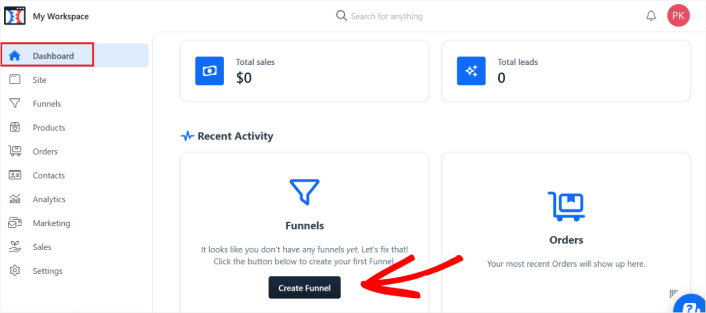
1. Συνδεθείτε στον λογαριασμό σας στο ClickFunnels και, στη συνέχεια, μεταβείτε στον Πίνακα ελέγχου. Μόλις βρίσκεστε στον πίνακα ελέγχου, κάντε κλικ στο Δημιουργία Funnel εάν δεν έχετε ήδη δημιουργήσει ένα funnel.
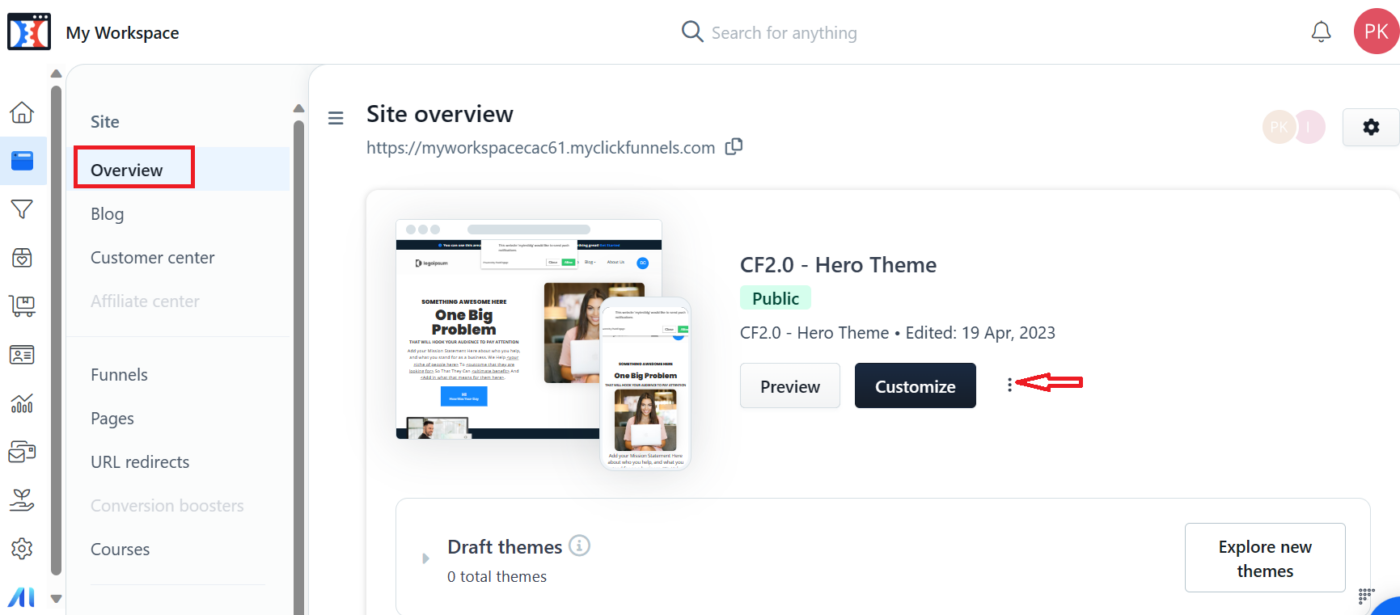
2. Μόλις δημιουργήσετε το Funnel, μπορείτε να μεταβείτε στην ενότητα Ιστότοποι. Στην ενότητα ιστότοπου κάντε κλικ στο Επισκόπηση » Προσαρμογή
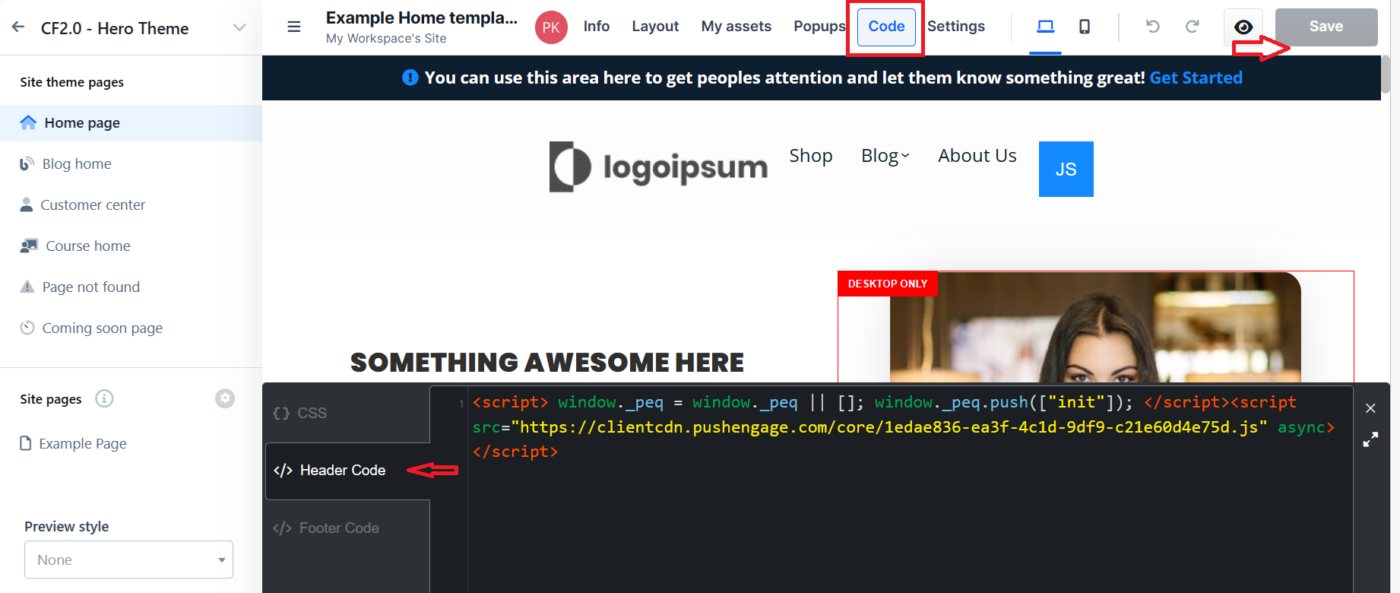
3. Τώρα πρέπει να μετακινηθείτε στην επάνω γραμμή πλοήγησης και να κάνετε κλικ στην ενότητα Κώδικας. Αυτό θα σας επιτρέψει να προσθέσετε τον κωδικό εγκατάστασης στην ενότητα Κεφαλίδα/Υποσέλιδο.
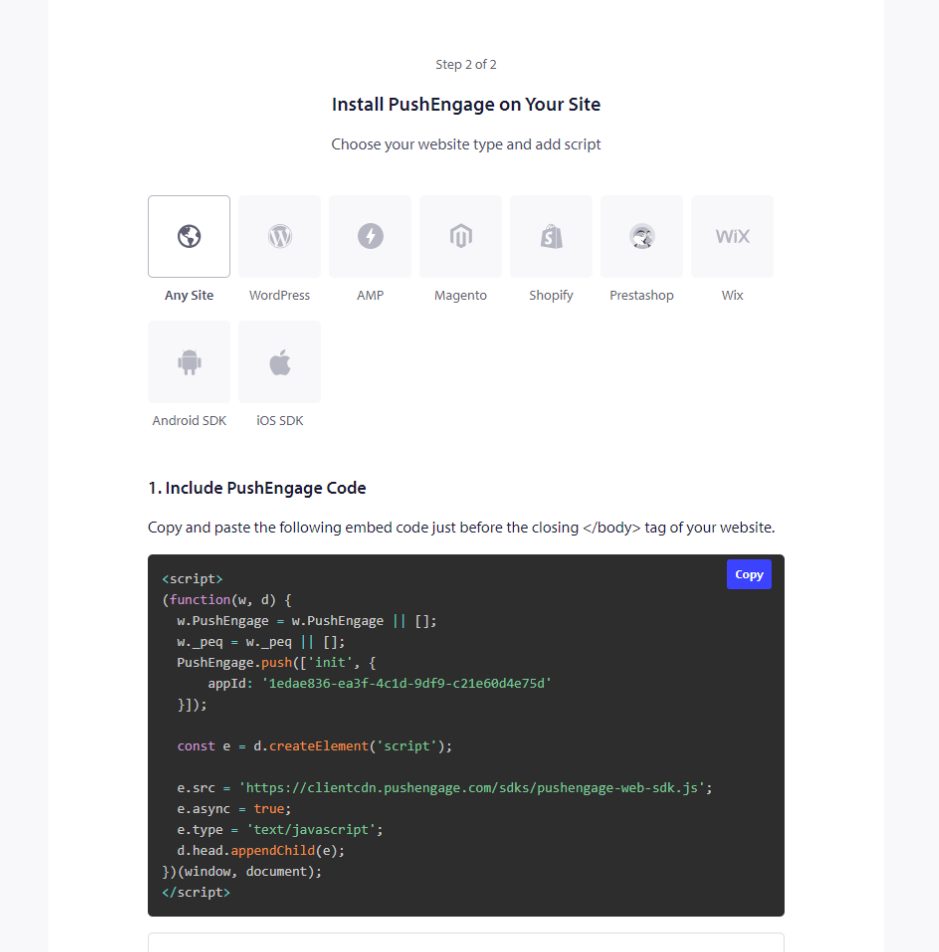
4. Για να λάβετε τον κωδικό, πρέπει να συνδεθείτε στον πίνακα ελέγχου PushEngage και να μεταβείτε στις Ρυθμίσεις Ιστότοπου » Εγκατάσταση. Εδώ, επιλέξτε την καρτέλα Οποιοσδήποτε Ιστότοπος και αντιγράψτε τον κωδικό εγκατάστασης που αναφέρεται εδώ.
5. Μόλις επικολλήσετε τον κωδικό στην ενότητα Κεφαλίδα/Υποσέλιδο, μπορείτε να κάνετε κλικ στο κουμπί Αποθήκευση στον πίνακα ελέγχου του ClickFunnels.
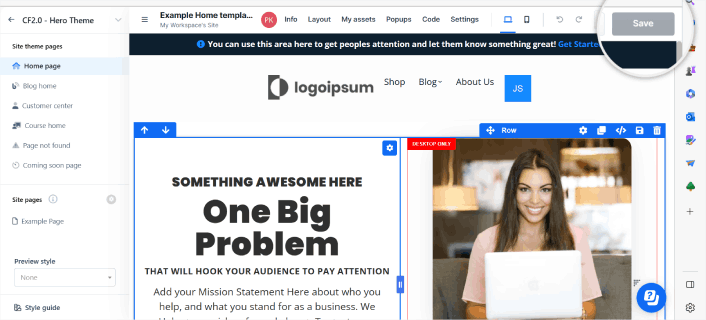
Ρύθμιση της Αναδυόμενης Καρτέλας
Μόλις προστεθεί ο κωδικός, είναι σημαντικό να έχετε τη σωστή ρύθμιση στην Αναδυόμενη Καρτέλα, καθώς θα βοηθήσει στη συλλογή συνδρομητών. Δεν μπορείτε να επιλέξετε Ενιαία Εγγραφή Push, καθώς το ClickFunnels δεν σας επιτρέπει να προσθέσετε το service worker στον κύριο φάκελο.
Μεταβείτε στις Ρυθμίσεις Σχεδίασης » Αναδυόμενες Καρτέλες »
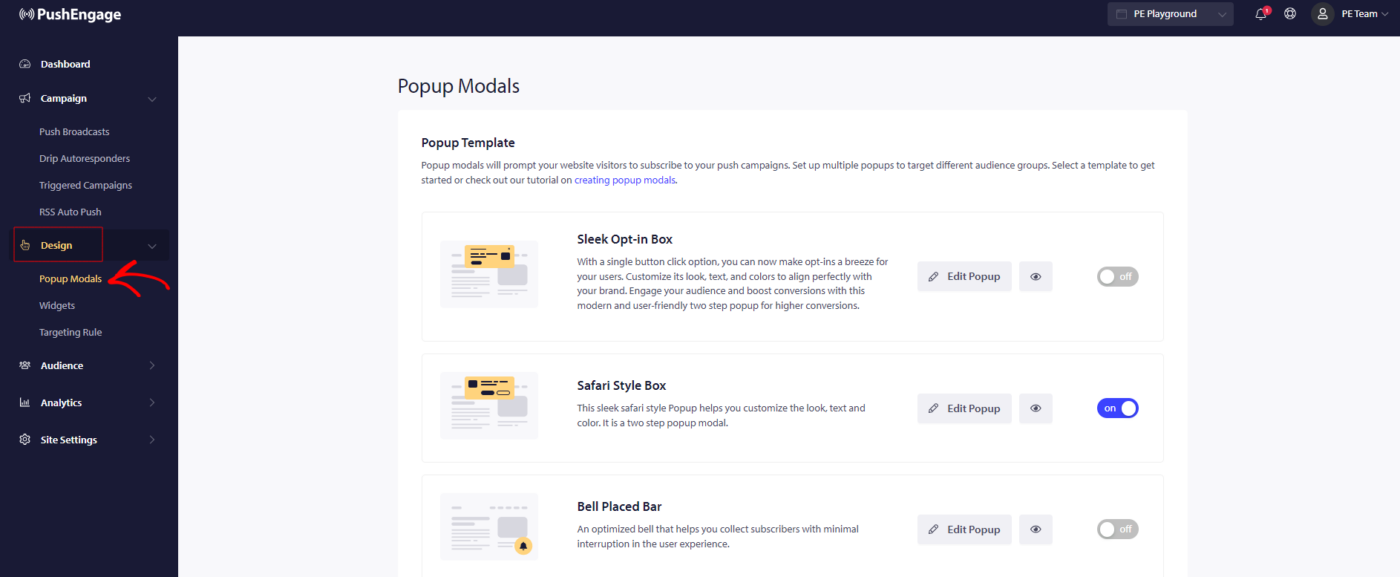
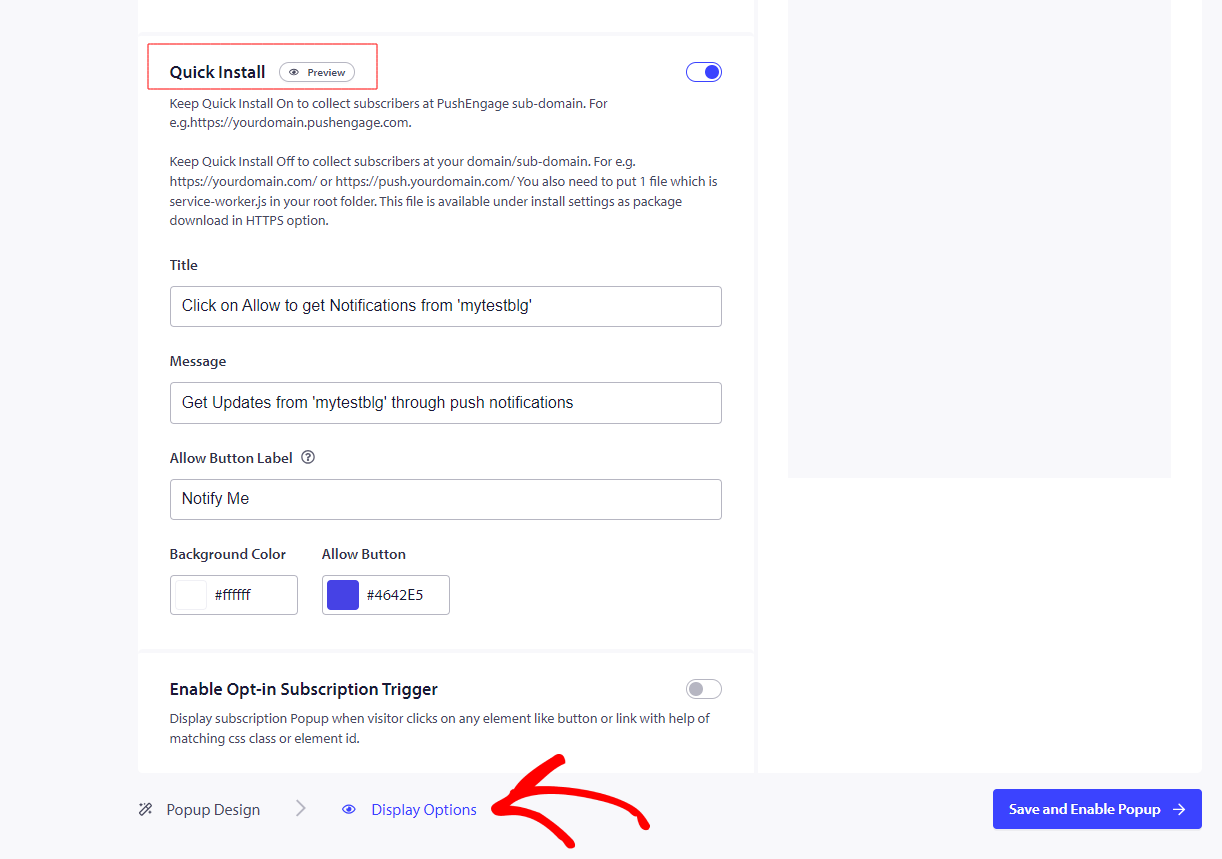
Επιλέξτε οποιοδήποτε στυλ εγγραφής εκτός από την Ενιαία Εγγραφή Push. Έτσι, θα πρέπει να ενεργοποιήσετε την γρήγορη εγκατάσταση. Δείτε πώς μπορείτε να το κάνετε αυτό –
Μεταβείτε στις Ρυθμίσεις Σχεδίασης » Επεξεργασία Αναδυόμενων Καρτελών » Επιλογές Εμφάνισης
Έτσι θα βλέπετε την εγγραφή στον ιστότοπό σας μόλις ρυθμιστεί.
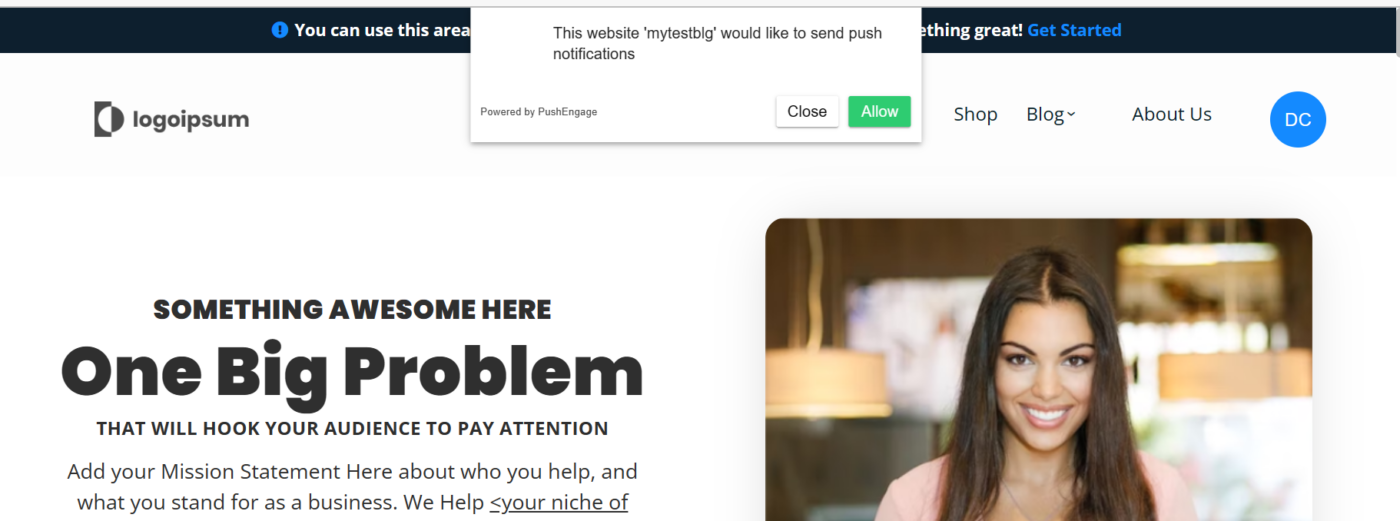
Αυτό είναι όλο, και η εγκατάστασή σας ολοκληρώθηκε. Θα λάβετε μια επιλογή εγγραφής όταν επισκέπτεστε τον ιστότοπό σας.
Σημείωση: Με το ClickFunnels, περιορίζεστε στο να έχετε μια συνδρομή στο υποτομέα του PushEngage, καθώς δεν μπορούμε να προσθέσουμε ένα αρχείο service worker στο ClickFunnels.
Εάν αντιμετωπίσετε οποιοδήποτε πρόβλημα, μη διστάσετε να επικοινωνήσετε μαζί μας κάνοντας κλικ εδώ. Η ομάδα υποστήριξής μας θα μπορέσει να σας βοηθήσει.