Η ανάλυση εγγραφής opt-in θα σας δώσει μια προβολή της ροής των επισκεπτών σας που αποδέχονται/αποκλείουν ειδοποιήσεις push στο πρόγραμμα περιήγησης στον ιστότοπό σας.
Μπορείτε να αναλύσετε αυτά τα δεδομένα και να ελέγξετε ποιες από τις στρατηγικές ή τα στυλ opt-in λειτουργούν για εσάς.
Σημείωση : Αυτή είναι η δυνατότητα που είναι διαθέσιμη σε Business plans και άνω.
Για να ενεργοποιήσετε αυτήν την αναφορά, μεταβείτε στο Analytics > Opt-in Analytics > Κάντε κλικ στο κουμπί Settings

Ενεργοποιήστε την ανάλυση opt-in εγγραφής και κάντε κλικ στο Update Subscription Opt-in Analytics.
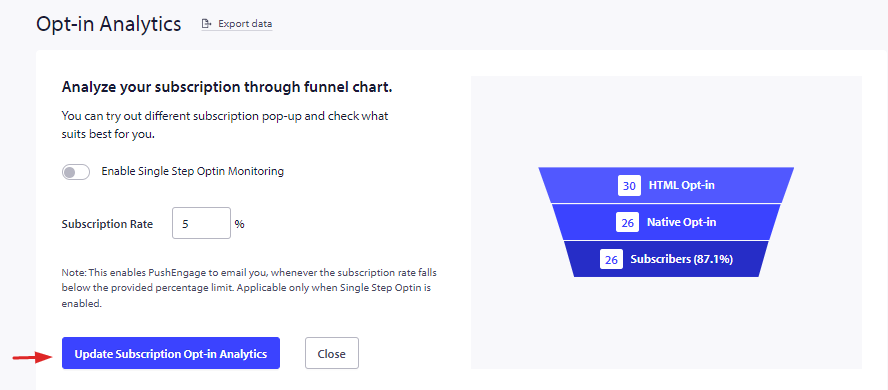
Αφού ενεργοποιήσετε αυτήν τη δυνατότητα, μπορείτε να δείτε την ανάλυση στην ίδια ενότητα.
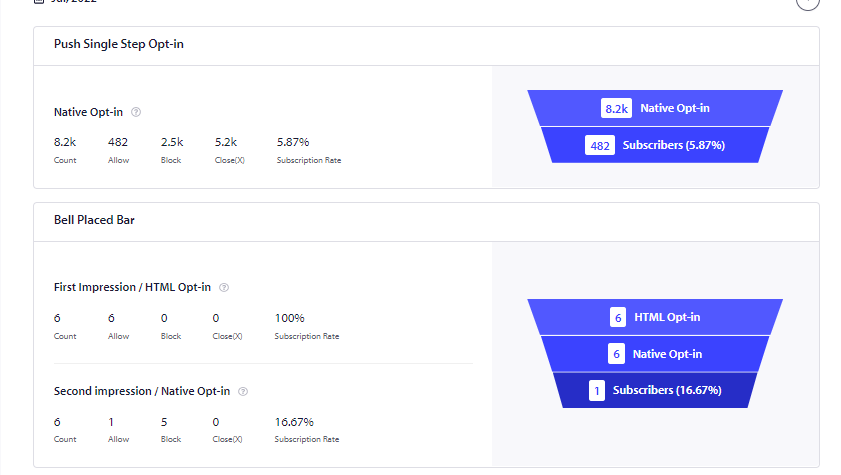
Εδώ, εκτός από το opt-in εγγραφής, μπορείτε επίσης να δείτε την ανάλυση από το widget ανάκτησης που ονομάζεται widget Get notification. Αυτό το widget δίνει μια δεύτερη ευκαιρία στους επισκέπτες που έχουν κάνει κλικ στο block.
Σε περίπτωση που αντιμετωπίσετε προβλήματα, μη διστάσετε να επικοινωνήσετε μαζί μας κάνοντας κλικ εδώ. Η ομάδα υποστήριξής μας θα μπορέσει να σας βοηθήσει.