Λοιπόν, έχετε εξερευνήσει τις δυνατότητες του PushEngage και είστε έτοιμοι να αναβαθμίσετε τον λογαριασμό σας για προηγμένες λειτουργίες. Αυτό θα σας βοηθήσει να αυξήσετε την επαναλαμβανόμενη επισκεψιμότητα και την αλληλεπίδραση.
Σε αυτό το άρθρο, θα μάθετε πώς να αναβαθμίσετε τον λογαριασμό σας.
Πριν Ξεκινήσετε
Ορίστε μερικά πράγματα που πρέπει να γνωρίζετε πριν ξεκινήσετε:
- Δεν μπορείτε να υποβαθμίσετε τον λογαριασμό σας χωρίς να επικοινωνήσετε με την υποστήριξη.
- Η αναβάθμιση του λογαριασμού σας PushEngage θα γίνει αναλογικά όταν ενημερώσετε τον λογαριασμό σας.
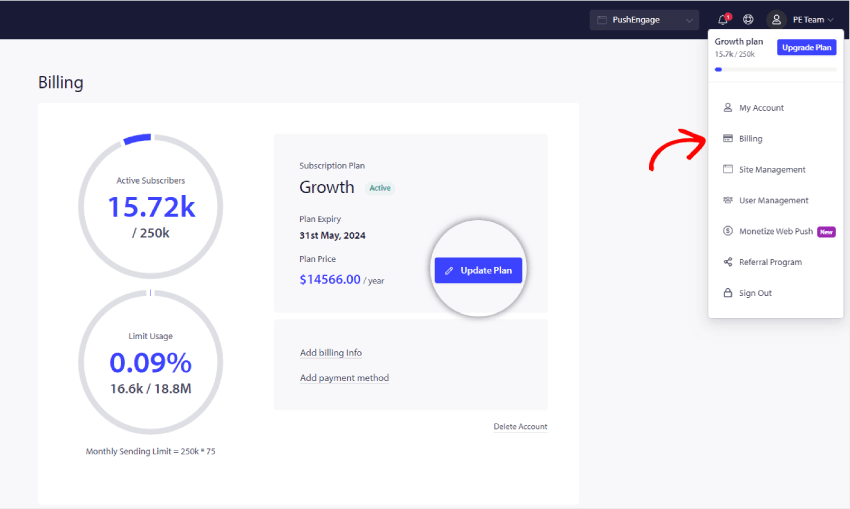
Όλες οι λεπτομέρειες στον λογαριασμό PushEngage σχετικά με το πρόγραμμα συνδρομής βρίσκονται στον Πίνακα Ελέγχου στην ενότητα Χρεώσεις. Μπορείτε να αναβαθμίσετε το πρόγραμμά σας ελέγχοντας το όριο συνδρομητών, το πρόσθετο ιστότοπου, τις δυνατότητες αυτοματισμού, τη λειτουργία χρεώσεων κ.λπ.
Μεταβείτε στο Εικονίδιο Προφίλ στην επάνω δεξιά γωνία και κάντε κλικ στο Χρεώσεις
Στη συνέχεια, στη σελίδα Λεπτομέρειες Χρεώσεων, κάντε κλικ στο Ενημέρωση Προγράμματος, όπως φαίνεται στην παρακάτω οθόνη:
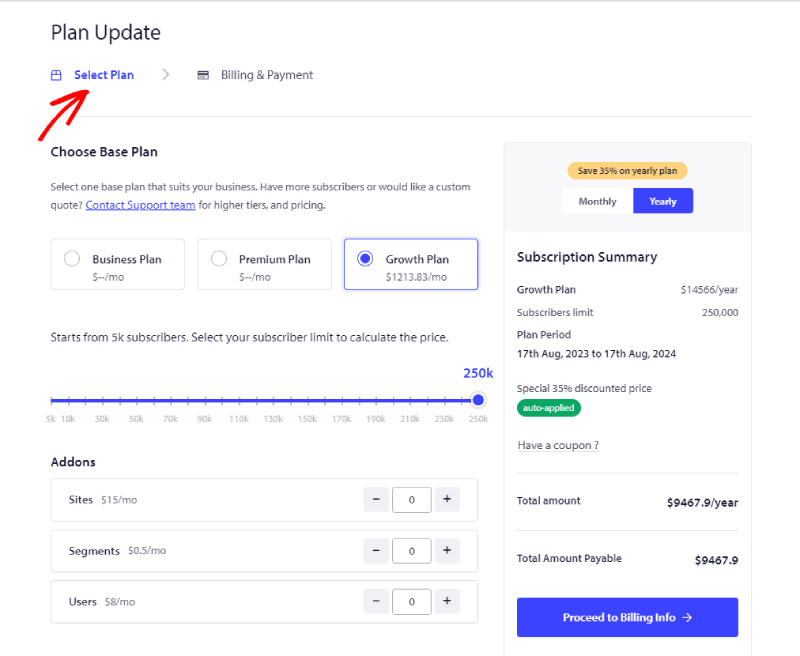
Επιλέξτε το σωστό πρόγραμμα σύμφωνα με τις επιχειρηματικές σας ανάγκες. Και επιλέξτε τη βαθμίδα συνδρομητών και το Πρόγραμμα στο οποίο θέλετε να κάνετε αναβάθμιση. Τώρα μπορείτε να κάνετε κλικ στο Μετάβαση σε Πληροφορίες Χρεώσεων
Τώρα μπορείτε να μεταβείτε στη σελίδα Πληροφορίες Χρεώσεων.
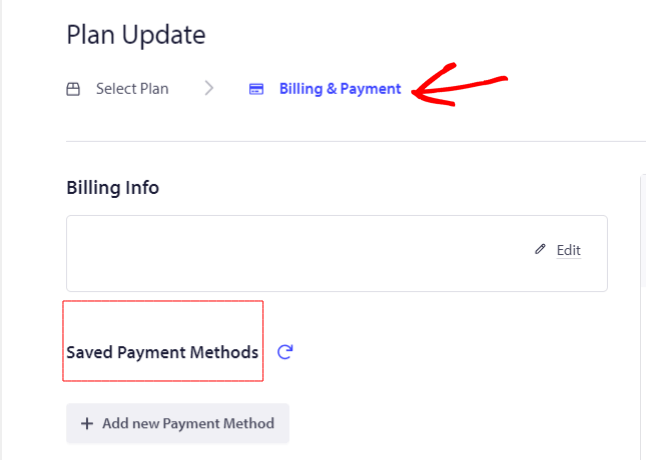
Μπορείτε να προσθέσετε Λεπτομέρειες Χρεώσεων και Λεπτομέρειες κάρτας για να προχωρήσετε στην ολοκλήρωση της αγοράς.
Αυτό είναι όλο. Ο λογαριασμός σας έχει πλέον αναβαθμιστεί.
Εάν αντιμετωπίσετε οποιοδήποτε πρόβλημα, μη διστάσετε να επικοινωνήσετε μαζί μας κάνοντας κλικ εδώ. Η ομάδα υποστήριξής μας θα μπορέσει να σας βοηθήσει.