Τα καταστήματα WooCommerce υπερέχουν στην προσφορά ποικίλων προϊόντων, αλλά συχνά αντιμετωπίζουν προκλήσεις με την εγκατάλειψη καλαθιού και περιήγησης. Το PushEngage προσφέρει μια καινοτόμο λύση, επιτρέποντας καμπάνιες που αλληλεπιδρούν απευθείας με τη ροή προϊόντων σας και μετατρέπουν πιθανές απώλειες σε μετατροπές με τη βοήθεια του WPCode.
Οι πελάτες σας μπορούν να λαμβάνουν υπενθυμίσεις μέσω ειδοποιήσεων push μετά την εγκατάλειψή τους, και αυτό μπορεί να τους ενθαρρύνει να ολοκληρώσουν την πληρωμή.
Πριν Ξεκινήσετε
Ορίστε μερικά πράγματα που πρέπει να γνωρίζετε πριν ξεκινήσετε:
- Η ενσωμάτωση WooCommerce απαιτεί μια συνδρομή PushEngage Growth για τη δημιουργία μιας Καμπάνιας Εγκατάλειψης Καλαθιού και Περιήγησης χρησιμοποιώντας τη λειτουργία Trigger Campaign.
- Αυτός ο οδηγός υποθέτει ότι έχετε ήδη εγκαταστήσει τα plugins WooCommerce και WPCode στην ιστοσελίδα σας στο WordPress.
Δημιουργία Καμπάνιας Ενεργοποίησης στο Πίνακα Ελέγχου του PushEngage
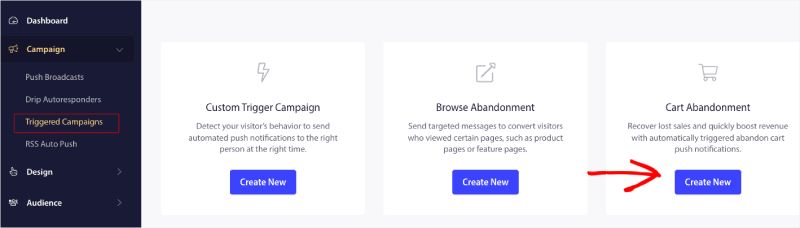
Πρέπει να συνδεθείτε στον πίνακα ελέγχου σας και να μεταβείτε στο Campaign » Triggered Campaigns.
Επιλέξτε Καμπάνια Εγκατάλειψης Καλαθιού/Περιήγησης και κάντε κλικ στο Δημιουργία Νέας.
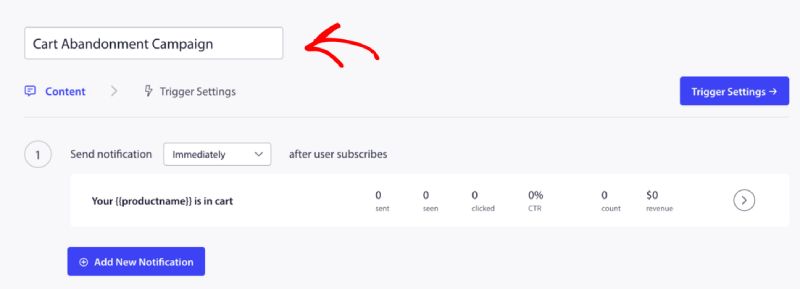
Τώρα μπορείτε να εισαγάγετε το Όνομα Καμπάνιας.
Προσθήκη Περιεχομένου Καμπάνιας
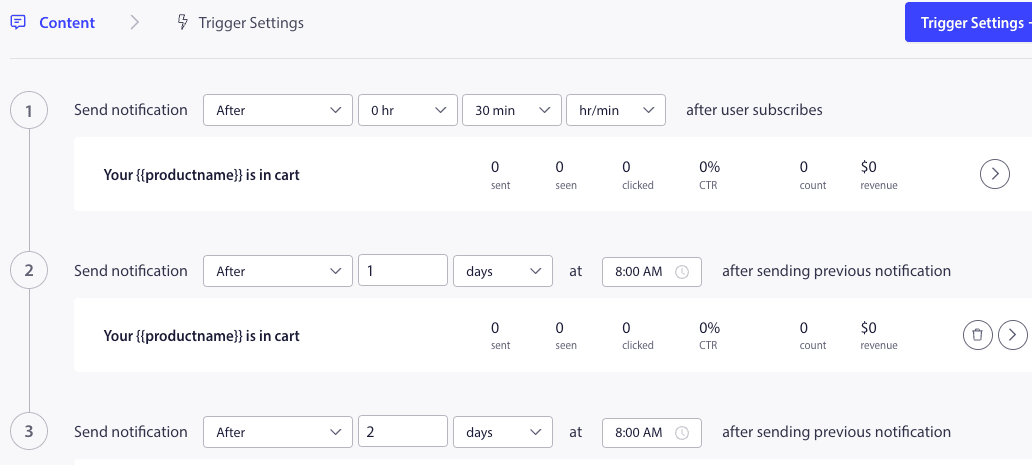
Το επόμενο βήμα είναι να διαμορφώσετε το πρόγραμμα της ροής – Μπορείτε να επιλέξετε είτε την άμεση επιλογή, μετά από n ώρες και λεπτά, είτε μετά από μια συγκεκριμένη ημέρα.
Συνήθως, δεν συνιστούμε να προγραμματίζετε την ώρα για άμεσα. Θα πρέπει να έχετε τουλάχιστον 15 ή 30 λεπτά κενό για την πρώτη καμπάνια της σειράς.
Όταν ρυθμίζετε μια σειρά, μπορείτε να έχετε τουλάχιστον τρεις καμπάνιες. Μπορείτε να προσαρμόσετε τον τίτλο και το μήνυμα για κάθε καμπάνια της σειράς. Βεβαιωθείτε ότι δεν αλλάζετε μεταβλητές εάν σκοπεύετε να χρησιμοποιήσετε αυτές τις μεταβλητές στην καμπάνια.
Οι προεπιλεγμένες μεταβλητές που προστίθενται στον κώδικα ανάλογα με την καμπάνια είναι – {{productname}}, {{price}} και {{notificationurl}}
Διαχείριση Ρυθμίσεων Ενεργοποίησης
Αφού προσθέσετε το περιεχόμενο της ειδοποίησης, μπορείτε να μεταβείτε στις Ρυθμίσεις Ενεργοποίησης.
Εδώ οι ενεργοποιητές είναι προκαθορισμένοι. Η καμπάνια ξεκινά εάν ένα άτομο προσθέσει το προϊόν στο καλάθι και δεν ολοκληρώσει την πληρωμή. Εάν ολοκληρώσει την πληρωμή, δεν θα λάβει την ειδοποίηση εγκατάλειψης καλαθιού. Αλλά αυτά είναι απλώς συμβάντα που ορίζονται· δεν μπορούν να εκτελεστούν εκτός αν τοποθετηθούν στον ιστότοπο.
Οι ενεργοποιητές εδώ είναι Έναρξη Καμπάνιας Εάν – προσθήκη στο καλάθι και Διακοπή Καμπάνιας Εάν – πληρωμή.
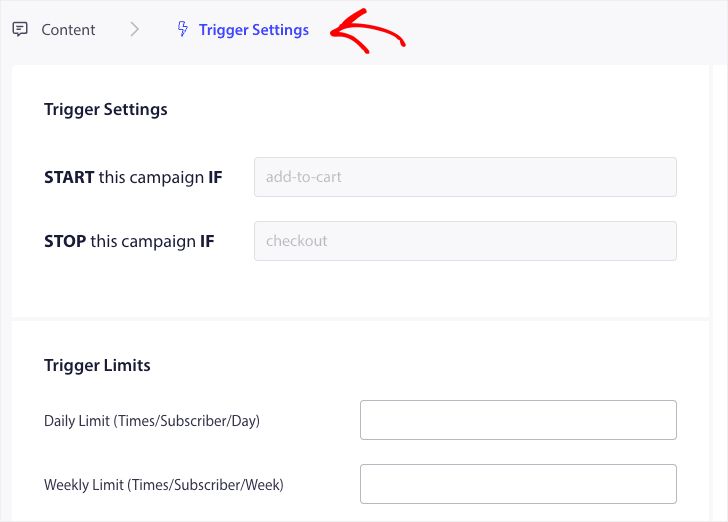
Το επόμενο βήμα είναι να προσθέσετε τα ημερήσια και εβδομαδιαία όρια ενεργοποίησης. Αυτό θα καθορίσει τον συνολικό αριθμό ειδοποιήσεων που μπορεί να λάβει ένας συνδρομητής καθημερινά και εβδομαδιαία. Για παράδειγμα – Εάν 2 ειδοποιήσεις είναι καθημερινές, τότε θα πρέπει να είναι 14 εβδομαδιαίες· με αυτόν τον τρόπο, η συχνότητα θα περιοριστεί ακόμη και αν εγκαταλειφθούν περισσότερα από δύο προϊόντα.
Επεξεργασία και Ενεργοποίηση Snippet στο WPCode
Για να ξεκινήσετε, επισκεφθείτε την καρτέλα Snippets Κώδικα στον Πίνακα Ελέγχου του WordPress σας.
Εδώ θα χρειαστείτε δύο αποσπάσματα για επεξεργασία με βάση την καμπάνια σας.
- Για Καμπάνια Εγκατάλειψης Καλαθιού – Κατά το Γεγονός Προσθήκης στο Καλάθι στο WooCommerce και Μετά το Γεγονός Ολοκλήρωσης Αγοράς στο WooCommerce.
- Για Καμπάνια Εγκατάλειψης Περιήγησης – Κατά την Περιήγηση σε Προϊόντα WooCommerce και Κατά το Γεγονός Προσθήκης στο Καλάθι στο WooCommerce
Επιλέξτε με βάση την καμπάνια σας και κάντε κλικ στο Χρήση Αποσπάσματος. Μόλις έχετε το απόσπασμα ανοιχτό στον Επεξεργαστή.
Προσθήκη του Ονόματος της Καμπάνιας
Βεβαιωθείτε ότι έχει προστεθεί το σωστό όνομα καμπάνιας για κάθε γεγονός. Δεν χρειάζεται να αλλάξετε την Τοποθεσία, αφήστε το απόσπασμα να προστεθεί σε όλο τον ιστότοπο.
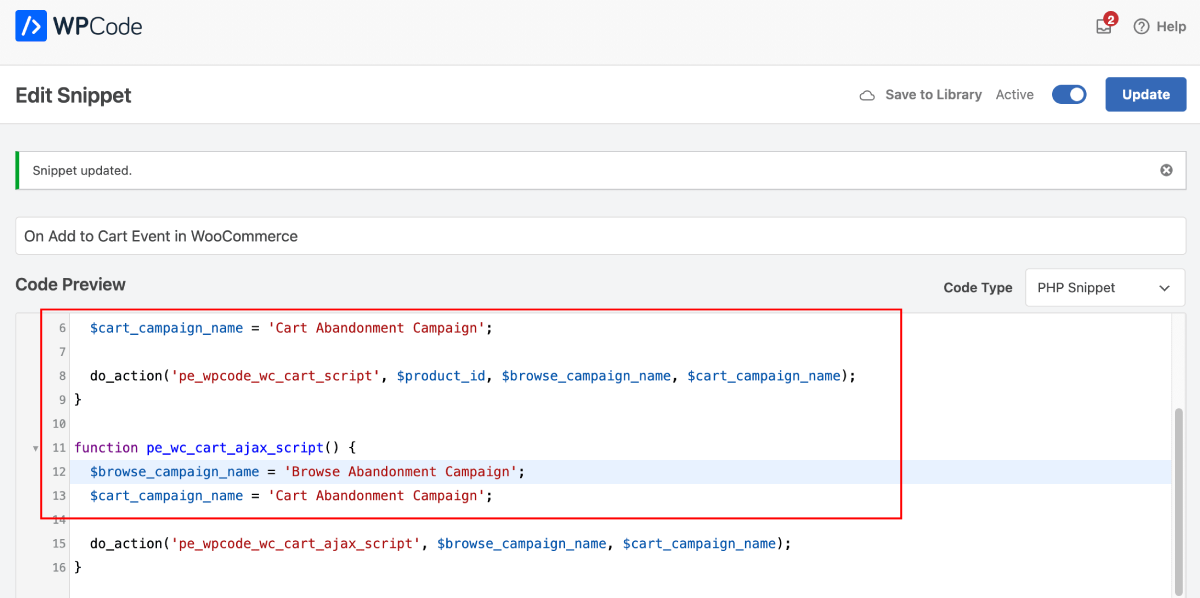
Αφού οριστικοποιηθεί το απόσπασμα, μπορείτε να το ενεργοποιήσετε. Χωρίς ενεργοποίηση, το απόσπασμα δεν θα είναι λειτουργικό.
Αντιμετώπιση Προβλημάτων Ενεργοποιημένων Καμπανιών
- Το όνομα της καμπάνιας πρέπει να είναι το ίδιο στον κώδικα και στον πίνακα ελέγχου του PushEngage.
- Ο κώδικας εγκατάστασης του PushEngage πρέπει να υπάρχει εκεί που υπάρχει και ο κώδικας καμπάνιας εγκατάλειψης καλαθιού, αλλιώς οι καμπάνιες δεν θα ενεργοποιηθούν χωρίς αυτόν.
- Βεβαιωθείτε ότι η καμπάνια είναι ενεργή στον πίνακα ελέγχου αφού έχετε τοποθετήσει τον κώδικα στον ιστότοπό σας.
- Πρέπει να είστε συνδρομητής web push του ιστότοπού σας· αλλιώς, δεν μπορείτε να ελέγξετε αν λαμβάνετε καμπάνιες εγκατάλειψης καλαθιού στο σύστημά σας.
Αυτό είναι όλο! Έχετε πλέον ενεργοποιήσει μια καμπάνια Εγκατάλειψης Καλαθιού/Περιήγησης στο Κατάστημα WooCommerce σας χρησιμοποιώντας το WPCode.
Εάν αντιμετωπίσετε οποιοδήποτε πρόβλημα, μη διστάσετε να επικοινωνήσετε μαζί μας κάνοντας κλικ εδώ. Η ομάδα υποστήριξής μας θα μπορούσε να σας βοηθήσει.