Στον λογαριασμό σας PushEngage, μπορείτε να ενημερώσετε τις λεπτομέρειες του ιστότοπου όπως Όνομα Ιστότοπου, URL και λογότυπο ιστότοπου οποιαδήποτε στιγμή.
Αυτός ο οδηγός θα σας καθοδηγήσει στη διαδικασία ενημέρωσης/αλλαγής των λεπτομερειών του ιστότοπου απευθείας από τον πίνακα ελέγχου σας
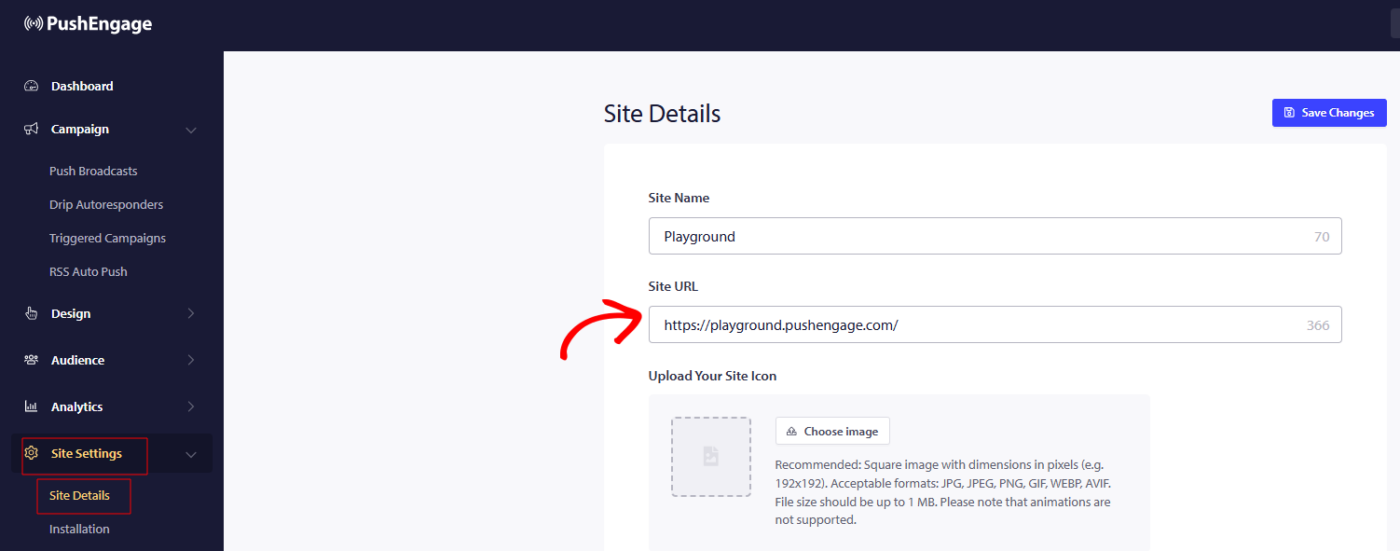
Μπορείτε να μεταβείτε στις Ρυθμίσεις Ιστότοπου » Λεπτομέρειες Ιστότοπου και να ενημερώσετε οποιεσδήποτε λεπτομέρειες θέλετε να ενημερώσετε.
Οι διαστάσεις για το λογότυπο του ιστότοπου αναφέρονται επίσης, οπότε αναμένεται να χρησιμοποιήσετε την ίδια αναλογία και μέγεθος, ώστε το λογότυπο να μην περικοπεί στην Εικόνα Εγγραφής ή Ειδοποίησης.
T
G
Αφού κάνετε τις αλλαγές, θυμηθείτε να κάνετε κλικ στο Αποθήκευση Αλλαγών για να εφαρμόσετε τις ενημερώσεις
Αν αντιμετωπίσετε οποιοδήποτε πρόβλημα, παρακαλούμε επικοινωνήστε μαζί μας κάνοντας κλικ εδώ. Η ομάδα υποστήριξής μας θα μπορέσει να σας βοηθήσει.