Ναι, μπορείτε να αλλάξετε από Paypal σε χρέωση μέσω πιστωτικής κάρτας. Εάν μας πληρώνατε μέσω Paypal αλλά θέλετε αντ' αυτού να αρχίσετε να πληρώνετε μέσω της επιλογής πιστωτικής κάρτας, καθώς αυτό θα κάνει τη διαδικασία πιο βολική με μια επιλογή επαναλαμβανόμενης χρέωσης.
Μπορείτε να το κάνετε ακολουθώντας τα παρακάτω βήματα –
1. Μπορείτε να μας στείλετε ένα email στο [email protected] για να ακυρώσετε τις προγραμματισμένες τιμολογήσεις Paypal.
2. Μεταβείτε στην επάνω δεξιά γωνία του Πίνακα Ελέγχου. Κάντε κλικ στο όνομα του Λογαριασμού σας και μεταβείτε στην Επιλογή Χρέωσης » Κάντε κλικ στο Ενημέρωση Προγράμματος
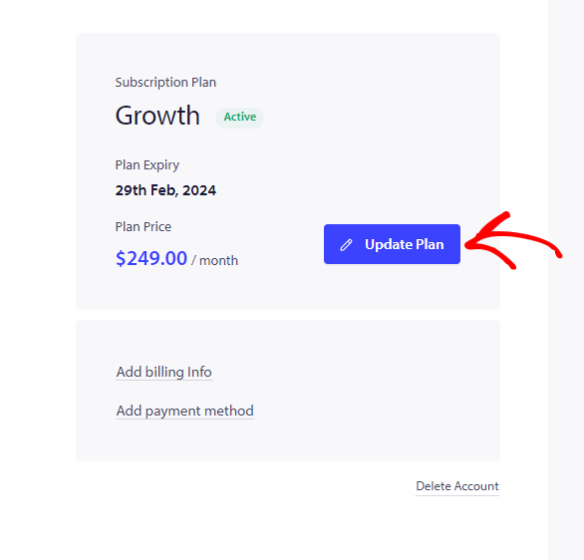
3. Επιλέξτε το πρόγραμμα που είχατε στο PayPal. Αργότερα, μπορείτε στη συνέχεια να μεταβείτε στην καρτέλα Ενημέρωση Χρέωσης & Πληρωμής
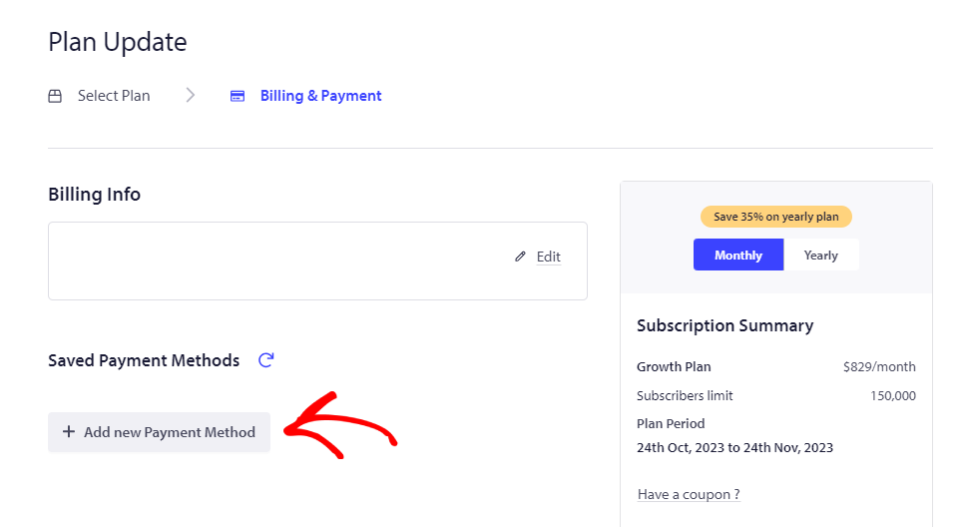
4. Προσθέστε τα στοιχεία της πιστωτικής κάρτας και κάντε κλικ στο ‘Προσθήκη Νέας Μεθόδου Πληρωμής’.
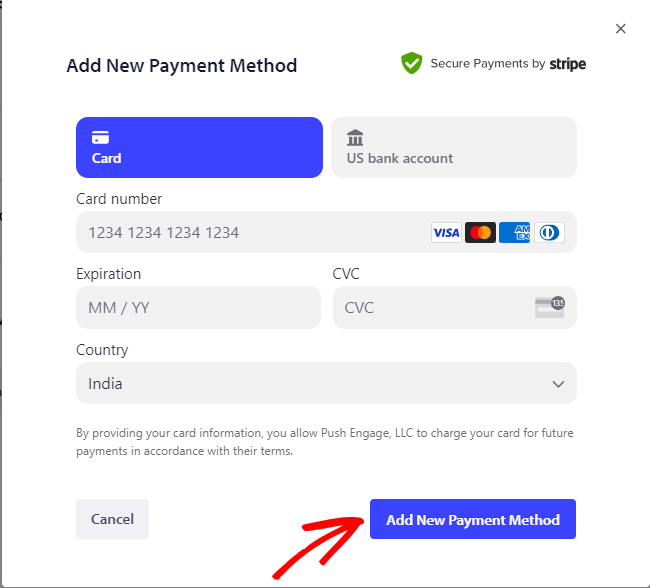
Ολοκληρώστε τα επόμενα βήματα & κάντε checkout. Ο λογαριασμός σας είναι τώρα σε λειτουργία πληρωμής με πιστωτική κάρτα.
Σε περίπτωση που αντιμετωπίσετε οποιοδήποτε πρόβλημα, μη διστάσετε να επικοινωνήσετε μαζί μας κάνοντας κλικ εδώ. Η ομάδα υποστήριξής μας θα μπορέσει να σας βοηθήσει.