目标跟踪与分析
获取您需要的所有可操作数据,以便自信地增加您的流量、销售额和收入。
- 永久免费套餐
- 轻松设置
- 五星支持
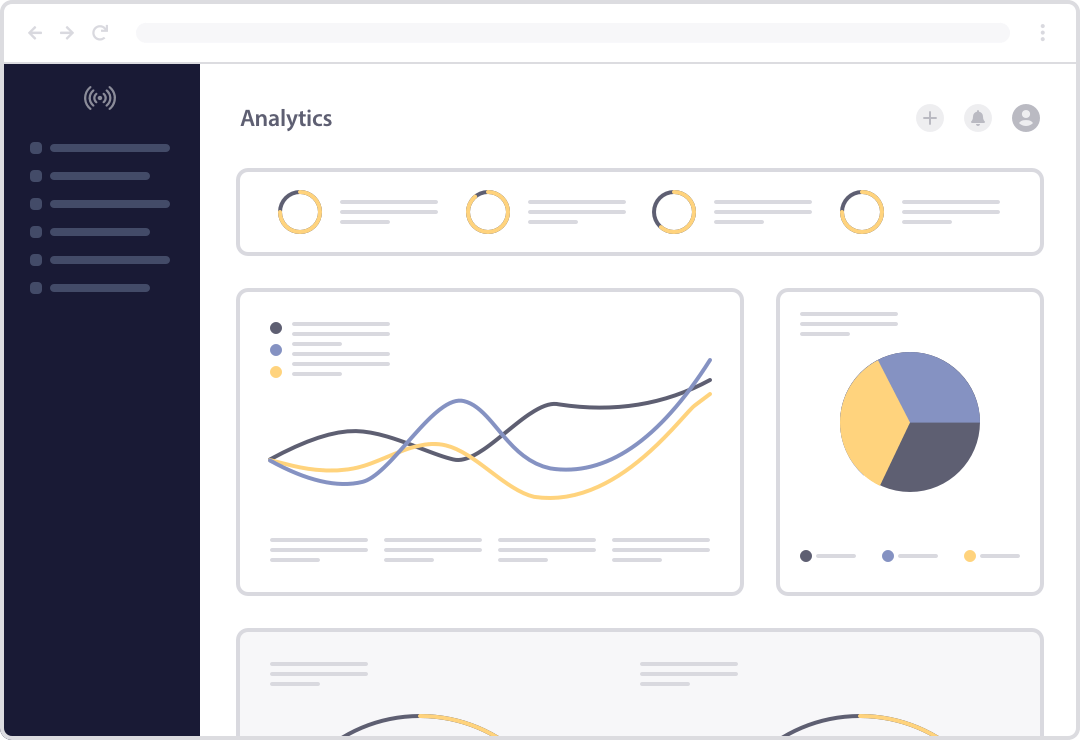
高级推送通知分析
获取重要统计数据,以便您做出数据驱动的决策来发展您的业务。
电子商务分析
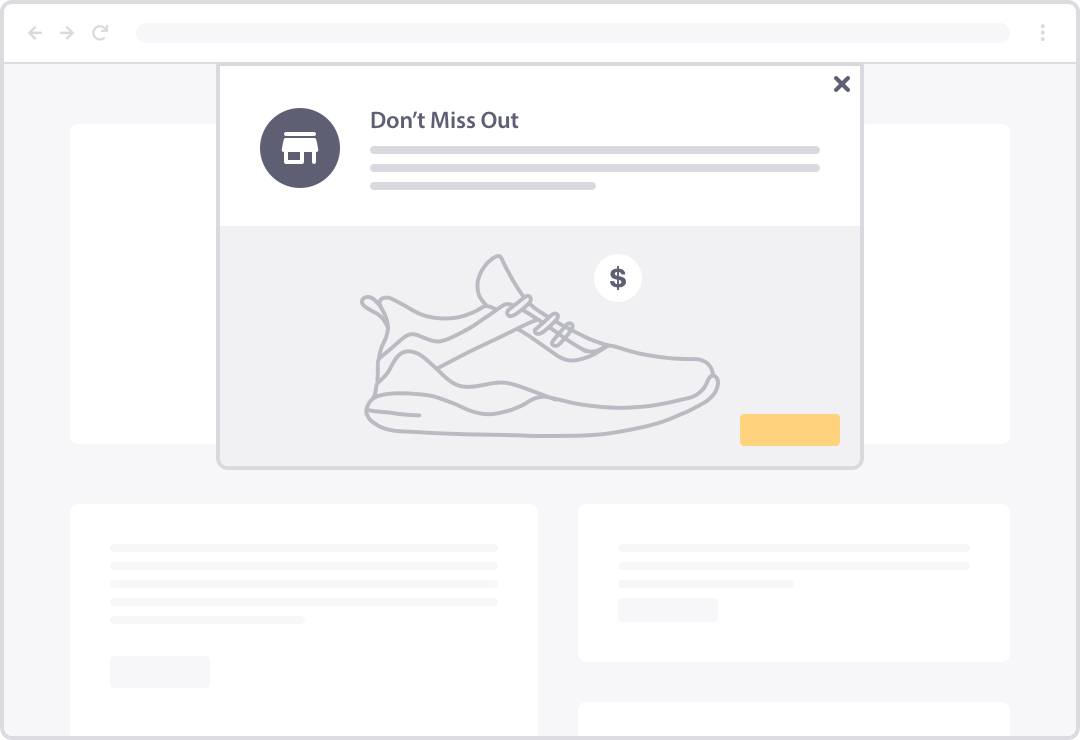
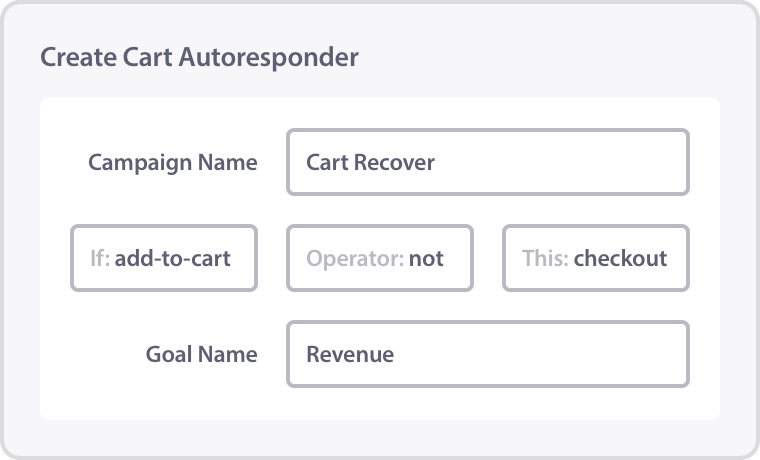
PushEngage 可通过简单的代码片段轻松与任何电子商务平台集成,因此您可以确切地了解您的推送通知如何驱动销售、收入和参与度。
通过 PushEngage 分析,您可以一目了然地看到您的购物车放弃提醒为您的利润带来的确切收入。
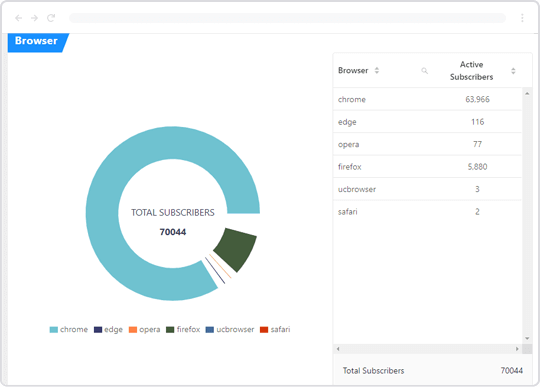
订阅者人口统计信息
获取有关订阅者人口统计和设备数据的详细信息,包括:
- 地理报告
- 浏览器细分
- 订阅者设备
LoanMart 非常关注 Push Engage 提供的营销自动化工具。我们喜欢可以为新订阅者设置一系列强大的消息,让他们在访问我们网站几周甚至几个月后都能收到。

我们考虑了几家浏览器通知平台,PushEngage 是唯一一个完全满足我们用例并能考虑客户终身价值 (LTV) 带来正向投资回报的平台。对于已选择接收通知的用户,PushEngage 帮助我们提高了用户留存率和客户终身价值。

能够通过更有效的信息重新定位我们的客户群,使我们能够提高流量质量并带来更多销售。通过提高我们的投资回报率,我们能够实现营销目标。

PushEngage 的实施快速简便。它能迅速提供结果,并且分析以清晰易懂的方式呈现。能够定制目标受众的功能尤其令人印象深刻,因为您在使用该软件时能够提高参与率。

PushEngage 是我们转化率最高的付费流量渠道。打开率比发送新闻通讯高约 400%,而且创建推送通知所需的时间也更有效。

我喜欢 PushEngage 的一点是,他们很有创新精神,并将电子邮件营销的所有强大功能融入到推送通知中。PushEngage 的细分功能在根据用户兴趣主题对用户进行正确细分方面帮助很大。

自定义目标跟踪
我们的目标跟踪功能可轻松跟踪转化,甚至可以为您网站上的任何操作分配价值:
查看任何推送通知活动的投资回报率:
- 购物车放弃推送通知
- 表单放弃提醒
- 交叉销售活动
- 客户评论活动
- 潜在客户生成活动
- 以及更多







探索更多强大的推送通知功能
PushEngage 拥有您创建强大的推送通知以发展您的业务所需的所有功能。

触发式通知
检测访问者行为,以便在正确的时间向正确的人发送自动推送通知。

购物车放弃提醒
通过自动触发的废弃购物车推送通知,挽回损失的销售额并快速提高收入。

自定义域名与品牌
通过自定义域名和品牌推广,在建立品牌认知度和信任度的同时,提高参与度。
动态细分
细分推送通知,以便在正确的时间定位正确的订阅者,从而最大化您的效果。
A/B 测试
轻松尝试任何元素,并解锁推送通知的全部潜力,以发展您的业务。
目标跟踪与分析
获取您需要的所有可操作数据,以便自信地增加您的流量、销售额和收入。

自动邮件营销系列
发送一系列网络推送通知,将普通订阅者转化为付费客户。

个性化
通过发送为用户需求量身定制的推送通知,增加流量、销售额和收入。
深度电子商务集成
发送以电子商务为中心的推送通知,以从每位访客那里解锁最大收入。

TurboSend 与调度
通过在访客所在时区发送推送通知,推广限时优惠。

符合 GDPR
PushEngage 提供多种工具,可轻松遵守 GDPR 和其他隐私法规。

离线通知
随时发送推送通知,您的订阅者上线后即可看到。
WordPress 推送通知插件
获取您需要的所有可操作数据,以便自信地增加您的流量、销售额和收入。
移动应用推送
获取您需要的所有可操作数据,以便自信地增加您的流量、销售额和收入。
Android 推送通知
获取您需要的所有可操作数据,以便自信地增加您的流量、销售额和收入。
iOS 应用推送通知
获取您需要的所有可操作数据,以便自信地增加您的流量、销售额和收入。

AI 文本生成
利用人工智能驱动的、针对您受众量身定制的建议,即时生成高转化率的推送通知文案。
React Native SDK
将 PushEngage 无缝集成到您的 React Native 应用中,并通过实时推送通知吸引用户。
Flutter SDK
轻松地将推送通知添加到您的 Flutter 应用中,我们易于使用的 SDK 可确保流畅的用户体验。
目标跟踪和推送通知分析
推送通知分析可以帮助您设计表现优于竞争对手的活动。
通过 PushEngage Analytics,您可以跟踪您的目标,以数据驱动的方式发展您的业务。
将推送通知与您的电子商务网站集成,以跟踪收入、购物车放弃恢复和参与率。或者将其用于您的博客并不断扩大您的在线受众。推送通知分析也是联盟营销的绝佳工具。
因此,只要您有一个希望用来扩大在线受众的网站,您就会喜欢我们的目标跟踪和推送通知分析。
什么是推送通知分析?
Push notification analysis helps you optimize your campaigns and analyze customer trends and satisfaction. It can also be used to make informed business decisions when you see something sell really quickly or not sell at all.
For every campaign we run, we have our own Key Performance Indicators (KPIs) and we highly recommend that you do the same. This is just a fancy way of saying that you want to measure specific numbers that indicate if your campaigns are successful.
So, what KPIs can you measure with push notification analytics?
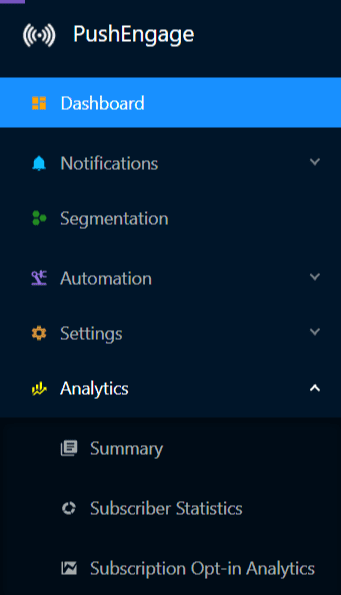
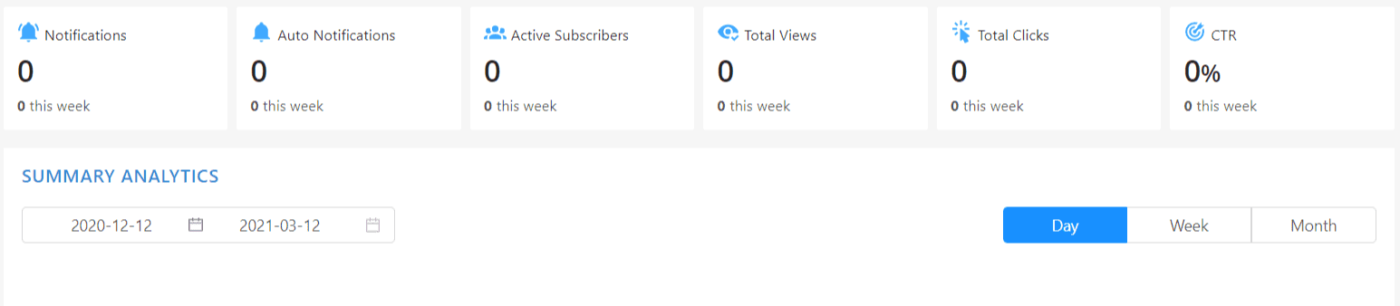
From a top-level view, you can see how many notifications you sent out, how many subscribers you have, how many of them are active right now, the number of views and clicks generated, and your average click-through rate.
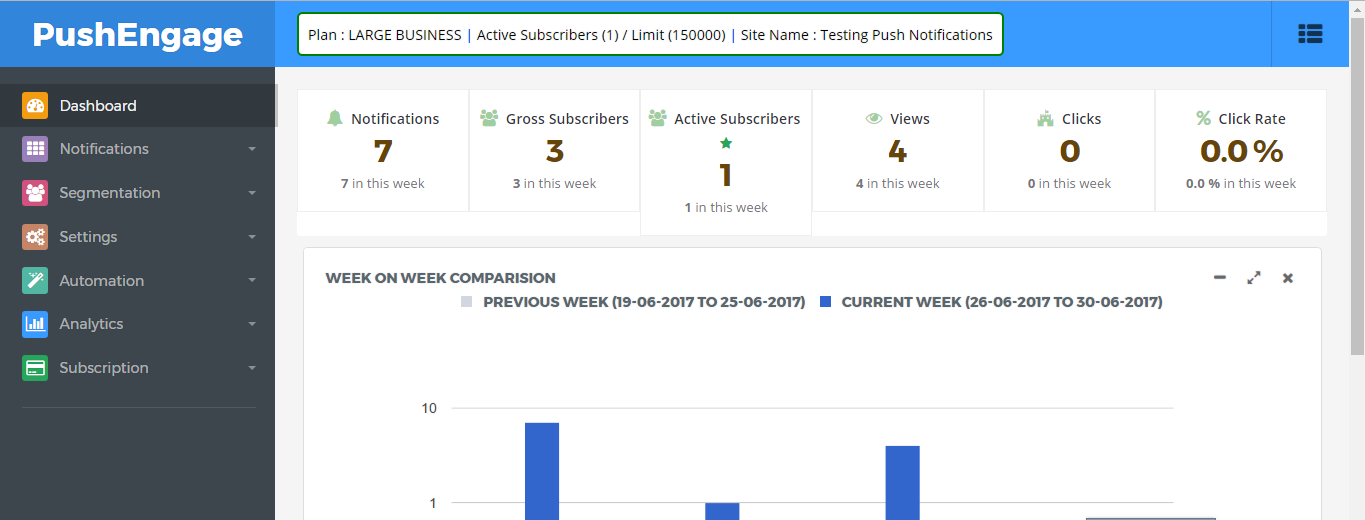
Now, you can break this down into a weekly report to understand weekly progress if you track weekly progress. In this report, you can additionally see the number of unsubscribed users and new subscribers generated in the week.
Just click on Analytics » Summary to see this report.
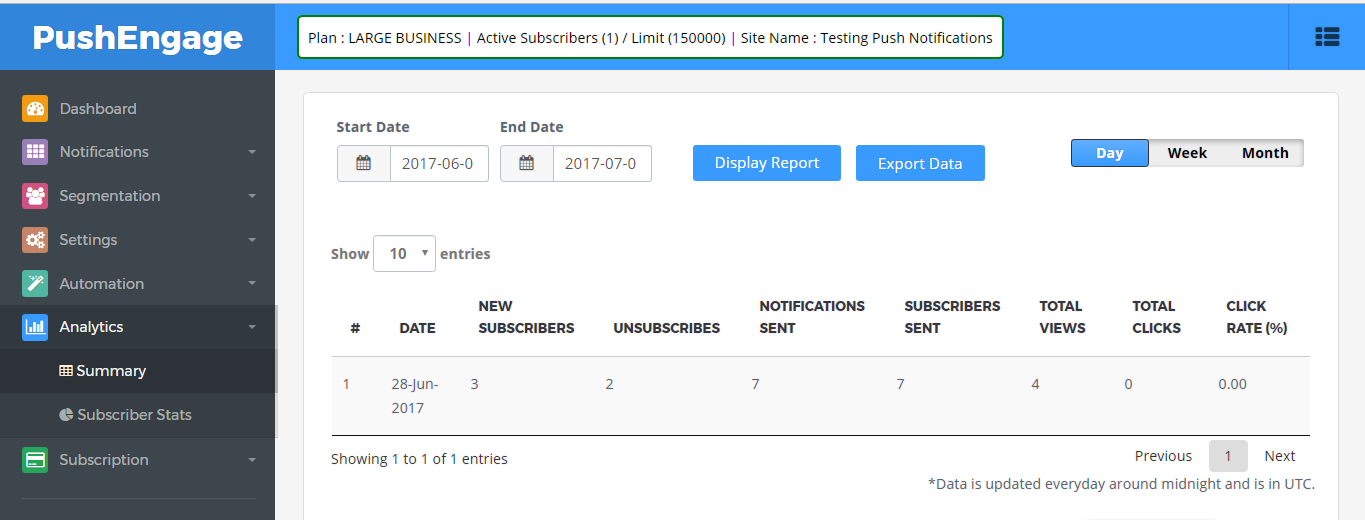
Since we use offline notifications, you can also check the number of delivered notifications under the Subscribers Sent column.
You can also click on the Subscriber Stats tab to see a geolocation and device report for your subscribers.
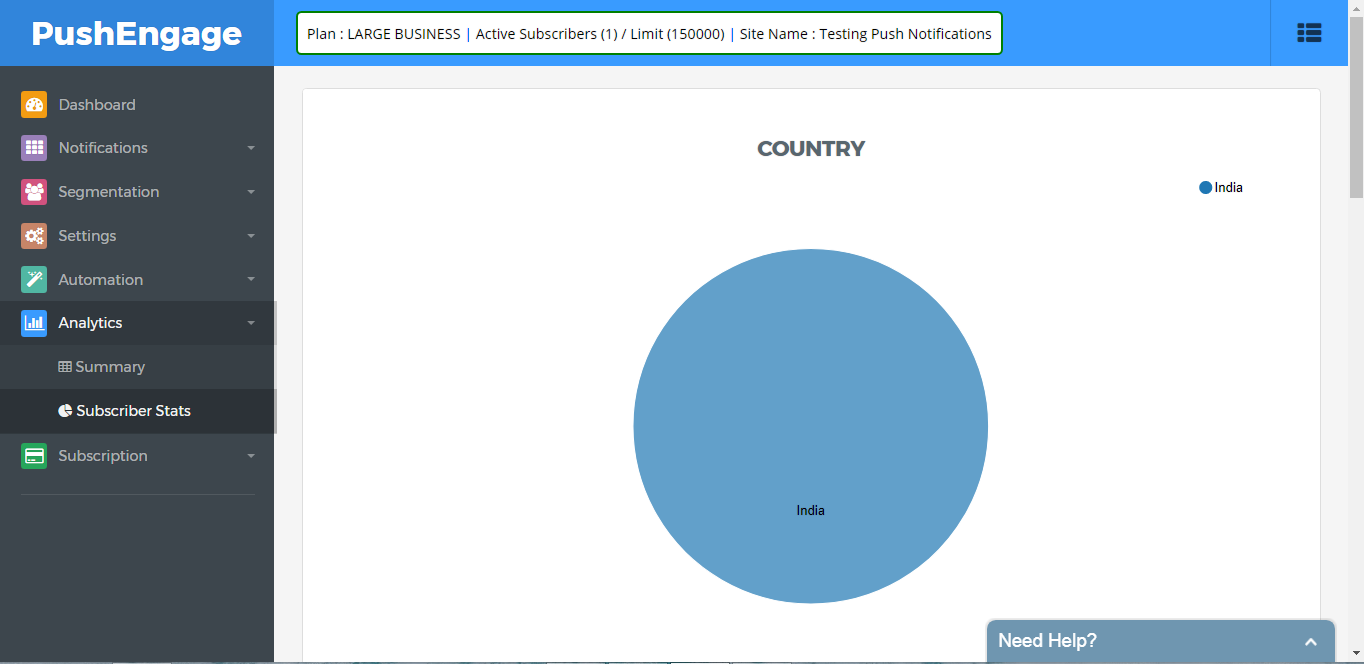
As you can see, there’s a lot of different things to measure. The best part is that you can set goals for some specific push notification campaigns.
Setting goals is obviously a great business practice. But at the same time, the push notification analysis makes a lot more sense when you also have goals in place.
You can use goal tracking for Form Abandonment campaigns, Cross-Selling campaigns, Review campaigns, A/B tests, and Trigger campaigns.
When Should You Look at Push Notification Performance Metrics?
The short answer: Always keep an eye on your analytics dashboard.
Push notification performance metrics help keep track of what is important so that you don’t get lost in a maze of meaningless data.
It doesn’t matter how big or small you are, you should always be able to understand how your marketing campaigns are contributing to your business growth. Push notification analytics simply helps you keep track of your goals and how far along you are.
How to Set Up Push Notification Analytics
So, now that you know all about PushEngage’s push notification analytics, it’s time to see how you can set it up.
Step #1: Go to Analytics in the Dashboard and check the report
Step #2: Check campaign-specific reports or individual push notification analytics
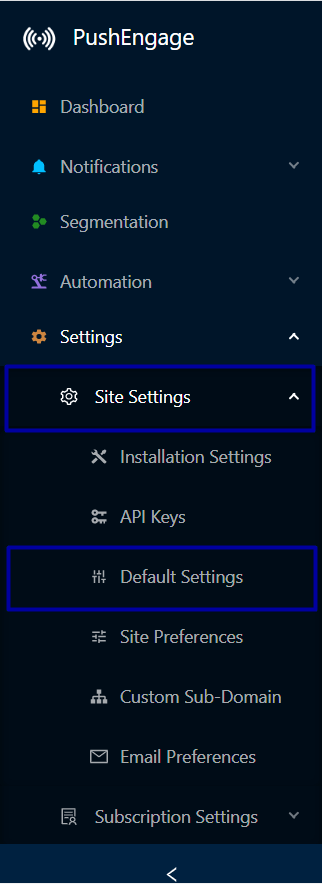
You can also enable goal tracking in your dashboard under Site Settings » Default Settings:
And that’s all, folks! Make the most of PushEngage’s push notification analytics and get started right away.
通过智能目标跟踪和分析,更快地发展您的业务
通过难以忽略的推送通知,增加每次网站访问的价值。
- 永久免费套餐
- 轻松设置
- 五星支持

已发送超过 1000 亿条通知

100% 安全且符合 GDPR
获 150 多个国家/地区客户信赖