
THE BEST VISUAL PUSH NOTIFICATION AUTOMATION
Build Complex Push Campaigns on One Visual Canvas
Tired of stitching together drip campaigns, triggered sends, and A/B tests across disconnected tools? PushEngage Workflows gives you a single drag-and-drop canvas to design, launch, and optimize multi-step push notification journeys — with conditional branching, split testing, and real-time analytics built in.



Stop Stitching Campaigns Together with Duct Tape
Are you tired of:
- Managing drip sequences and triggered campaigns in separate tools? Spending hours configuring each one, only to lose track of who gets what and when?
- Building "if/then" logic in your head instead of on a canvas? Knowing that one misconfigured rule can send the wrong message to thousands of subscribers?
- Running A/B tests that take weeks to set up? Copying entire campaigns just to test a different headline or offer angle?
- Flying blind without real-time performance data? Waiting until a campaign finishes to discover half your flow wasn't working?
Let PushEngage Workflows handle all of it — on one visual canvas, with zero coding required.
INTRODUCING PUSHENGAGE WORKFLOWS
Design Multi-Step Campaigns Visually — No Code, No Guesswork
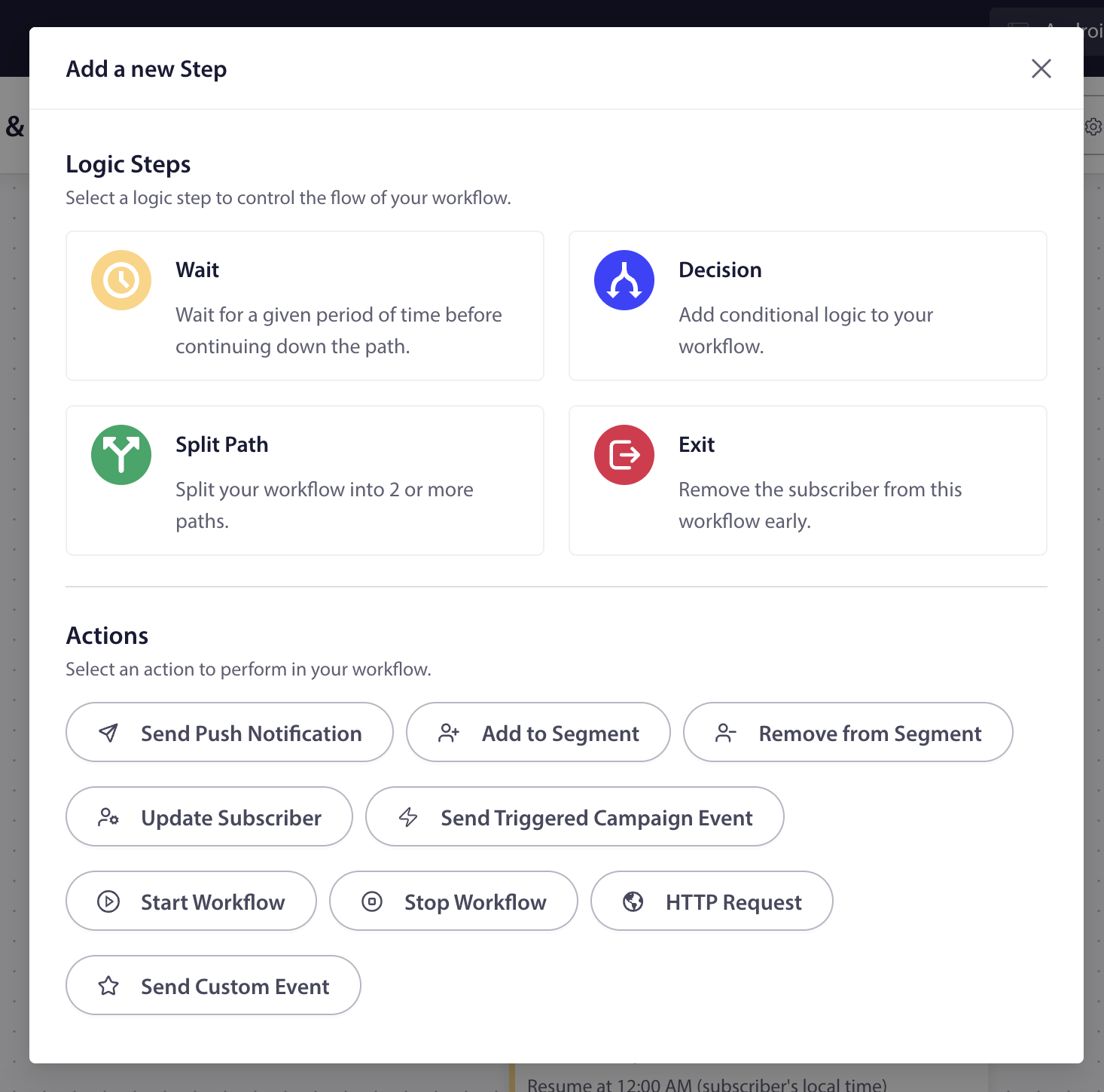
Drag, drop, and connect. PushEngage Workflows replaces spreadsheets and mental models with a flow-chart canvas where every step, condition, and notification is visible at a glance. Click the + button between any two nodes to add a new step. See live performance stats on every node. Know exactly what happens, when, and to whom.
Design Multi-Step Campaigns Visually — No Code, No Guesswork
Drag, drop, and connect. PushEngage Workflows replaces spreadsheets and mental models with a flow-chart canvas where every step, condition, and notification is visible at a glance. Click the + button between any two nodes to add a new step. See live performance stats on every node. Know exactly what happens, when, and to whom.
SAVE HOURS OF WORK EACH WEEK
60+ Templates: Pick, Customize, Launch
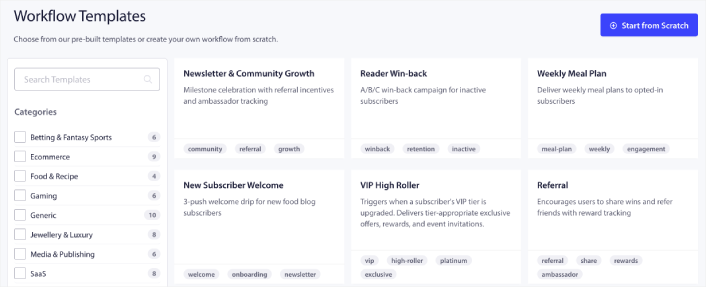
Don't start from scratch. Choose from 60+ pre-built workflow templates across 9 industries — eCommerce, SaaS, travel, gaming, media, and more. Each template comes fully wired with triggers, wait steps, branching logic, and notification copy. Just customize the details and go live. What used to take days now takes minutes.
60+ Templates: Pick, Customize, Launch
Don't start from scratch. Choose from 60+ pre-built workflow templates across 9 industries — eCommerce, SaaS, travel, gaming, media, and more. Each template comes fully wired with triggers, wait steps, branching logic, and notification copy. Just customize the details and go live. What used to take days now takes minutes.
BUILT-IN A/B/C SPLIT TESTING
Find Your Winning Message Without the Busywork
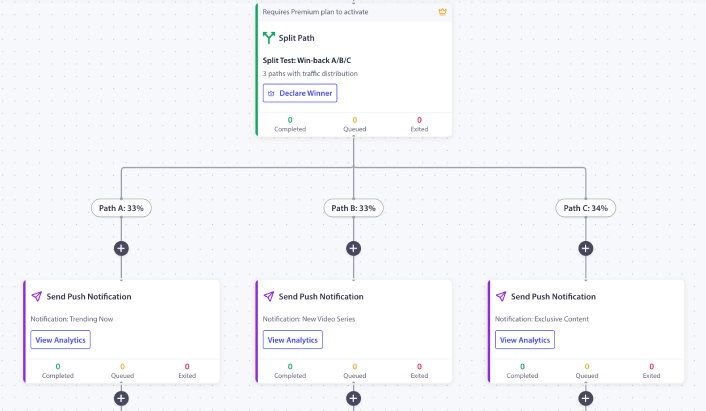
No more duplicating campaigns to test a headline. Split Path nodes let you divide traffic across 2+ variations — each with its own notification copy, tone, or offer angle. Every path tracks its own performance in real time, and a Declare Winner button instantly routes all future traffic to the best performer. Run more tests, find winners faster.
Find Your Winning Message Without the Busywork
No more duplicating campaigns to test a headline. Split Path nodes let you divide traffic across 2+ variations — each with its own notification copy, tone, or offer angle. Every path tracks its own performance in real time, and a Declare Winner button instantly routes all future traffic to the best performer. Run more tests, find winners faster.
CONDITIONAL BRANCHING & SMART EXITS
Personalize Every Path Based on Real Behavior
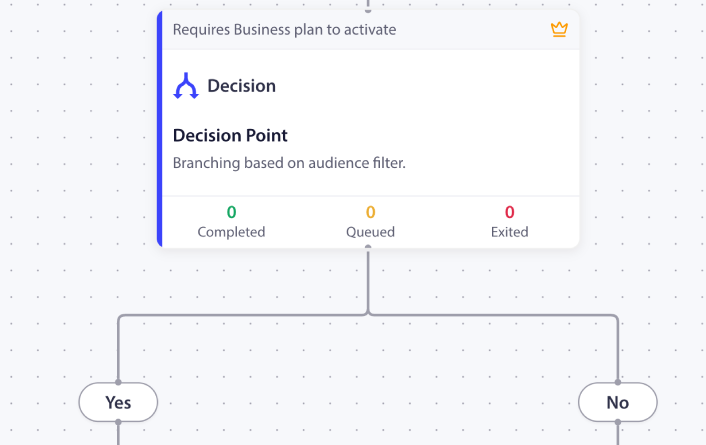
Decision nodes route subscribers down different paths based on who they are and what they've done. Did they click? Send the follow-up. Didn't engage? Try a different angle. Combined with Goal-Based Exits, your workflows stop automatically when subscribers convert — no wasted messages, no awkward "we miss you" pushes to someone who just purchased.
Personalize Every Path Based on Real Behavior
Decision nodes route subscribers down different paths based on who they are and what they've done. Did they click? Send the follow-up. Didn't engage? Try a different angle. Combined with Goal-Based Exits, your workflows stop automatically when subscribers convert — no wasted messages, no awkward "we miss you" pushes to someone who just purchased.
Orchestrate Across Your Entire Stack From the Same Dashboard
With PushEngage Workflows, you can create and manage both web and app push notification automations from the same dashboard.
HTTP Request nodes let your workflows talk to CRMs, analytics platforms, Slack, Zapier, or any system with an API. Start Workflow and Stop Workflow actions enable master-child orchestration. Send Custom Events to trigger actions across your entire PushEngage automation stack. All from one canvas.

We Also Have a 100% No-Risk Money Back Guarantee!
Still on the fence? We're so confident in our solution that we offer a risk-free 14-day money-back guarantee. That's right—if you're not completely satisfied, we'll refund your investment, no questions asked.
All pricing is in USD. You can change plans or cancel your account at any time. Special introductory pricing, all renewals are at full price.


Get a Custom Contract with PushEngage
You need high volume, bulk discounts, legendary customer support, great security, and total privacy. And we can deliver! Get started with a Non-Disclosure Agreement (NDA), Data Processing Agreement (DPA), and Enterprise support along with Enterprise pricing.
$2,000-4,000/Week in Extra Revenue with a Simple Growth Hack!
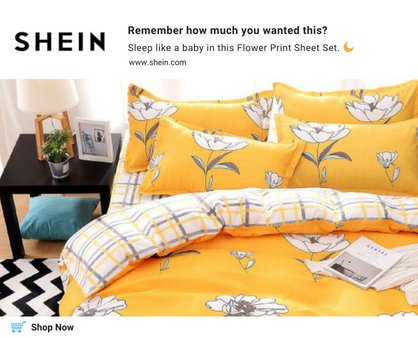
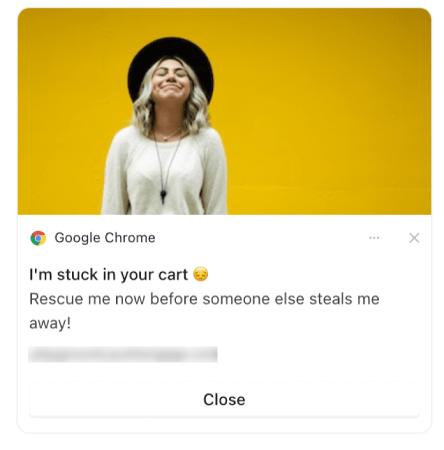
Picture this: a shopper visits your eCommerce store, browses through your products, adds items to their cart, and then, poof! They vanish into thin air. Or, they don't even add the product to their cart and vanish.
With PushEngage's eCommerce push notification templates, you have the power to bring them back.
We helped WickedWeasel recover $2,000-4,000 every week in lost sales.
Let us help you create a compelling cart recovery campaign that converts too!
Great tool to build relationships and sales. PushEngage allows you to stay in contact with your website visitors to notify them of new content or to send customized notifications based on your website visitor’s behavior or stage in the buying process.
PushEngage is very easy to implement and use and has helped us in achieving a good deal of revenue. Their Customer Service is amazing as well, very prompt with their reply. PushEngage helped us retain those customers who are always looking for the deal and keep them coming back for more.
It’s uber-easy to use, the support team is helpful, and the results are impressive. Especially when you take into account how little work they are to build and send. Highly recommend PushEngage to anyone wanting a way to reach customers that’s fast, reliable, and effective.
LoanMart has really focused on the drip campaign tools that Push Engage provides. We love that we can set up a robust series of messages that new subscribers will see for weeks and even months after they initially visited our website.
Join customers in 150+ countries who use PushEngage to send over 15 billion notifications each month.
14.68% Click Rates on Cart Abandonment Push Notifications!
SuperJeweler saw 14.68% click rates on their cart abandonment campaigns and it led to an 8% increase in store conversions!
You don't even have to add yet another marketing channel where you'll have to create more content.
The browse abandonment and cart abandonment campaigns that we'll set up for you will mint money on autopilot till the end of days!
And yes, our team of Conversion Optimization Specialists will set it up for you.
We Also Have a 100% No-Risk Money Back Guarantee!
Still on the fence? We're so confident in our solution that we offer a risk-free 14-day money-back guarantee. That's right—if you're not completely satisfied, we'll refund your investment, no questions asked.
All pricing is in USD. You can change plans or cancel your account at any time. Special introductory pricing, all renewals are at full price.
Frequently Asked Questions
1. What are PushEngage Workflows?
Workflows is PushEngage's visual automation builder. It lets you design multi-step push notification campaigns on a drag-and-drop canvas — combining triggers, time delays, conditional branching, A/B/C split testing, and subscriber management actions in a single visual flow. Think of it as a flowchart that actually sends notifications.2. Do I need coding skills to use Workflows?
Not at all. Workflows is entirely visual — you drag, drop, and connect nodes on a canvas. No code, no configuration files, no developer required. If you can draw a flowchart, you can build a workflow.3. What's the difference between Workflows and Drip Autoresponders?
Drip Autoresponders send a linear sequence of notifications on a fixed schedule. Workflows go further: you can add conditional branching (if/then logic), A/B/C split testing, subscriber data updates, goal-based exits, and even trigger other workflows. It's the difference between a playlist and a DJ who reads the room.4. Are Workflows available on all PushEngage plans?
Yes! Every PushEngage plan includes Workflows with Send Push Notification and up to 5 steps. Business+ plans unlock logic steps (Wait, Decision, Exit) and subscriber management. Growth+ adds workflow orchestration, HTTP requests, and custom events. Premium+ adds Split Path for A/B/C testing.5. Can I use templates or do I have to build from scratch?
Both! PushEngage ships with 60+ pre-built templates across 9 industries — eCommerce, SaaS, travel, gaming, media, and more. Each template comes fully wired with triggers, delays, branching logic, and notification copy. Pick one, customize, and launch. Or start from a blank canvas if you prefer.6. Can Workflows connect to my other tools (CRM, Slack, Zapier)?
Yes. The HTTP Request action node lets your workflows make outbound API calls to any external system — CRMs, analytics platforms, Slack, Zapier, Make, or your own backend. You can also use Start Workflow, Stop Workflow, and Send Custom Event actions to orchestrate across your entire PushEngage automation stack.7. How does A/B/C split testing work in Workflows?
The Split Path node divides traffic across 2 or more paths with configurable percentage distribution (e.g., 33%/33%/34%). Each path can contain its own notification sequence and logic. Every path tracks performance in real time, and a Declare Winner button lets you end the test and route all future subscribers to the winning path.Sign up for the latest product news and updates.

©PushEngage 2025. All rights reserved